1. Uvod
This manual provides comprehensive instructions for the installation, operation, and maintenance of your UHPPOTE 4 Channel Color Quad System Video Splitter, Model UT-XYL-440. This device is designed to process and display video feeds from up to four CCTV cameras simultaneously on a single monitor, offering various display modes and control options for effective surveillance monitoring.
2. Sigurnosne informacije
- Pazite da je uređaj postavljen na stabilnu, ravnu površinu kako biste spriječili slučajne padove.
- Upravljajte uređajem unutar navedenog volumenatage range (DC 12V) using the provided power adapter.
- Avoid exposing the unit to moisture, rain, or extreme temperatures. This device is intended for indoor use only.
- Ne otvarajte casinili pokušavajte sami popraviti uređaj. Za sve servise obratite se kvalificiranom osoblju.
- Osigurajte odgovarajuću ventilaciju oko uređaja kako biste spriječili pregrijavanje.
3. Sadržaj paketa
Molimo provjerite jesu li svi artikli prisutni u vašem paketu:
- UHPPOTE 4 Channel Color Quad System Video Splitter (UT-XYL-440)
- Infracrveni daljinski upravljač
- BNC Adapters (7 pieces)
- Adapter za napajanje (DC 12V)

Image 3.1: UHPPOTE 4 Channel Color Quad System Video Splitter, remote control, and BNC adapters.
4. Proizvod je gotovview
Familiarize yourself with the components and controls of your video splitter.
4.1. Prednja ploča
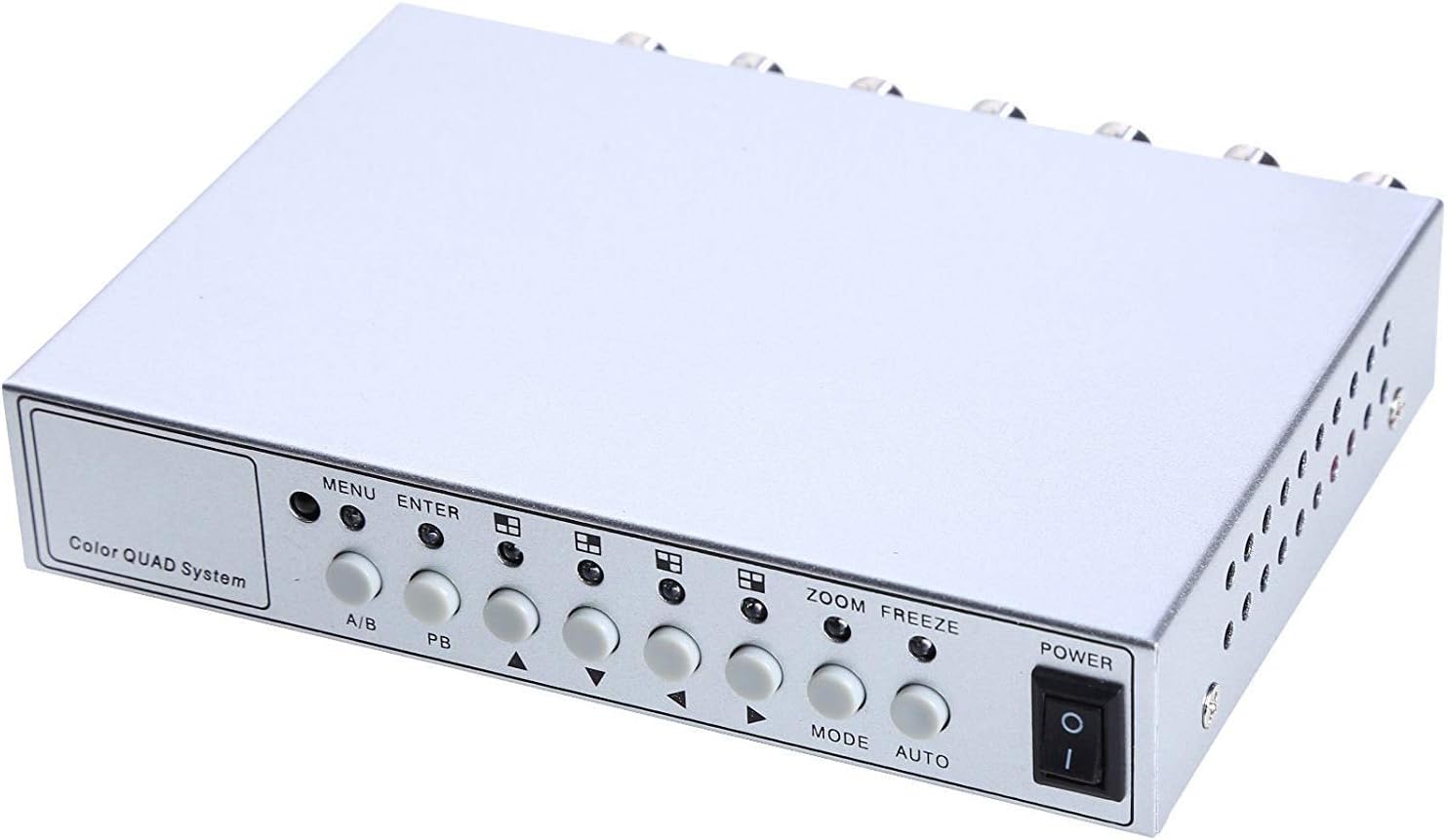
Slika 4.1: Kontrole i indikatori na prednjoj ploči.
- IZBORNIK: Accesses the on-screen display (OSD) menu for settings adjustment.
- UNESI: Confirms selections within the OSD menu.
- A/B: Switches between different display modes or channels.
- PB: Playback control (if connected to a VCR).
- Strelice za smjer (gore/dolje/lijevo/desno): Krećite se kroz opcije izbornika i prilagođavajte vrijednosti.
- ZUM: Activates the digital zoom function.
- ZAMRZNUTI: Freezes the current video frame.
- NAČIN: Cycles through various display modes (Quad, Full Screen, PIP, Dual Split).
- AUTOMOBIL: Activates the auto-sequence display mode.
- VLAST: Prekidač za uključivanje/isključivanje uređaja.
4.2. Stražnja ploča

Image 4.2: Rear panel video input/output ports and power input.
- VIDEO 1-4: BNC inputs for connecting up to four CCTV cameras.
- VCR IN: BNC input for connecting a VCR or other recording device.
- VCR OUT: BNC output for connecting to a VCR or other recording device.
- MONITOR: BNC output for connecting to a display monitor.
- DC 12 V: Power input jack for the DC 12V power adapter.
4.3. Daljinski upravljač

Image 4.3: Infrared remote control for convenient operation.
The remote control provides convenient access to all functions, mirroring the front panel controls and offering direct channel selection.
5. Postavljanje
Follow these steps to set up your UHPPOTE Video Splitter:
- Spojite kamere: Connect your CCTV cameras to the VIDEO 1, VIDEO 2, VIDEO 3, i VIDEO 4 BNC input ports on the rear panel. Ensure secure connections.
- Spoji monitor: Connect your display monitor to the MONITOR BNC output port on the rear panel.
- Connect VCR (Optional): If you wish to record video, connect the VCR IN i VCR OUT BNC ports to your VCR or recording device.
- Priključite napajanje: Insert the DC 12V power adapter into the DC 12V input jack on the rear panel, then plug the adapter into a standard electrical outlet.
- Uključivanje: Pritisnite tipku VLAST gumb na prednjoj ploči ili daljinskom upravljaču za uključivanje uređaja.
6. Upute za rad
6.1. Uključivanje/isključivanje
Pritisnite tipku VLAST button on the front panel or the remote control to switch the unit on or off.
6.2. Načini prikaza
The unit supports various display configurations. Use the NAČIN RADA button on the front panel or remote to cycle through them:
- QUAD Split Mode: Displays all four camera feeds simultaneously in a four-way split screen.
- Način rada preko cijelog zaslona: Displays a single camera feed in full screen. Use the directional arrows or number buttons (1-4) on the remote to select the desired camera.
- PIP (Picture-in-Picture) Mode: Displays one main camera feed with a smaller window of another camera feed. The position of the PIP window can often be adjusted via the menu.
- Dual Split Mode: Displays two camera feeds simultaneously (e.g., side-by-side or top-bottom).
- Auto Sequence Mode: Automatically cycles through full-screen views of each connected camera. Activate using the AUTO gumb na prednjoj ploči ili daljinskom upravljaču.
6.3. Navigacija izbornikom i postavke
To access and adjust system settings:
- Pritisnite tipku JELOVNIK button on the front panel or remote control. The On-Screen Display (OSD) menu will appear.
- Koristite Gore/Dolje directional arrows to navigate between menu options.
- Pritisnite ENTER za odabir opcije ili ulazak u podizbornik.
- Koristite Lijevo/Desno directional arrows to adjust values (e.g., brightness, contrast) or change settings.
- Pritisnite JELOVNIK ponovno za izlaz iz izbornika.
Ključne postavke:
- Video prilagodbe: Adjust Brightness, Contrast, Saturation, Hue, and Sharpness for optimal image quality.
- Format sustava: Select between NTSC (for North America, Japan, etc.) or PAL (for Europe, Asia, etc.) based on your region's video standard. Incorrect selection can lead to distorted or black and white images.
- Overlay Information: Configure display of Camera Title, Real Time and Date, and Alarm/Loss/Motion messages.
- Event Report: Review event logs and configure buzzer/relay output settings.
6.4. Funkcija zumiranja
In full-screen mode, press the ZUM button on the front panel or remote to activate digital zoom. Use the directional arrows to select the area to zoom in on.
6.5. Freeze Function
Pritisnite tipku ZAMRZNUTI (FRZ) button on the front panel or remote to pause the current video frame. Press it again to resume live video.
7. Održavanje
- Čišćenje: Za čišćenje vanjske strane uređaja koristite meku, suhu krpu. Nemojte koristiti tekuća ili aerosolna sredstva za čišćenje.
- Ventilacija: Ensure the ventilation holes are not obstructed to prevent overheating.
- Skladištenje: Ako uređaj skladištite dulje vrijeme, isključite ga iz struje i pohranite na hladnom i suhom mjestu.
8. Rješavanje problema
| Problem | Mogući uzrok | Otopina |
|---|---|---|
| Nema video signala na monitoru |
|
|
| Distorted, black & white, or rolling image |
|
|
| Daljinski upravljač ne radi |
|
|
| Constant buzzing sound |
|
|
9. Specifikacije
| Značajka | Detalj |
|---|---|
| Broj modela | UT-XYL-440 |
| Video ulazi | 4 BNC (for cameras), 1 BNC (VCR In) |
| Video izlazi | 1 BNC (Monitor), 1 BNC (VCR Out) |
| Video rezolucija | 720x480 (NTSC 60Hz), 720x576 (PAL 50Hz) |
| Načini prikaza | Quad Split, Full Screen, PIP, Dual Split, Auto Sequence |
| Podešavanja slike | Svjetlina, kontrast, zasićenje, nijansa, oštrina |
| Posebne funkcije | Freeze Function, Zoom Function, Video Loss Detection, Motion Detection |
| Napajanje | DC 12V |
| Težina artikla | 13.4 unci (otprilike 380 g) |
| Dimenzije paketa | 8.54 x 6.06 x 2.4 inča (otprilike 21.7 x 15.4 x 6.1 cm) |
| Daljinska baterija | 1 x CR2 battery (required) |
10. Jamstvo i podrška
UHPPOTE products are designed for reliability and performance. For warranty information, technical support, or service inquiries, please refer to the contact information provided with your purchase or visit the official UHPPOTE website. Please have your model number (UT-XYL-440) available when contacting support.


