1. Uvod i krajview
The Ewent EW7012 USB 3.1 Gen1 Docking Station provides a convenient and efficient solution for connecting 2.5-inch and 3.5-inch SATA hard disk drives (HDDs) or solid-state drives (SSDs) to your computer via a USB port. This docking station is ideal for quick data transfers, backups, and accessing data from multiple drives without needing to install them internally. It supports SuperSpeed USB 3.1 Gen1 (USB 3.0) for high-speed data transfer and is backward compatible with USB 2.0.

Slika 1: Prednja strana view of the Ewent EW7012 USB 3.1 Gen1 Docking Station with its blue LED indicator.
2. Što je u kutiji
Molimo provjerite sadržaj paketa kako biste bili sigurni da su svi artikli prisutni:
- Ewent EW7012 USB 3.1 Gen1 Docking Station
- USB 3.1 Gen1 (USB 3.0) Cable
- AC adapter za napajanje
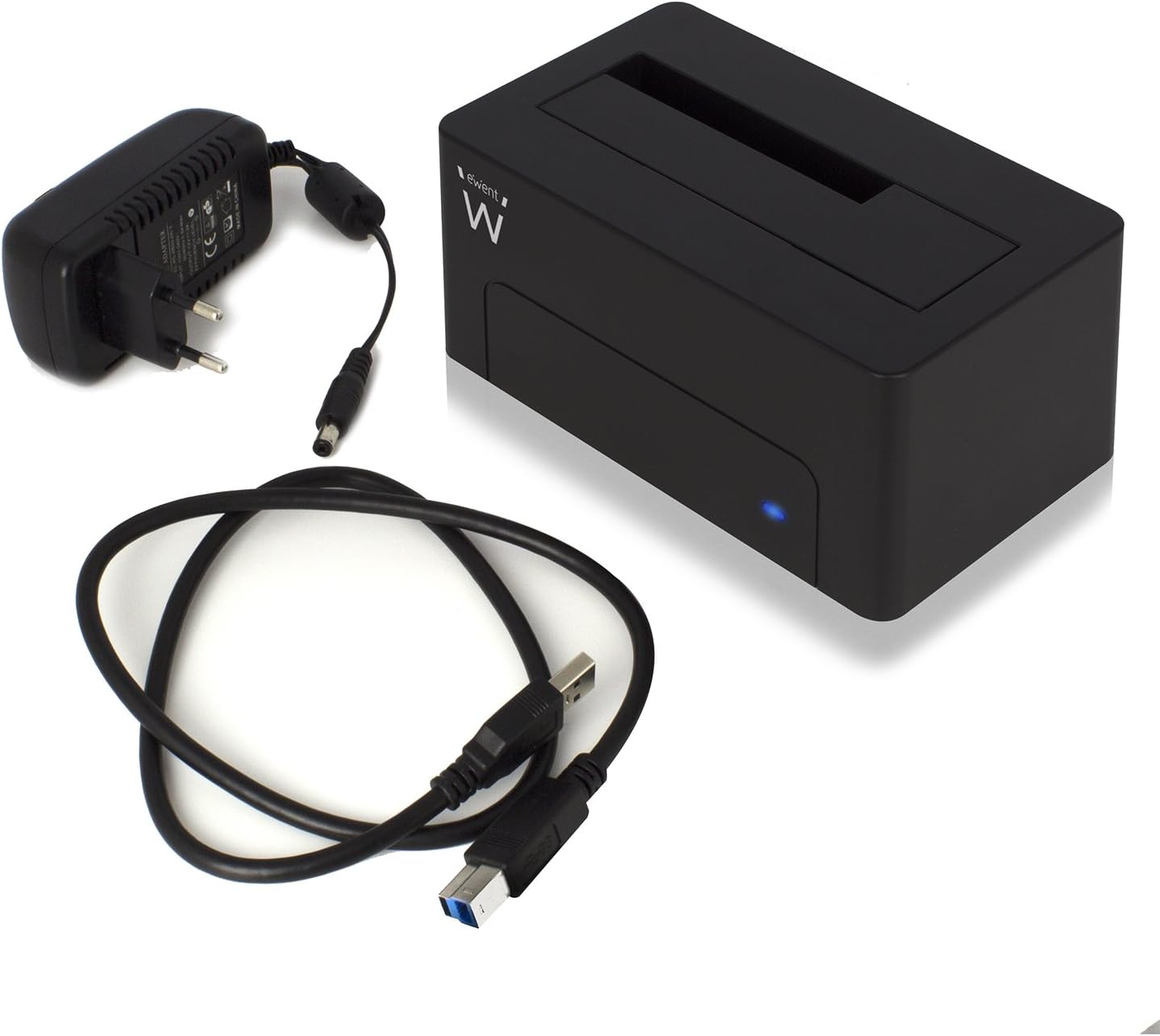
Figure 2: The Ewent EW7012 docking station, USB 3.1 Gen1 cable, and AC power adapter included in the package.
3. Značajke
- Univerzalna kompatibilnost: Supports both 2.5-inch and 3.5-inch SATA I/II/III HDDs and SSDs.
- SuperSpeed Data Transfer: Equipped with USB 3.1 Gen1 (USB 3.0) interface, offering data transfer rates up to 5 Gbps.
- Kompatibilnost s prethodnim verzijama: Fully compatible with USB 2.0 ports, though at USB 2.0 speeds.
- Plug & Play: Za većinu operativnih sustava nije potrebna instalacija upravljačkih programa.
- LED indikator: A blue LED light indicates power status and data activity.
- Kompaktan dizajn: Space-saving and portable, with dimensions of approximately 4.92 x 2.91 x 2.24 inches.
- Vanjsko napajanje: Includes an AC adapter for stable power delivery to the drive.
4. Vodič za postavljanje
- Priključite napajanje: Plug the AC power adapter into the "POWER" port on the back of the docking station. Connect the other end of the adapter to a wall outlet.
- Povežite se s računalom: Connect one end of the supplied USB 3.1 Gen1 cable to the "USB 3.1" port on the back of the docking station. Connect the other end of the USB cable to an available USB port on your computer. For optimal performance, use a USB 3.0 or USB 3.1 port.
- Umetnite tvrdi disk: Gently slide your 2.5-inch or 3.5-inch SATA HDD/SSD into the top slot of the docking station, ensuring the SATA connectors align properly. Apply gentle pressure until the drive is fully seated.
- Uključivanje: Flip the "ON/OFF" switch on the back of the docking station to the "ON" position. The blue LED indicator on the front will illuminate, indicating the device is powered on.

Slika 3: Stražnji dio view of the docking station showing the USB 3.1 port, power input, and ON/OFF switch.

Figure 4: A 3.5-inch hard drive being inserted into the docking station.
5. Upute za rad
Once the docking station is set up and powered on, your operating system should automatically detect the connected hard drive. The blue LED on the front will blink during data transfer activity.
- Pristup podacima: The connected drive will appear as a removable disk in your computer's file explorer (e.g., "This PC" on Windows, "Finder" on macOS). You can then access, copy, or move filekao što biste to učinili s bilo kojim drugim uređajem za pohranu.
- Sigurnosna kopija podataka: The docking station is ideal for creating backups of your valuable photos, videos, and files. Simply drag and drop files to and from the docked drive.
- Removing a Drive: Before removing a drive, always safely eject it from your operating system to prevent data corruption. On Windows, use the "Safely Remove Hardware and Eject Media" icon in the system tray. On macOS, drag the drive icon to the Trash or use the Eject button in Finder. Once safely ejected, gently pull the drive out of the docking station.

Figure 5: A hard drive fully inserted into the docking station, ready for use. Note the QR code on the drive for additional information: http://qr.wdc.com/wdred
6. Održavanje
To ensure the longevity and optimal performance of your Ewent EW7012 docking station, follow these simple maintenance guidelines:
- Čišćenje: Use a soft, dry, lint-free cloth to clean the exterior of the docking station. Do not use liquid cleaners or aerosols.
- Skladištenje: Kada se ne koristi, priključnu stanicu čuvajte na hladnom i suhom mjestu, dalje od izravne sunčeve svjetlosti i ekstremnih temperatura.
- Rukovanje: Pažljivo rukujte uređajem. Izbjegavajte ispuštanje ili izlaganje jakim udarcima.
- Ventilacija: Ensure the docking station is placed in an area with adequate ventilation to prevent overheating, especially during prolonged use.
7. Rješavanje problema
| Problem | Mogući uzrok | Otopina |
|---|---|---|
| Računalo nije prepoznalo pogon. |
|
|
| Spore brzine prijenosa podataka. |
|
|
| Blue LED not illuminating. |
|
|
8. Specifikacije
| Broj modela | EW7012 |
| Marka | Ewent |
| Kompatibilne vrste pogona | 2.5-inch and 3.5-inch SATA I/II/III HDD/SSD |
| Maksimalni kapacitet pohrane | Up to 4 TB (as per listed specifications) |
| Sučelje | USB 3.1 Gen1 (USB 3.0) |
| Brzina prijenosa podataka | Do 5 Gbps (USB 3.1 Gen1) |
| Materijal | Plastični |
| Boja | Crna |
| Dimenzije proizvoda (D x Š x V) | 4.92 x 2.91 x 2.24 inča (12.5 x 7.4 x 5.7 cm) |
| Težina artikla | 8.7 unci (248 grama) |
| Napajanje | AC adapter (uključen) |
| Kompatibilnost operativnog sustava | Windows, macOS, Linux (Plug & Play) |
9. Jamstvo i podrška
The Ewent EW7012 USB 3.1 Gen1 Docking Station comes with a Jamstvo 5 godine, osiguravajući mir u pogledu njegove kvalitete i trajnosti.
For technical support, product information, or warranty claims, please visit the official Ewent webstranica:

Figure 6: Product packaging highlighting the 5-year warranty and webadresa stranice.


