1. Uvod
This manual provides detailed instructions for the installation, operation, and maintenance of your Hiseeu A1004NS-US and A1008NS-US 5-in-1 Digital Video Recorders (DVRs). These DVRs are designed for comprehensive security surveillance systems, supporting multiple video input formats including TVI, CVI, AHD, Analog, and IP cameras. Please read this manual thoroughly before using the product to ensure proper setup and functionality.
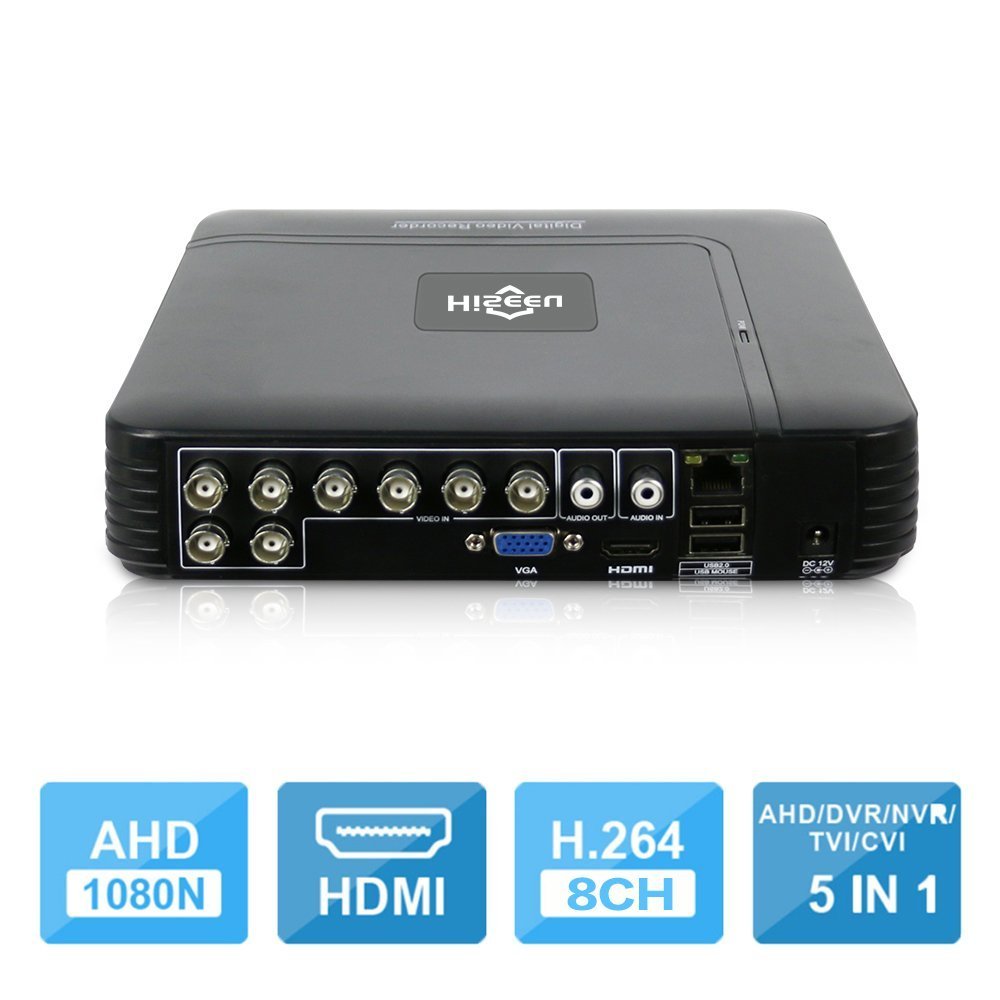
Image 1.1: The Hiseeu 5-in-1 DVR unit, showcasing its compact design and connectivity ports.
2. Sigurnosne informacije
To prevent injury to yourself or others, and to avoid damage to your device, read all safety information before using the product. Keep this manual for future reference.
- Izvor napajanja: Use only the provided power adapter. Using unauthorized adapters may cause fire, electric shock, or damage to the device.
- Ventilacija: Ensure the DVR is placed in a well-ventilated area. Do not block ventilation openings.
- Vlaga: Do not expose the device to rain, moisture, or any liquids.
- Temperatura: Uređaj koristite unutar navedenog temperaturnog raspona. Izbjegavajte ekstremnu toplinu ili hladnoću.
- Čišćenje: Isključite napajanje prije čišćenja. Koristite suhu, meku krpu. Nemojte koristiti tekuća ili aerosolna sredstva za čišćenje.
- Servisiranje: Ne pokušavajte sami servisirati ovaj proizvod. Sve servise prepustite kvalificiranom servisnom osoblju.
3. Sadržaj paketa
Provjerite jesu li svi artikli prisutni u vašem paketu. Ako bilo koji artikl nedostaje ili je oštećen, obratite se prodavaču.
- 1 x Mini 4-channel or 8-channel DVR (Model A1004NS-US or A1008NS-US)
- 1 x USB miš
- 1 x DC12V adapter za napajanje
- 1 x Korisnički priručnik (ovaj dokument)

Image 3.1: Included accessories: USB mouse and DC12V power adapter.
4. Postavljanje
Follow these steps to set up your Hiseeu DVR system.
4.1 Hard Drive Installation (HDD not included)
The DVR requires a 3.5-inch SATA hard drive for video recording. A hard drive is not included in the package. Please select an appropriate HDD (up to 6TB) based on your camera count and desired recording duration.
- Unscrew the top cover of the DVR.
- Spojite SATA podatkovni kabel i kabel za napajanje s DVR-a na tvrdi disk.
- Secure the HDD to the DVR chassis using the provided screws.
- Vratite gornji poklopac i pričvrstite ga vijcima.

Image 4.1: Illustration of connecting the SATA data and power cables to the hard drive.
4.2 Spajanje kamera
Connect your security cameras to the BNC video input ports on the back of the DVR. This DVR supports 5-in-1 camera types: TVI, CVI, AHD, Analog, and IP cameras. For IP cameras, ensure they support ONVIF 2.0 for compatibility.
4.3 Spajanje monitora
Connect a monitor to the DVR using either the HDMI or VGA port. The DVR supports 1080P resolution output.
4.4 Mrežna veza
Connect an Ethernet cable from the DVR's LAN port to your router or network switch for remote access and online features.
4.5 Uključivanje
Spojite DC12V adapter za napajanje na ulaz za napajanje DVR-a, a zatim ga uključite u utičnicu. DVR će se automatski uključiti.
5. Upute za rad
This section covers the basic operation of your Hiseeu DVR.
5.1 Initial Setup and Main Menu
Upon first power-on, the DVR will guide you through an initial setup wizard. Use the connected USB mouse to navigate the on-screen menus. The main menu provides access to live view, playback, recording settings, network configuration, and system settings.
5.2 Remote Monitoring (P2P Cloud)
The DVR supports P2P (Cloud) functionality, eliminating the need for port forwarding for remote access. You can monitor your system remotely using a smartphone or PC.
- Aplikacija za pametni telefon: Download the "XMEye" app from your device's app store.
- Dodaj uređaj: Open the app, register an account, and add your DVR by scanning the QR code displayed on the DVR's monitor (usually found in the network settings) or by manually entering the device ID.
- Živjeti View: Nakon što ga dodate, možete view live feeds from your cameras and access recorded footage.

Slika 5.1: Primjerample screenshot of the XMEye mobile application for remote viewing.
5.3 Detekcija pokreta i upozorenja putem e-pošte
Configure motion detection settings for each camera to trigger recording and send email notifications or mobile push alerts when motion is detected.
- Idite do Main Menu > Alarm > Motion Detect.
- Enable motion detection for desired channels.
- Adjust sensitivity and detection areas.
- Configure email settings under Main Menu > Network > Email to receive alerts.
5.4 Reprodukcija video zapisa
The DVR supports synchronous 8-channel playback. You can review snimljeno footage s više kamera istovremeno.
- Od uživo view, kliknite desnom tipkom miša i odaberite Reprodukcija.
- Select the date and time range for the footage you wish to review.
- Choose the cameras for playback.
- Use the playback controls (play, pause, fast forward, rewind) to navigate through the recording.
5.5 Dvosmjerni zvuk
If your cameras and audio setup support it, the DVR allows for two-way audio communication. Connect a microphone to the audio input and a speaker to the audio output port on the DVR.
6. Održavanje
Regular maintenance ensures the longevity and optimal performance of your DVR system.
- Čišćenje: Periodically clean the DVR's exterior with a soft, dry cloth. Ensure ventilation openings are free from dust and debris.
- Ažuriranja firmvera: Check the Hiseeu official website for any available firmware updates. Updating firmware can improve performance and add new features. Follow the instructions provided with the update carefully.
- Sigurnosna kopija podataka: Redovito pravite sigurnosne kopije važnih videozapisatage to an external USB drive. This can be done via the DVR's menu system.
- Stanje tvrdog diska: Monitor the health of your hard drive through the DVR's system information. Replace the HDD if any errors or warnings are reported.
7. Rješavanje problema
This section addresses common issues you might encounter with your DVR.
- Nema video izlaza na monitoru:
- Provjerite spojeve HDMI/VGA kabela.
- Provjerite je li monitor uključen i postavljen na ispravan ulazni izvor.
- Try a different monitor or cable.
- Nema slike s kamere:
- Verify camera power supply and video cable connections.
- For IP cameras, ensure they support ONVIF 2.0 and are correctly configured on the network.
- Check camera settings within the DVR interface.
- Bez snimanja:
- Ensure a hard drive is installed and properly formatted. (Note: Hard drive unit is not included.)
- Provjerite rasporede snimanja i postavke detekcije pokreta.
- Verify the hard drive status in system settings.
- Daljinski pristup ne radi:
- Provjerite je li DVR spojen na internet.
- Verify the P2P status in network settings.
- Provjerite internetsku vezu svog pametnog telefona.
- Ensure the correct device ID or QR code was used to add the DVR to the XMEye app.
8. Specifikacije
| Značajka | Opis |
|---|---|
| Proizvođač | HisEEu |
| Broj modela | DVR17823 |
| Dimenzije | 28.6 x 25.6 x 7.9 cm; 767 g |
| Tehnologija povezivanja | HDMI, VGA, BNC, Ethernet, USB |
| Kompatibilni uređaji | Desktop Computer, Smartphone, CCTV Cameras (TVI/CVI/AHD/Analog/IP ONVIF) |
| Broj kanala | 4 or 8 (depending on model) |
| Video kompresija | H.264, H.265 |
| Video Input Modes | 5-in-1 (AHD, TVI, CVI, Analog, IP) |
| Video izlaz | HDMI, VGA (1080P) |
| Audio ulaz/izlaz | 1 CH Audio In / 1 CH Audio Out |
| Skladištenje | 1 SATA Port (Max 6TB HDD, HDD not included) |
| Aplikacija za udaljeni pristup | XMEye |
9. Jamstvo i podrška
Your Hiseeu DVR comes with a standard manufacturer's warranty. Please refer to the warranty card included in your package or visit the official Hiseeu webstranicu za detaljne uvjete jamstva.
For technical support, troubleshooting assistance, or warranty claims, please contact Hiseeu customer service through their official website or the contact information provided with your purchase. When contacting support, please have your model number (DVR17823) and purchase details ready.


