1. Uvod
This manual provides essential information for the safe and efficient operation of your Xerox VersaLink C8000/DT Color Printer. It covers setup, daily use, maintenance, and troubleshooting. Please read this manual thoroughly before using the printer and retain it for future reference.
2. Što je u kutiji
Verify that all items are present in the packaging.
- Xerox VersaLink C8000/DT Color Printer
- Kabel za napajanje
- Dokumentacija (ovaj priručnik, sigurnosne informacije)
- Initial Toner Cartridges (Black, Cyan, Magenta, Yellow)
3. Postavljanje
3.1 Raspakiranje
- Pažljivo izvadite pisač iz pakiranja.
- Uklonite sve zaštitne trake i materijale za pakiranje s vanjske i unutarnje strane pisača. Za specifična mjesta pogledajte vodič za brzo postavljanje.
3.2 Fizički smještaj
Place the printer on a sturdy, level surface capable of supporting its weight (approximately 178 pounds). Ensure adequate ventilation around the printer.

Slika 3.2.1: Ispred view of the Xerox VersaLink C8000/DT Color Printer, showing its overall design and paper trays.
3.3 Priključak za napajanje
- Connect the power cord to the printer's power inlet.
- Uključite drugi kraj kabela za napajanje u uzemljenu električnu utičnicu.
- Pritisnite gumb za uključivanje kako biste uključili pisač.
3.4 Početna konfiguracija i postavljanje mreže
Upon first power-on, the printer's user interface will guide you through initial setup steps, including language selection, date/time, and network configuration. The printer supports Ethernet connectivity.

Slika 3.4.1: Close-up of the printer's control panel, displaying the touch screen interface with various application icons.
For network connection, connect an Ethernet cable from your network router or switch to the Ethernet port on the printer. Follow the on-screen prompts to complete network settings.
4. Upute za rad
4.1 Osnovni ispis
- Provjerite je li pisač uključen i spojen na vašu mrežu.
- Load paper into the paper trays. The printer supports standard paper sizes up to 8.5 x 14 inches.
- From your computer or mobile device, select the Xerox VersaLink C8000/DT as your printer.
- Adjust print settings (e.g., color, duplex, paper type) as needed.
- Pokrenite zadatak ispisa.
4.2 Mobilna i oblačna povezivost
The VersaLink C8000/DT offers instant connectivity to cloud services and mobile devices directly from its user interface. Access pre-loaded, cloud-hosted services to manage documents and print from various platforms. Compatible with smartphones and controlled via an app.
4.3 Duplex ispis
The printer supports automatic dual-sided (duplex) printing. This feature can be enabled through the print settings on your computer or directly from the printer's control panel for supported functions.
5. Održavanje
5.1 Zamjena tonera
When a toner cartridge is low or empty, the printer's control panel will display a notification.
- Otvorite prednji poklopac pisača.
- Locate the toner cartridge that needs replacement (Black, Cyan, Magenta, or Yellow).
- Grasp the handle of the cartridge and pull it straight out.
- Raspakirajte novi toner uložak i lagano ga protresite kako biste ravnomjerno rasporedili toner.
- Umetnite novi uložak u odgovarajući utor dok ne klikne na mjesto.
- Zatvorite prednji poklopac.
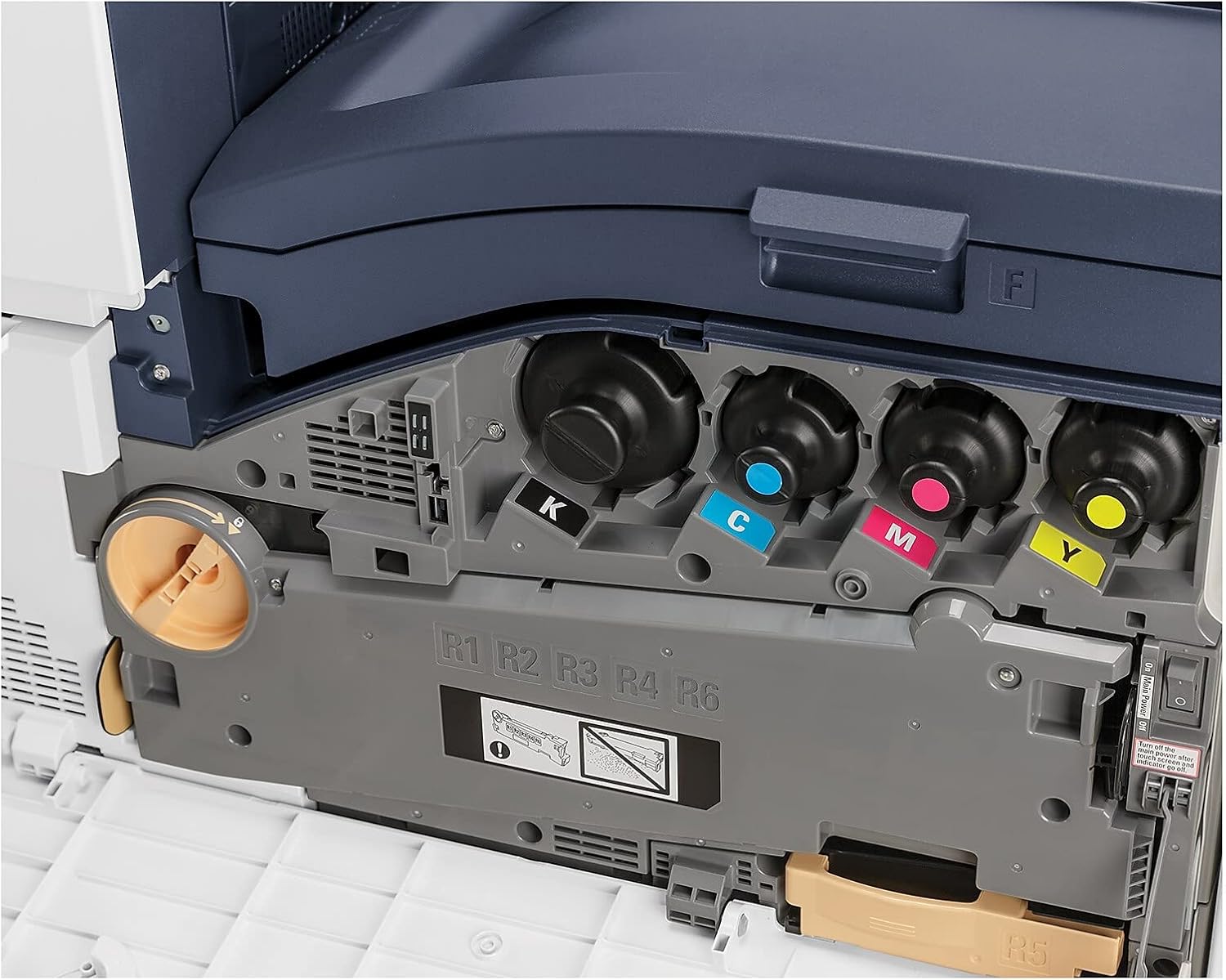
Slika 5.1.1: View of the toner cartridge compartment, showing the slots for Black (K), Cyan (C), Magenta (M), and Yellow (Y) toner.
5.2 Čišćenje
Regularly clean the exterior of the printer with a soft, lint-free cloth. Do not use abrasive cleaners or solvents. Refer to the printer's internal cleaning procedures via the control panel for specific instructions on cleaning internal components.
6. Rješavanje problema
This section provides solutions to common issues. For more complex problems, refer to the online support resources or contact Xerox customer service.
- Pisač ne reagira: Check power connection, network cable, and ensure the printer is powered on. Restart the printer and the connected device.
- Problemi s kvalitetom ispisa: Check toner levels. Perform a print quality calibration from the printer's control panel. Ensure correct paper type settings.
- Zastoj papira: Follow the on-screen instructions or refer to the printer's internal guides for clearing paper jams from specific areas.
- Problemi s mrežnom povezivošću: Verify Ethernet cable connection. Check network settings on the printer and your computer. Restart network devices.
7. Specifikacije
| Značajka | Detalj |
|---|---|
| Marka | Xerox |
| Broj modela | C8000/DT |
| Tehnologija tiska | Laser |
| Izlaz za pisač | Boja |
| Maksimalna brzina ispisa (u boji) | 42 ppm |
| Maksimalna brzina ispisa (monokromatski) | 42 ppm |
| Maksimalna rezolucija ispisa u boji | 1200 x 2400 dpi |
| Maksimalna crno-bijela rezolucija ispisa | 1200 x 2400 dpi |
| Duplex ispis | Automatski |
| Tehnologija povezivanja | Ethernet |
| Hardversko sučelje | Ethernet |
| Kompatibilni uređaji | pametni telefoni |
| Metoda kontrole | aplikacija |
| Maksimalna veličina medija | 8.5 x 14 inča |
| Vrste medija za ispis | Kuverte, papir (obični) |
| Maksimalni ulazni kapacitet listova | 45 |
| Broj ladica | 2 |
| Težina artikla | 178 funti |
| Dimenzije proizvoda | 28.5 x 24.4 x 31.9 inča |
| Kapacitet pohrane memorije | 4096 MB |
| Wattage | 2300 vata |
| Vrsta skenera | Ravna platforma |
| Dodatne funkcije pisača | Sve u jednom |
8. Jamstvo i podrška
8.1 Jamstvo za proizvod
The Xerox VersaLink C8000/DT Color Printer comes with a standard one-year warranty. For detailed terms and conditions, please refer to the warranty documentation included with your product or visit the official Xerox support webmjesto.
8.2 Korisnička podrška
For technical assistance, troubleshooting, or service requests, please contact Xerox customer support. Support contact information can typically be found on the Xerox webweb-mjestu ili u dokumentaciji koja je isporučena s vašim pisačem.


