1. Uvod
This user manual provides detailed instructions for the operation and maintenance of your LOTUS Mini Portable Projector YG-300. Please read this manual thoroughly before using the projector to ensure proper functionality and to prevent damage.
The YG-300 is a compact and versatile video projection system designed for various applications, including presentations, conferences, training, and home theater setups. It projects light beams to display images and videos from compatible sources.
2. Sadržaj paketa
Nakon raspakiranja, molimo provjerite jesu li svi dolje navedeni artikli uključeni u vaš paket:
- YG-300 Projector Unit
- Power Adapter (AC/DC 12V, 1.5A)
- Daljinski upravljač
- Tri-u-jednom AV kabel
- Engleski korisnički priručnik

Figure 2.1: Included accessories with the YG-300 Mini Portable Projector.
3. Proizvod je gotovview
3.1. Projector Front and Side View

Slika 3.1: Prednja strana view of the YG-300 projector, highlighting the projection lens and side ventilation.
3.2. Projector Top Panel Controls
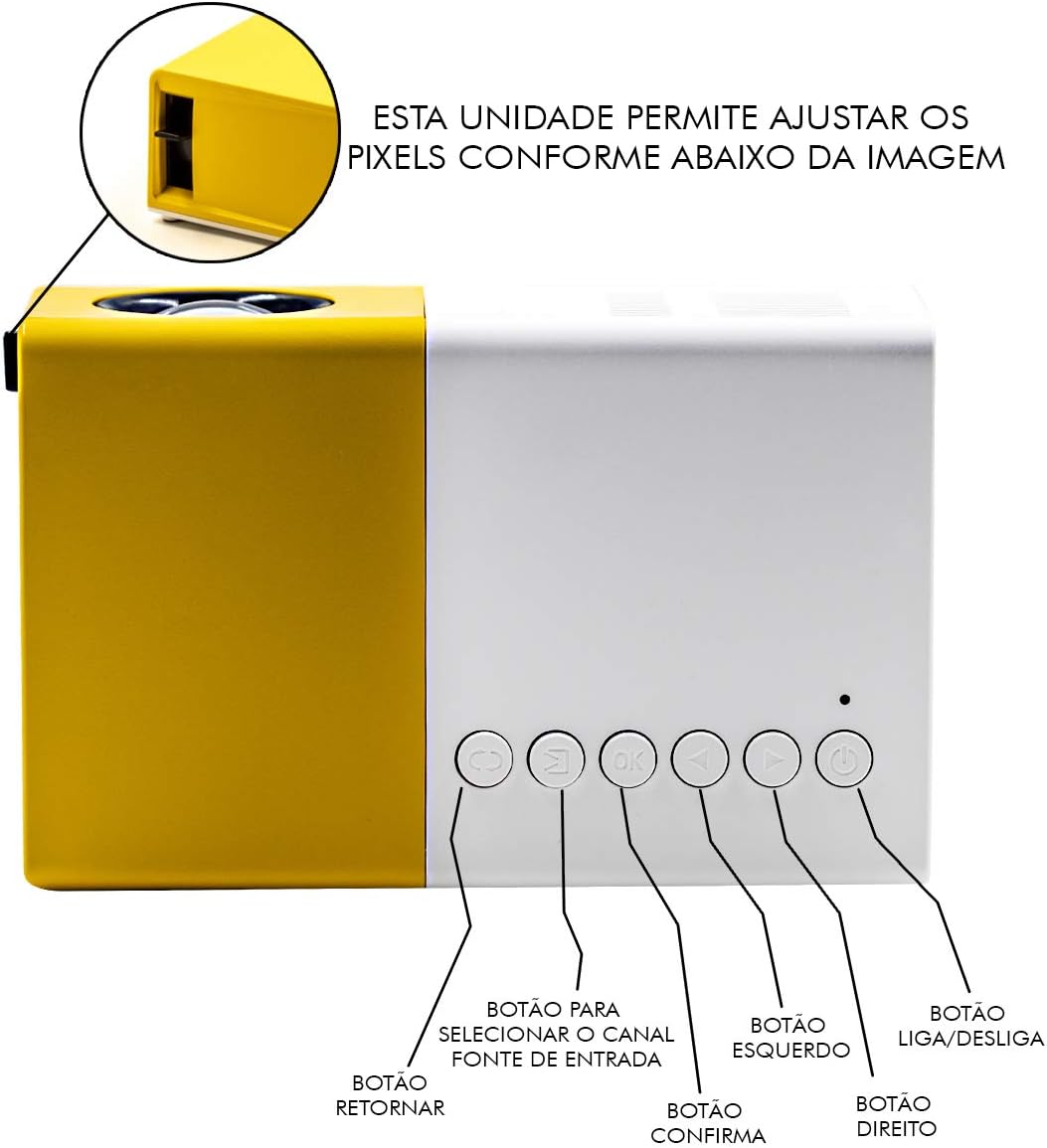
Figure 3.2: Top panel controls of the YG-300 projector. From left to right: Return button, Input Source selection button, OK (Confirm) button, Left navigation button, Right navigation button, and Power On/Off button.
3.3. Projector Rear Panel Ports
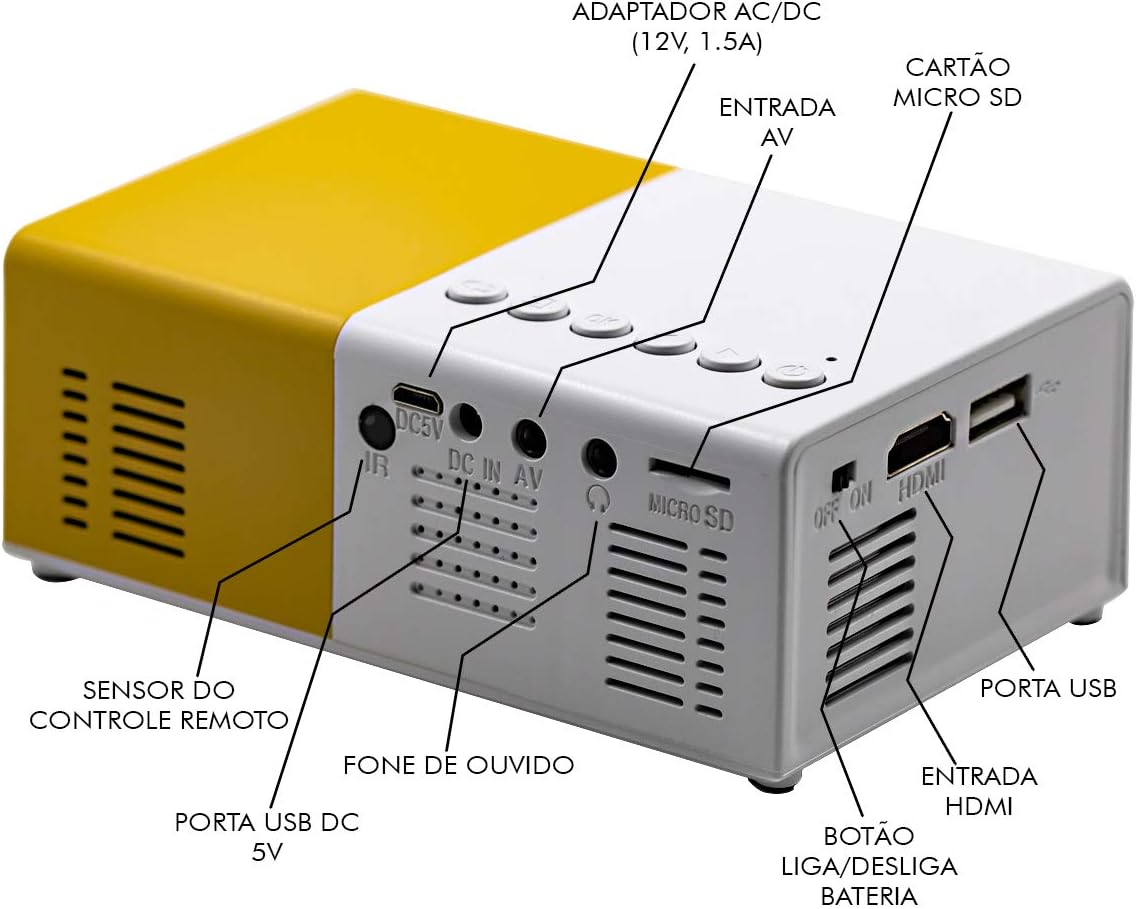
Figure 3.3: Rear panel of the YG-300 projector, detailing the connectivity options including USB, AV, Micro SD, HDMI, and audio output.
3.4. Funkcije daljinskog upravljača

Figure 3.4: Remote control for the YG-300 projector, showing buttons for power, menu access, source selection, directional navigation, OK, play/pause, volume control, and exit.
4. Postavljanje
4.1. Priključak za napajanje
- Connect the provided power adapter to the "DC IN AV" port on the rear of the projector.
- Priključite strujni adapter u standardnu električnu utičnicu.
- Ensure the power switch (if present, often near the DC IN port) is in the "ON" position.
4.2. Postavljanje projektora
Place the projector on a stable, flat surface. For optimal image quality, position the projector between 1.2 to 3 meters (approximately 4 to 10 feet) from the projection surface. This distance will yield an image size between 20 to 80 inches.

Slika 4.1: Nprample setup of the YG-300 projector for home use.
4.3. Spajanje ulaznih uređaja
The YG-300 supports multiple input sources:
- HDMI: Connect an HDMI cable from your device (e.g., laptop, game console, streaming stick) to the HDMI port on the projector.
- USB: Umetnite USB flash pogon u USB priključak za reprodukciju medija files izravno.
- Micro SD: Insert a Micro SD card into the Micro SD slot to play media files.
- OD: Use the provided three-in-one AV cable to connect to devices with AV output (e.g., older DVD players, set-top boxes).
5. Upute za rad
5.1. Uključivanje/isključivanje
- Za uključivanje pritisnite Uključivanje/isključivanje button on the projector's top panel or the remote control.
- Za isključivanje, pritisnite Uključivanje/isključivanje ponovno gumb.
5.2. Odabir ulaznog izvora
Nakon uključivanja, koristite Izvor tipku na daljinskom upravljaču ili Odabir izvora unosa button on the projector's top panel to cycle through available input sources (HDMI, USB, Micro SD, AV).
5.3. Adjusting Image Focus
The projector features a manual focus adjustment. Rotate the focus ring located around the lens until the projected image appears clear and sharp.
5.4. Navigating Menus and Media
Koristite tipke za smjer (Lijevo, Pravo, Up, dolje) i OK button on the remote control or projector to navigate through menus and select media files. The Povratak button will take you back to the previous screen.
5.5. Kontrola glasnoće
Podesite glasnoću pomoću Povećaj glasnoću i Stišaj zvuk buttons on the remote control. You can also connect external speakers or headphones to the 3.5mm audio jack for enhanced sound.
6. Održavanje
6.1. Čišćenje leće
Nježno obrišite leću projektora mekom krpom koja ne ostavlja dlačice, posebno namijenjenom za optičke površine. Nemojte koristiti abrazivna sredstva za čišćenje ili otapala.
6.2. Čišćenje tijela projektora
Obrišite vanjski dio projektora mekom, suhom krpom. Izbjegavajte korištenje tekućih sredstava za čišćenje izravno na uređaju.
6.3. Ventilacija
Ensure that the ventilation grilles on the projector are not blocked to prevent overheating. Adequate airflow is crucial for the projector's longevity.
7. Rješavanje problema
| Problem | Mogući uzrok | Otopina |
|---|---|---|
| Nema projicirane slike |
|
|
| Slika je mutna |
|
|
| Nema zvuka |
|
|
| Projektor se pregrijava i gasi |
|
|
8. Specifikacije
| Značajka | Detalj |
|---|---|
| Marka | LOTOS |
| Model | YG-300 |
| Proizvođač | LEJIADA |
| Svjetlina | 600 lumena |
| Izvorna razlučivost | 800 x 480 piksela |
| Udaljenost projekcije | 1.2 - 3 meters (approx. 4 - 10 feet) |
| Veličina slike | 20 - 80 inča |
| Omjer zaslona | 4:3 |
| Povezivost | HDMI, USB, 3.5mm Audio, Micro SD Card Slot |
| Dimenzije proizvoda | 12.5 x 8 x 5 cm (4.9 x 3.1 x 2 inča) |
| Težina proizvoda | 480 g (1.06 lbs) |

Figure 8.1: Dimensions of the YG-300 projector and its remote control.
9. Jamstvo i podrška
For warranty information and technical support, please refer to the contact details provided by your retailer or the manufacturer, LEJIADA. Keep your purchase receipt as proof of purchase for any warranty claims.
This product is designed for durability and performance. For any issues not covered in the troubleshooting section, please contact customer support.


