1. Uvod
This manual provides comprehensive instructions for the installation, operation, and maintenance of your UHPPOTE 2.4GHz WiFi Outswinging Indoor 1200lb Electric Magnetic Door Lock Kit System. This system offers secure access control with the convenience of remote and smartphone app control, designed for outswinging indoor doors.
Ključne značajke uključuju:
- Wireless RF remote control for convenient door unlocking.
- Smartphone app control via Tuya Smart App (requires 2.4GHz Wi-Fi).
- 1200lb holding force electromagnetic lock for robust security.
- Included exit button for easy indoor egress.
- Timing functions for scheduled lock/unlock operations.
- Share control functionality with other users.
2. Sigurnosne informacije
Please read all safety warnings and instructions carefully before installing and operating this product. Failure to follow these instructions may result in electric shock, fire, or serious injury.
- Prije bilo kakve instalacije ili održavanja provjerite je li napajanje isključeno.
- Ovaj sustav je dizajniran za zatvoreni i outswinging doors only.
- U slučaju nesigurnosti, instalaciju treba izvršiti kvalificirano osoblje.
- Koristite samo isporučeni strujni adapter.
- Keep all components away from water and excessive humidity.
- Do not attempt to modify or repair the system components yourself. Contact support if issues arise.
3. Sadržaj paketa
Provjerite jesu li sve dolje navedene stavke prisutne u vašem paketu:
- 1x Electromagnetic Lock (1200lb holding force)
- 1x Armature Plate
- 1x Remote Control Receiver/WiFi Module
- 2x Wireless RF Remote Transmitters
- 1x Exit Button
- 1x strujni adapter (DC 12V)
- Oprema za montažu (vijci, sidra, itd.)

This image displays all the components included in the UHPPOTE 2.4GHz WiFi Outswinging Indoor 1200lb Electric Magnetic Door Lock Kit. Visible items are the main electromagnetic lock unit, its corresponding armature plate, a power adapter, two wireless remote controls, the central WiFi receiver module, and a push-to-exit button.
4. Instalacija i postavljanje
4.1 Dijagram ožičenja
Refer to the following diagram for proper wiring connections. Ensure all connections are secure before applying power.

This diagram illustrates the electrical connections for the UHPPOTE magnetic lock system. It shows how the access keypad (optional, not included in this kit), the WiFi receiver module, the exit button, the power adapter, and the fail-safe electromagnetic lock are interconnected. Pay close attention to the NO (Normally Open), NC (Normally Closed), COM (Common), V+ (Positive), and V- (Negative) terminals.
4.2 Electromagnetic Lock Installation
The electromagnetic lock is designed for outswinging doors. It should be mounted on the door frame, and the armature plate on the door itself.
- Identify the optimal mounting position on the door frame, ensuring proper alignment with the armature plate on the door.
- Drill pilot holes and secure the electromagnetic lock to the door frame using the provided screws.
- Mount the armature plate to the door, ensuring it aligns perfectly with the electromagnetic lock when the door is closed. Use a rubber washer if provided, to allow slight pivot for better contact.

This image shows the main electromagnetic lock unit and its corresponding armature plate. The lock is a rectangular metal bar with visible magnetic coils, and the armature plate is a flat metal piece designed to attach to the door, creating the magnetic bond when the lock is energized.
4.3 WiFi Receiver Module and Remote Pairing
The WiFi receiver module acts as the central control unit. It communicates with the electromagnetic lock, remote controls, and your smartphone via Wi-Fi.
- Connect the WiFi receiver module according to the wiring diagram (Figure 4.1).
- Pairing Remote Controls:
- Press the learning button on the receiver module (refer to the module's specific instructions for exact location, usually a small button).
- While the indicator light on the receiver is active, press any button on the remote control you wish to pair.
- The indicator light will flash or change color to confirm successful pairing. Repeat for all remote controls.

This image shows the compact black WiFi receiver module. It features indicator lights, connection ports for the lock and exit button, and clearly labeled WiFi and RF (remote frequency) icons, indicating its dual control capabilities.

This image depicts a hand pressing the button on one of the wireless remote controls included in the kit. The remote is small, black, and silver, designed for convenient, portable operation of the lock system.
4.4 Smartphone App Setup (Tuya Smart App)
The Tuya Smart App allows for remote control and advanced features.
- Download the "Tuya Smart" app from the App Store (iOS) or Google Play (Android).
- Registrirajte se ili prijavite na svoj Tuya Smart račun.
- Dodajte novi uređaj:
- Provjerite je li vaš telefon povezan na Wi-Fi mrežu od 2.4 GHz.
- In the app, tap "+" to add a device.
- Follow the in-app instructions to put the WiFi receiver module into pairing mode (usually by pressing and holding a button on the module until an indicator light flashes rapidly).
- Odaberite svoju Wi-Fi mrežu i unesite lozinku.
- The app will discover and connect to the device. Once connected, you can rename it.

This image shows a smartphone displaying the Tuya Smart app, which is used to control the magnetic door lock. The screen prominently features a large lock icon and an "OFF" button, indicating the current locked status and the option to unlock the door remotely.
5. Upute za rad
5.1 Otključavanje vrata
- Using Wireless RF Remote: Press the designated unlock button on the remote control. The lock will temporarily unlock, allowing the door to be opened.
- Using Smartphone App: Open the Tuya Smart App, select your lock device, and tap the "Unlock" or "OFF" button. The lock will temporarily unlock.
- Using Exit Button: From the inside, press the exit button. The lock will temporarily unlock for egress.
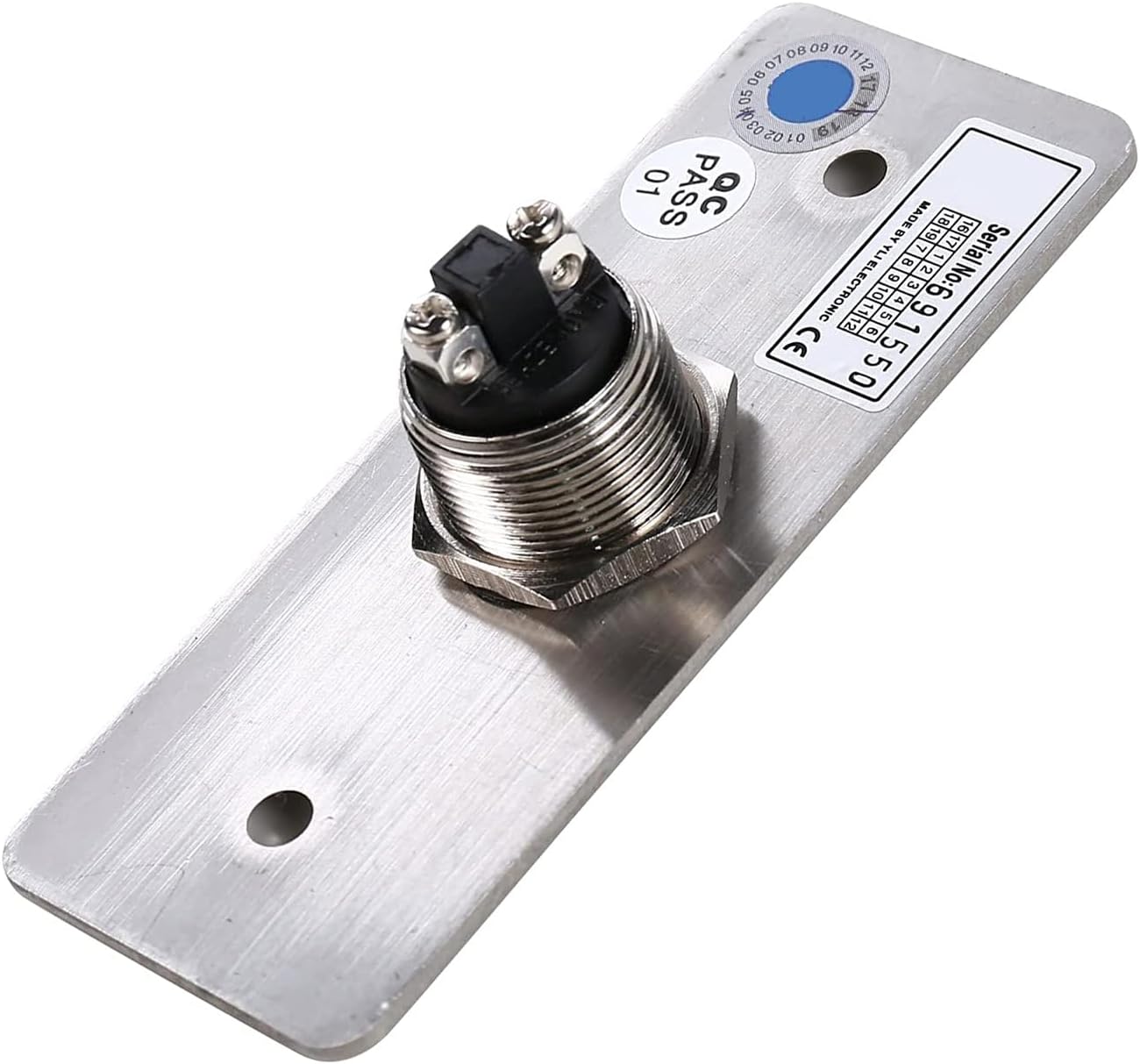
This image shows the rectangular silver exit button with a prominent black push button in the center. It is clearly labeled "PUSH TO EXIT" at the top and "EXIT" at the bottom, indicating its function for quick and easy egress from the secured area.
5.2 Napredne značajke aplikacije
- Funkcija mjerenja vremena: Set schedules for automatic lock/unlock operations (e.g., unlock during business hours, lock at night). This includes countdown, scheduled on/off, and loop timing.
- Upravljanje dijeljenjem: Grant access to family members or trusted individuals by sharing control of the device through the app.
- Funkcija grupiranja: Organize multiple smart devices into groups for easier management within the app.
- Smart Scene: Create automated scenarios where the lock interacts with other smart devices (e.g., unlock door when motion is detected).
6. Održavanje
Regular maintenance ensures optimal performance and longevity of your magnetic door lock system.
- Čišćenje: Wipe down the electromagnetic lock and armature plate with a soft, dry cloth periodically to remove dust and debris. Do not use abrasive cleaners or solvents.
- Provjera veze: Povremeno pregledajte sve spojeve ožičenja kako biste bili sigurni da su sigurni i bez korozije.
- Ažuriranja firmvera: Check the Tuya Smart App regularly for any available firmware updates for the WiFi receiver module. Install updates as recommended for improved performance and security.
- Battery Replacement (Remotes): If remote control range decreases or functionality becomes intermittent, replace the CR2 batteries (2 required) in the remote transmitters.
7. Rješavanje problema
| Problem | Mogući uzrok | Otopina |
|---|---|---|
| Brava se ne uključuje/isključuje. | No power; loose wiring; faulty component; remote not paired. | Check power adapter connection. Verify all wiring connections. Re-pair remote controls. Contact support if issue persists. |
| Daljinski upravljač ne radi. | Low/dead batteries; out of range; not paired. | Replace CR2 batteries. Move closer to the receiver. Re-pair the remote. |
| Kontrola aplikacije ne radi. | No Wi-Fi connection; incorrect Wi-Fi password; app not updated; device offline. | Ensure 2.4GHz Wi-Fi is active and strong. Verify Wi-Fi password in app. Update Tuya Smart App. Re-add device if necessary. |
| Magnetic lock holding force is weak. | Misalignment of lock and armature plate; debris on surfaces; insufficient power. | Adjust alignment. Clean contact surfaces. Ensure power adapter is providing stable 12V DC. |
8. Specifikacije
| Značajka | Detalj |
|---|---|
| Broj modela | UT-WIFI-500KG-814A |
| Marka | UHPPOTE |
| Vrsta brave | Elektromagnetska brava |
| Sila zadržavanja | 1200lb (approx. 544 kg) |
| Povezivost | 2.4GHz Wi-Fi, RF (Radio Frequency) |
| Metoda kontrole | Smartphone App (Tuya Smart), Wireless Remote Control, Exit Button |
| Izvor napajanja | DC 12V (putem priloženog adaptera za napajanje) |
| Preporučena uporaba | Outswinging Indoor Doors |
| Težina artikla | 11.14 funti (otprilike 5.05 kg) |
| Dimenzije paketa | 11.93 x 9.29 x 3.62 inča |
9. Jamstvo i podrška
For warranty information and technical support, please contact UHPPOTE customer service. Refer to the product packaging or the official UHPPOTE webstranicu za najnovije kontaktne podatke.
Online resursi mogu uključivati:
- UHPPOTE Official Webstranica: Visit the UHPPOTE Store on Amazon
- Product Support Page (if available)
- Odjeljak s često postavljanim pitanjima
Please have your model number (UT-WIFI-500KG-814A) and purchase date ready when contacting support.


