1. Uvod
The Autel MaxiPRO MP900-BT is an advanced automotive diagnostic scanner designed for comprehensive vehicle analysis and maintenance. This device offers a wide range of functionalities, including sophisticated ECU functions, extensive diagnostic capabilities, and numerous service resets. It is an upgraded version of previous MaxiPRO/MaxiDAS series models, incorporating newer technologies like DoIP/CAN FD protocols and enhanced hardware for improved performance.
The MP900-BT provides OE-level full system diagnostics, bidirectional control, and guided functions for various vehicle makes. Its wireless Bluetooth connectivity allows for flexible operation around the vehicle, while the Android 11 operating system ensures a smooth and intuitive user experience.

Figure 1: Autel MaxiPRO MP900-BT Scanner with included MV108S Endoscope.
2. Što je u kutiji
Upon unboxing your Autel MaxiPRO MP900-BT Scanner, please verify that all the following items are included:
- MP900-BT Main Tool
- MaxiVCI V150
- Adapter napajanja
- USB kabel vrste C
- Mekana tkanina
- Kratki referentni vodič
- Popis pakiranja
- Rugged Plastic Carrying Case (504*360*133mm)
The MV108S endoscope is also included as part of this package.
Video 1: Unboxing the Autel MP900TS (similar to MP900-BT) to see included components.
3. Postavljanje
Before using your MaxiPRO MP900-BT Scanner, ensure it is fully charged and connected to a stable internet connection via Wi-Fi. A good internet connection is crucial for software updates, online functions, and accessing certain vehicle authentication services.
3.1 Početno uključivanje i konfiguracija
- Napunite uređaj: Connect the power adapter to the scanner and a power outlet. Allow the device to charge fully before first use.
- Uključivanje: Pritisnite i držite gumb za napajanje dok se zaslon ne osvijetli.
- Početno postavljanje: Slijedite upute na zaslonu za odabir jezika, vremenske zone i povezivanje s Wi-Fi mrežom.
- Ažuriranje softvera: Navigate to the 'Update' application on the main menu and download any available software updates to ensure optimal performance and the latest vehicle coverage.
3.2 Spajanje MaxiVCI V150
The MaxiVCI V150 is the vehicle communication interface that connects the scanner to your vehicle's OBDII port.
- Pronađite OBDII priključak: The OBDII port is typically located under the dashboard on the driver's side of the vehicle.
- Spoji VCI: Plug the MaxiVCI V150 into the vehicle's OBDII port. The VCI's LED indicator should light up, indicating power.
- Uspostavljanje Bluetooth veze: On the MP900-BT scanner, ensure Bluetooth is enabled. The scanner will automatically attempt to connect to the VCI. A successful connection will be indicated by a solid blue LED on the VCI and a Bluetooth icon on the scanner's status bar.
Video 2: Instructions for accessing FCA AutoAuth with an Autel scanner, demonstrating connection steps.
4. Upute za rad
The Autel MaxiPRO MP900-BT offers a user-friendly interface with various functions accessible from the main menu.
4.1 OE Full Systems Diagnostics
This function allows for comprehensive scanning of all available electronic control modules (ECUs) in the vehicle.
- Select 'Diagnostics': From the main menu, tap on the 'Diagnostics' icon.
- Identifikacija vozila: Choose 'AutoVIN' for automatic vehicle identification or 'Manual Input' to enter VIN/vehicle details manually. The 8MP camera can also be used for VIN/License plate scanning.
- Automatsko skeniranje: Select 'Auto Scan' to perform a full system scan. The scanner will read ECU information, retrieve diagnostic trouble codes (DTCs), and display live data.
- Review Podaci: View live data in various formats (text, graph, histogram, meter diagram), analyze freeze frame data, and perform active tests to pinpoint issues.

Figure 2: Comprehensive Full System Diagnostics interface showing various data points and options.
4.2 ECU Functions (Coding & Activation)
The MP900-BT supports advanced ECU functions for specific vehicle makes, including online coding, offline coding, and hidden function activation.
- Online kodiranje: For BMW, Porsche, VW, Nissan, Infiniti, Hyundai, etc. Requires internet connection to synchronize with OEM data.
- Izvanmrežno kodiranje: For Ford, Mazda, Jaguar, Vauxhall, Opel, etc. Allows coding without an internet connection if original values are known.
- Hidden Function Activation: Activate hidden features on vehicles like Nissan, Infiniti, BMW, MINI, Toyota, Lexus, Scion.
- Personalizacija: Customize settings for Land Rover/Jaguar vehicles.
Video 3: Demonstration of Online ECU Coding using a VW vehicle as an example.

Slika 3: Gotovoview of advanced ECU coding capabilities including component matching and hidden function activation.
4.3 40+ Maintenance Resets
The scanner supports over 40 maintenance and service functions to address common vehicle needs.
- Resetiranje ulja: Resetirajte sustav vijeka trajanja ulja nakon izmjene ulja.
- EPB: Resetiranje elektroničke parkirne kočnice.
- SAS: Kalibracija senzora kuta upravljanja.
- BMS: Battery Management System registration.
- ABS Brake Bleed: Izvršite postupke odzračivanja kočnica ABS-a.
- Resetiranje gasa: Reset throttle body adaptations.
- CKP Relearn: Crankshaft Position System Relearn.
- Kodiranje injektora: Code new injector values.
- Air Suspension: Reset or calibrate air suspension systems.

Figure 4: Visual representation of various service reset functions available on the scanner.
4.4 Bidirectional Control / Active Tests
Perform active tests to command vehicle components to perform specific functions, aiding in troubleshooting.
- Windows: Test window up/down operation.
- Ogledala: Test mirror adjustments.
- ABS AutoBleed: Initiate automated ABS bleeding.
- Pumpa za gorivo: Aktivirajte pumpu za gorivo.
- Radiator Fan: Turn the radiator fan on/off.
- Interior/Exterior Lights: Control vehicle lighting.

Figure 5: Illustration of bidirectional control testing various vehicle actuators.
4.5 VAG vođene funkcije
For Volkswagen, Audi, Skoda, Seat, and Man LD vehicles, the scanner provides step-by-step on-screen instructions for complex service operations, special functions, and functional tests.
4.6 Upravljanje izvješćima u oblaku
Generate and manage diagnostic reports efficiently.
- Save Reports: Store diagnostic reports securely in the cloud.
- Podijeli izvješća: Share reports via QR codes, text messages, or email for easy collaboration.
- Ispis putem Wi-Fi-ja: Print reports directly from the device using a Wi-Fi connected printer.
5. Specifikacije
| Značajka | Detalj |
|---|---|
| Marka | Autel |
| Broj modela | MP900-BT |
| Operativni sustav | Android 11.0 |
| Dimenzije proizvoda | 11.06 cm D x 1.34 cm Š x 14.43 cm V |
| Težina artikla | 2.11 funti |
| Baterije | Potrebne su 1 litij -polimerne baterije (uključene) |
| Automobilska vrsta | Specifična prilagodba za vozilo |
| Posebne značajke | Extendable (DoIP/CAN FD, VIN/License Scan, 8MP Camera, Pre-& Post-Scan, WIFI Print, Personalization Settings) |
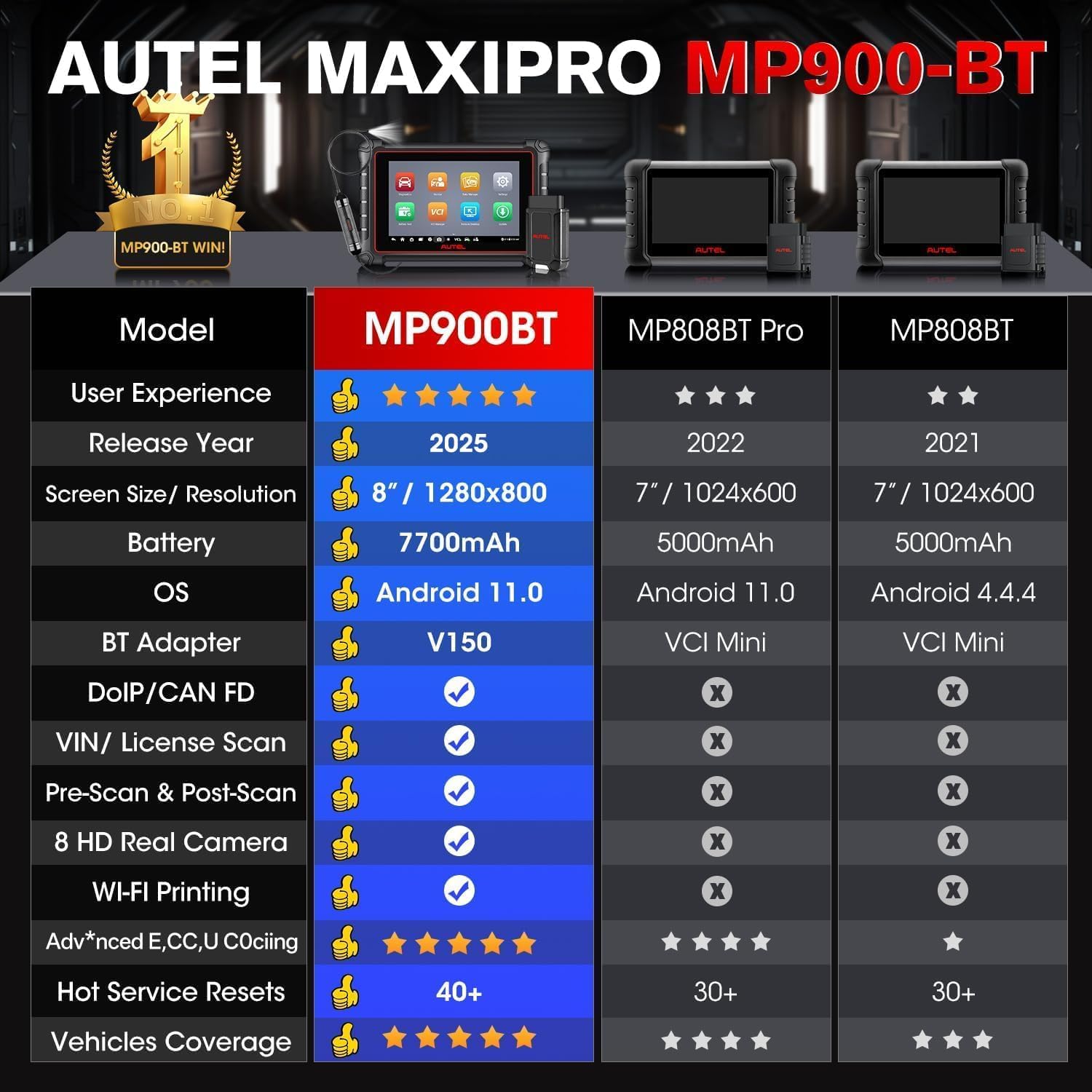
Figure 6: Comparison of MP900-BT specifications with other Autel models.
6. Održavanje
To ensure the longevity and optimal performance of your Autel MaxiPRO MP900-BT Scanner, follow these maintenance guidelines:
- Držati čistim: Regularly wipe the screen and device exterior with the provided soft cloth or a non-abrasive cleaner.
- Ažuriranja softvera: Connect to Wi-Fi monthly and check for software updates via the 'Update' application. Keeping the software current ensures the latest vehicle coverage and features.
- Pravilno čuvati: When not in use, store the scanner and its accessories in the rugged plastic carrying case to protect it from dust, moisture, and physical damage.
- Njega baterije: Izbjegavajte često potpuno pražnjenje baterije. Redovito punite uređaj, posebno ako će se skladištiti dulje vrijeme.
7. Rješavanje problema
If you encounter issues with your Autel MaxiPRO MP900-BT Scanner, consider the following troubleshooting steps:
- Bez napajanja: Ensure the device is fully charged or connected to the power adapter. Check the power adapter and cable for damage.
- Problemi s VCI vezom: Verify the MaxiVCI V150 is securely plugged into the vehicle's OBDII port and that the vehicle's ignition is on. Check the Bluetooth connection on the scanner.
- Online Functionality Problems: Confirm the scanner has a stable internet connection (Wi-Fi). Ensure your software subscription is active for online functions like ECU Coding and SGW module access.
- Greške u komunikaciji vozila: Double-check that the correct vehicle make, model, and year are selected. Ensure the VCI is properly connected and the vehicle's battery voltage is sufficient (not less than 11.5V).
- Softverski kvarovi: Try restarting the scanner. If the issue persists, perform a factory reset (note: this will erase user data, back up important information first).
8. Jamstvo i podrška
The Autel MaxiPRO MP900-BT Scanner comes with a 1-godišnje jamstvo from the date of purchase, covering manufacturing defects. Additionally, it includes 1-Year Free Software Updates. After the free update period expires, offline functions will remain available, but online functions (e.g., ECU Coding, SGW module access) will require a renewed subscription.
For technical assistance, warranty claims, or to inquire about language support (e.g., Spanish), please contact Autel's official customer support. You may need to provide your device's serial number (12 digits, located on the back of the device).


