1. Uvod
Thank you for choosing the LTS Hand Held Electric Concrete Vibrator. This manual provides essential information for the safe and efficient operation, maintenance, and troubleshooting of your new concrete vibrator. Please read this manual thoroughly before initial use and keep it for future reference.
This product is designed to remove air bubbles from freshly poured concrete, ensuring a denser, stronger, and more uniform concrete finish. It is suitable for various construction applications.
2. Sigurnosne upute
Uvijek slijedite osnovne sigurnosne mjere pri korištenju električnih alata kako biste smanjili rizik od požara, strujnog udara i tjelesnih ozljeda.
Opća sigurnost
- Sigurnost radnog područja: Radno područje održavajte čistim i dobro osvijetljenim. Nered ili tamna područja mogu uzrokovati nesreće. Ne koristite električne alate u eksplozivnim atmosferama, kao što je prisutnost zapaljivih tekućina, plinova ili prašine.
- Električna sigurnost: Utikači električnog alata moraju odgovarati utičnici. Nikada ne mijenjajte utikač ni na koji način. Ne zloupotrebljavajte kabel. Nikada ne koristite kabel za nošenje, povlačenje ili isključivanje električnog alata. Držite kabel dalje od topline, ulja, oštrih rubova ili pokretnih dijelova.
- Osobna sigurnost: Stay alert, watch what you are doing, and use common sense when operating a power tool. Do not use a power tool while you are tired or under the influence of drugs, alcohol, or medication. Always wear appropriate personal protective equipment (PPE), including safety glasses, hearing protection, and sturdy footwear.
- Upotreba i njega alata: Ne forsirajte električni alat. Koristite odgovarajući električni alat za svoju primjenu. Isključite utikač iz izvora napajanja prije bilo kakvih podešavanja, promjene pribora ili pohranjivanja električnog alata.
Specific Concrete Vibrator Safety
- Ensure the vibrator hose is securely attached to the motor unit before operation.
- Nemojte uranjati jedinicu motora u vodu ili bilo koju drugu tekućinu.
- Avoid bending the vibrator hose excessively, as this can damage the internal shaft.
- Operate the vibrator only in well-ventilated areas.
- Do not touch the vibrating poker head during operation or immediately after use, as it may be hot.
3. Sadržaj paketa
Vaš paket treba sadržavati sljedeće stavke:
- 2 x LTS Hand Held Electric Concrete Vibrator Motor Units
- 2 x 1.5m Long, 35mm Diameter Vibrating Poker Hoses
- 1 x Korisnički priručnik (ovaj dokument)

Image 3.1: Two complete LTS Hand Held Electric Concrete Vibrator units, each consisting of a motor unit and an attached vibrating poker hose.
4. Postavljanje
Follow these steps to prepare your concrete vibrator for use:
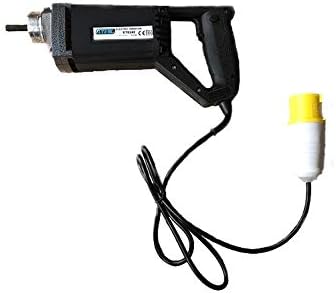
Image 4.1: The LTS Hand Held Electric Concrete Vibrator motor unit.
- Raspakirajte komponente: Pažljivo izvadite sve komponente iz pakiranja. Pregledajte ima li oštećenja tijekom dostave.
- Attach Vibrator Hose:
- Align the threaded end of the vibrating poker hose with the corresponding threaded port on the motor unit.
- Screw the hose onto the motor unit clockwise until it is hand-tight.
- Ensure a secure connection to prevent detachment during operation.
- Priključak za napajanje: Plug the power cord into a suitable 110V electrical outlet. Ensure the outlet is properly grounded.
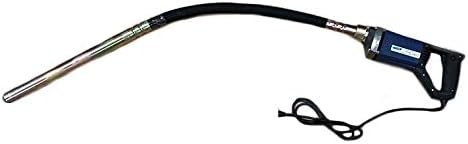
Image 4.2: The LTS Hand Held Electric Concrete Vibrator with the 1.5m long vibrating poker hose securely attached.
5. Upute za rad
Proper operation is crucial for achieving optimal concrete consolidation and extending the life of your tool.
- Pred-radna provjera: Before starting, ensure all connections are secure and the power cord is free from damage.
- Starting the Vibrator: Turn on the power switch located on the motor unit. The vibrator head will begin to vibrate.
- Vibrating Concrete:
- Slowly insert the vibrating poker head into the freshly poured concrete.
- Penetrate the concrete vertically or at a slight angle, ensuring the poker reaches the bottom of the formwork or the previous lift.
- Keep the poker submerged for approximately 5-15 seconds, or until air bubbles stop rising to the surface and the concrete surface becomes smooth and glossy.
- Slowly withdraw the poker, allowing the concrete to flow back into the void created by the poker.
- Overlap vibration areas by about 50% to ensure complete consolidation.
- Avoid touching the formwork with the vibrator head, as this can damage the forms or create surface imperfections.
- Stopping the Vibrator: Turn off the power switch on the motor unit when finished or when moving to a new section.
Tips for Effective Vibration:
- Do not over-vibrate concrete, as this can lead to segregation of aggregates.
- Maintain a consistent rhythm and pattern for uniform results.
- For deep pours, vibrate in layers, ensuring each layer is properly consolidated before adding the next.
6. Održavanje
Regular maintenance will ensure the longevity and optimal performance of your concrete vibrator.
- Čišćenje: After each use, clean the vibrator head and hose thoroughly to remove any concrete residue. Use a stiff brush and water. Do not use harsh chemicals or solvents that could damage the hose material. Ensure the motor unit remains dry.
- Inspekcija: Regularly inspect the power cord for cuts, fraying, or damage. Check the vibrator hose for cracks, kinks, or excessive wear. Ensure the connection between the hose and motor unit is secure.
- Skladištenje: Store the concrete vibrator in a clean, dry place, away from direct sunlight and extreme temperatures. Coil the hose loosely to prevent kinks.
- Motor Unit Care: Keep the ventilation openings on the motor unit clear of dust and debris to prevent overheating.
7. Rješavanje problema
This section addresses common issues you might encounter with your concrete vibrator.
| Problem | Mogući uzrok | Otopina |
|---|---|---|
| Vibrator does not start. | No power supply; Power switch off; Damaged cord/plug; Motor fault. | Check power outlet and circuit breaker; Ensure power switch is ON; Inspect cord/plug for damage (replace if necessary); Contact customer support. |
| Slaba vibracija. | Loose hose connection; Worn internal shaft/bearings; Motor overheating. | Tighten hose connection; Allow motor to cool down; Contact customer support for repair. |
| Excessive noise or unusual sounds. | Internal mechanical issue; Loose components. | Discontinue use immediately; Contact customer support. |
| Motor unit gets hot quickly. | Blocked ventilation; Overload; Prolonged continuous use. | Clear ventilation openings; Do not overload the tool; Allow for cooling breaks during extended use. |
If you encounter problems not listed here or if the suggested solutions do not resolve the issue, please contact LTS customer support.
8. Specifikacije
Technical specifications for the LTS Hand Held Electric Concrete Vibrator:
| Značajka | Specifikacija |
|---|---|
| Marka | LTS |
| Model | Hand Held Electric Concrete Vibrator |
| Ulazni voltage | 110 V |
| Frekvencija | 60 Hz |
| Vlast | 580 W |
| Maximum Load RPM | 4500 okretaja u minuti |
| Duljina crijeva | 1.5 metara |
| Promjer crijeva | 35mm (Note: Product description states 32mm, title states 35mm. Using 35mm as per title for consistency, but noting discrepancy.) |
| Težina artikla (po jedinici) | Approx. 10 kg (Total 20 kg for 2 units) |
| Boja | May Vary (Blue or Black) |
9. Jamstvo i podrška
This LTS Hand Held Electric Concrete Vibrator comes with a 2 godina jamstva od datuma kupnje.
The warranty covers defects in materials and workmanship under normal use. It does not cover damage resulting from misuse, abuse, accidents, unauthorized repairs, or normal wear and tear.
For warranty claims, technical support, or spare parts, please contact your retailer or the manufacturer directly. Please have your purchase receipt and product model information ready when contacting support.
Proizvođač: LTS
Služba za korisnike: Refer to your purchase documentation for specific contact details.


