1. Uvod
The DNT Grabstar AV is a standalone video digitizer designed to convert analog video signals from sources like VCRs, camcorders, and DVD players into digital MP4 files. This device allows you to preserve your old video memories by saving them directly to an SD card, USB flash drive, or external USB hard drive without requiring a computer. It features a built-in 3.5-inch color display for monitoring and playback, and supports both Composite (RCA) and S-Video inputs for optimal quality.
Važno: Always ensure your device is running the latest firmware. You can check your current firmware version in the device menu. The recommended firmware version is v210317dnt (dated 17.03.2021).
2. Sadržaj paketa
Molimo provjerite jesu li svi dolje navedeni artikli uključeni u vaš paket:
- 1 x DNT Grabstar AV Video Digitizer
- 1 x USB Power Adapter (5V DC/1A)
- 1 x USB Charging Cable (Micro USB)
- 1 x AV Cable (3 x RCA male to 3 x RCA male)
- 1 x korisnički priručnik

Image: DNT Grabstar AV device with its power adapter, USB cable, and RCA cable.
3. Uređaj prekoview
Familiarize yourself with the various components and controls of your DNT Grabstar AV.

Slika: prednja strana view of the DNT Grabstar AV, displaying the 3.5-inch screen and control panel with Menu, Back, OK, directional buttons, Mode, and Rec/Stop buttons.
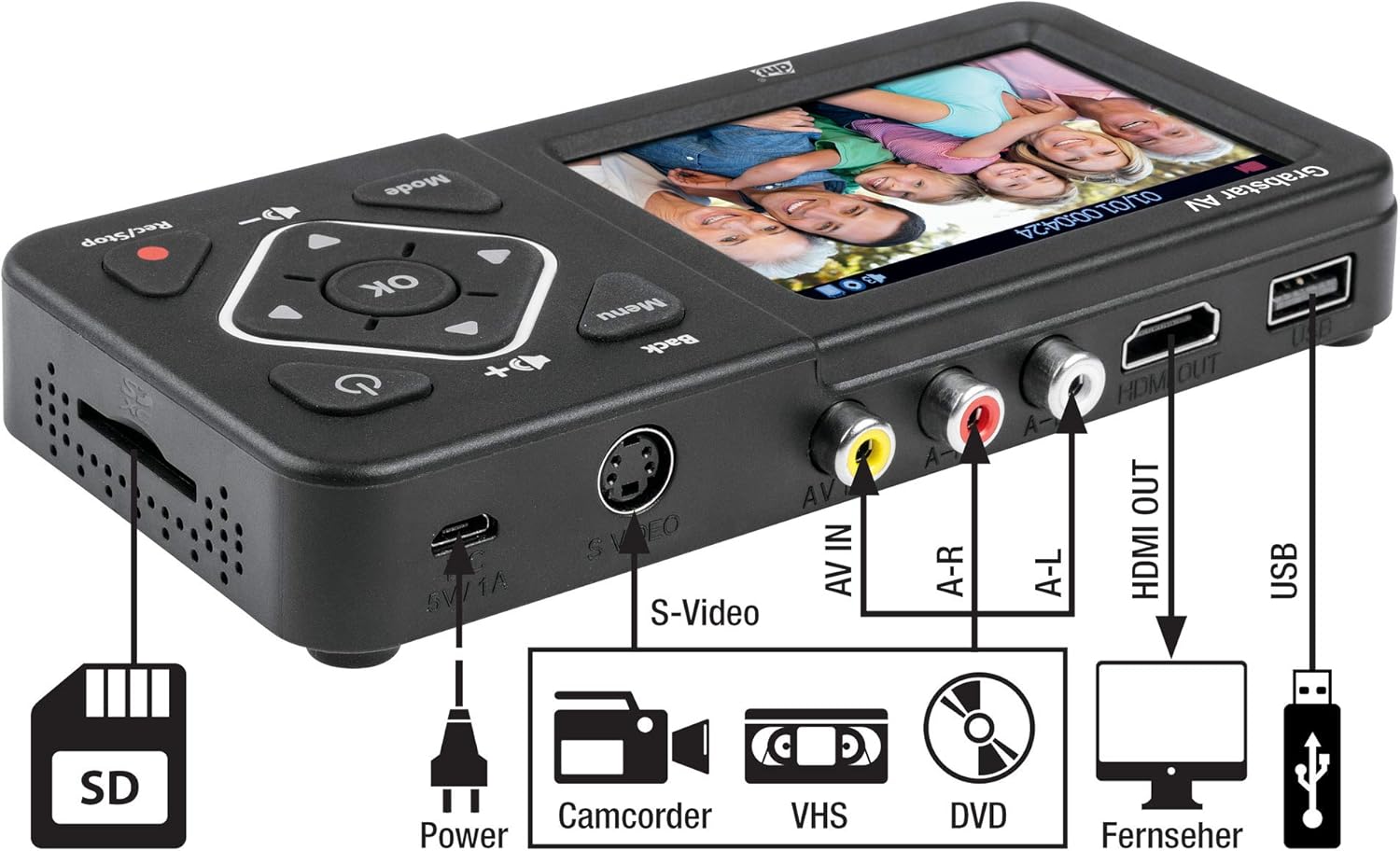
Slika: Kutna view of the DNT Grabstar AV, highlighting the S-Video input, AV IN (RCA) ports, HDMI OUT, USB port, Micro USB power input, and SD card slot.
Kontrole i priključci:
- Zaslon u boji od 3.5 inča: For live monitoring and playback of recordings.
- Gumb izbornika: Pristupa postavkama i opcijama uređaja.
- Gumb Natrag: Povratak na prethodni izbornik ili ekran.
- Smjerne tipke (gore, dolje, lijevo, desno): Navigacija kroz izbornike i podešavanje postavki.
- Gumb OK: Potvrđuje odabire.
- Gumb za način rada: Switches between recording and playback modes.
- Rec/Stop Button: Initiates and terminates video recording.
- Tipke za glasnoću (+/-): Adjusts the built-in speaker volume.
- Gumb za napajanje: Uključuje ili isključuje uređaj.
- DC 5V/1A (Micro USB): Ulaz za napajanje.
- S-Video Input: For connecting video sources with S-Video output.
- AV IN (RCA): Composite video (yellow) and stereo audio (red/white) input ports.
- HDMI IZLAZ: Connects to a TV or monitor for external display.
- USB priključak: For connecting USB flash drives or external USB hard drives.
- Utor za SD karticu: Za umetanje SD/SDHC memorijskih kartica.
4. Postavljanje
Follow these steps to prepare your DNT Grabstar AV for use:
- Priključak za napajanje: Connect the supplied USB power adapter to the Micro USB port (DC 5V/1A) on the device and plug it into a power outlet.
- Umetnite medij za pohranu: Insert an SD/SDHC memory card (Class 10 or higher, up to 128 GB) into the SD card slot, or connect a USB flash drive (up to 128 GB) or an external USB hard drive (up to 4 TB) to the USB port. Ensure the storage media is formatted to FAT32, NTFS, or exFAT.
- Connect Analog Video Source:
- Composite (RCA): Use the supplied AV cable to connect the yellow video output from your source device (VCR, camcorder, DVD player) to the yellow AV IN port on the Grabstar AV. Connect the red and white audio outputs from your source to the corresponding red (A-R) and white (A-L) AV IN audio ports.
- S-video: If your source device has an S-Video output, connect an S-Video cable to the S-Video port on the Grabstar AV. For audio, you must still connect the red and white audio RCA cables from your source to the Grabstar AV's A-R and A-L ports. S-Video only transmits video.
- (Optional) Connect to TV: Do view the input signal or recorded videos on a larger screen, connect an HDMI cable from the HDMI OUT port on the Grabstar AV to an HDMI input on your television or monitor.
5. Upute za rad
5.1 Uključivanje/isključivanje
Press and hold the Power button (⑁) on the device for a few seconds to turn it on or off.
5.2 Snimanje videa
- Odaberite unos: Ensure your analog video source is connected and powered on. The Grabstar AV will automatically detect the input signal (Composite or S-Video). The live video feed should appear on the 3.5-inch display.
- Start Source Playback: Begin playing the video on your source device (e.g., press Play on your VCR).
- Početak snimanja: Pritisnite tipku Snimanje/zaustavljanje (●) button on the Grabstar AV. A red recording indicator will appear on the screen, and the recording duration will be displayed.
- Snimanje monitora: Observe the recording on the device's screen or an external TV connected via HDMI.
- Zaustavi snimanje: Pritisnite tipku Snimanje/zaustavljanje (●) button again to stop the recording. The device will save the video file to your inserted storage media.
Automatic Recording Function: The device supports automatic recording durations of 60, 90, 120, or 150 minutes. This can be configured in the device's menu settings.
Napomena o File Veličina: Zbog file system limitations (especially FAT32), individual recorded files are limited to a maximum size of 4 GB. If a recording exceeds this limit, the device will automatically split it into multiple 4 GB files.
Rezolucija snimanja: The Grabstar AV supports recording resolutions of 720x576p, 720x480p, and 640x480p. For analog sources, higher recording resolutions do not necessarily improve the visual quality, as the native resolution of analog material is inherently low. Selecting a higher resolution than the source material may not yield better results and can sometimes lead to less optimal digitization.
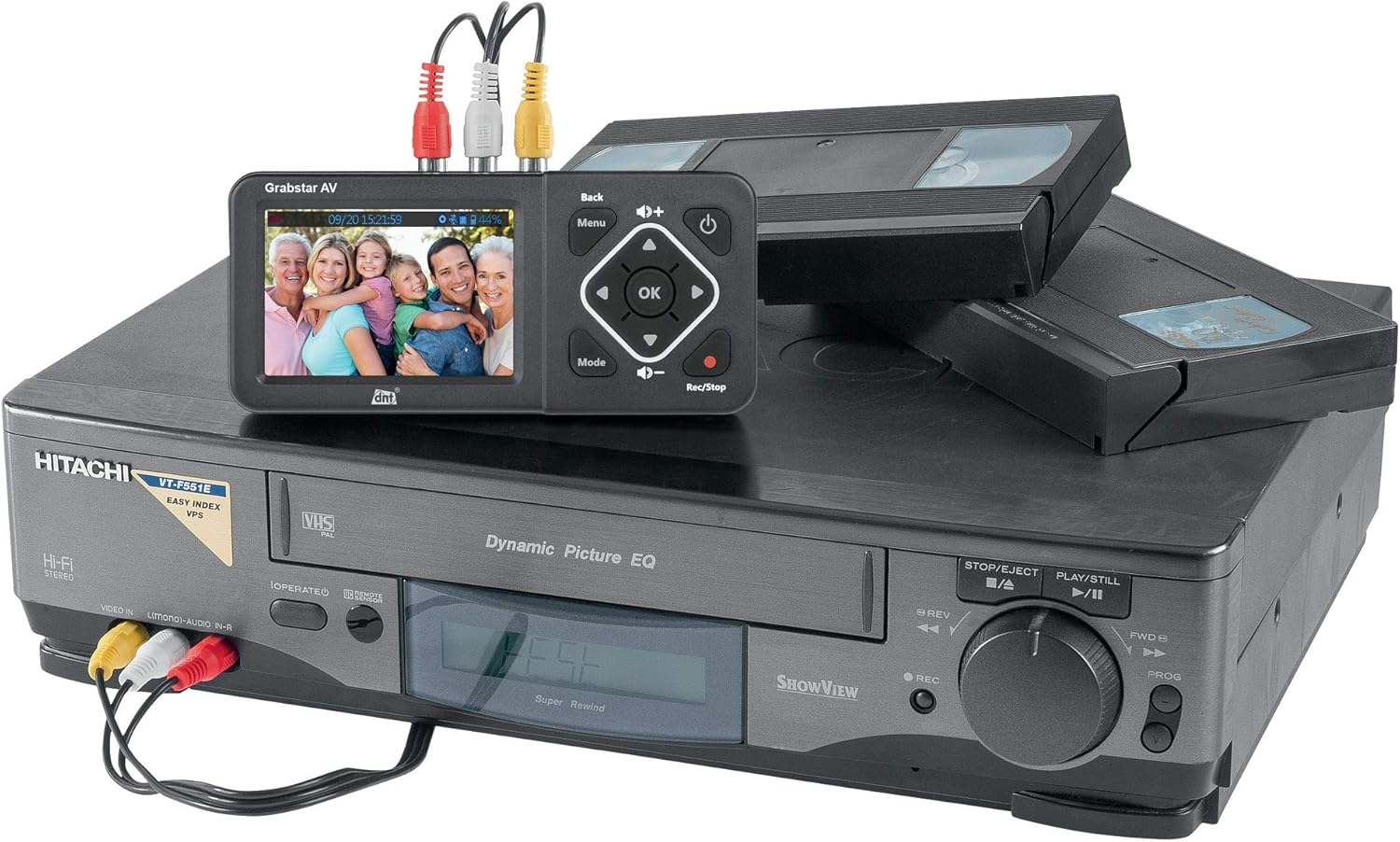
Image: The DNT Grabstar AV connected to a VHS player, demonstrating the process of digitizing old video tapes.
5.3 Reprodukcija
Za reprodukciju snimljenih videozapisa:
- Pritisnite tipku Način rada gumb za prebacivanje u način reprodukcije.
- Use the directional buttons to navigate through your recorded files.
- Pritisnite tipku OK gumb za početak reprodukcije odabranog file.
- If connected to a TV via HDMI, the video will be displayed on the external screen.
5.4 File Upravljanje
You can access and manage your recorded MP4 files directly on the inserted SD card or USB storage device. Connect the storage media to a computer to transfer, edit, or back up your digitized videos.
6. Održavanje
6.1 Čišćenje
Obrišite uređaj mekom, suhom krpom. Nemojte koristiti tekuća sredstva za čišćenje ili abrazivne materijale jer mogu oštetiti zaslon iliasing.
6.2 ažuriranja firmvera
Periodically check the DNT website for available firmware updates. Updates can improve performance, add features, or resolve issues. Firmware updates are typically performed via USB or SD card. Refer to the DNT support resources for detailed instructions on how to update your device's firmware.
7. Rješavanje problema
If you encounter issues with your DNT Grabstar AV, refer to the following common problems and solutions:
- Nema prikazanog signala:
- Ensure your source device (VCR, camcorder) is powered on and playing video.
- Verify that all video cables (Composite or S-Video) are securely connected to both the source device and the Grabstar AV.
- Check the input selection on the Grabstar AV if there is an option to manually switch.
- Pregledajte kablove na oštećenja.
- No Audio During Recording or Playback:
- Ensure the red (A-R) and white (A-L) audio RCA cables are correctly connected from your source device to the Grabstar AV. Even when using S-Video for video, audio must be connected via RCA cables.
- Check the volume level on the Grabstar AV using the volume buttons.
- Provjerite postavke audio izlaza na izvornom uređaju.
- Recording Not Starting or Stopping Unexpectedly:
- Ensure a compatible storage device (SD card, USB drive) is inserted and has sufficient free space.
- Check the formatting of your storage media (FAT32, NTFS, exFAT).
- Confirm that a stable video signal is present before pressing the record button. The device will only record if it detects an active input signal.
- Za vanjske tvrde diskove, provjerite imaju li vlastito napajanje ako je potrebno.
- Loša kvaliteta videa:
- The quality of the digitized video is highly dependent on the quality of the original analog source material and playback device.
- Ensure video tapes or other media are clean and in good condition.
- Use S-Video connection if available on your source device for potentially better video quality compared to Composite (RCA).
- Storage Media Not Recognized:
- Ensure the SD card or USB drive is inserted correctly.
- Verify the storage media is formatted to a supported file system (FAT32, NTFS, exFAT).
- Try a different SD card or USB drive to rule out media issues.
8. Specifikacije
| Značajka | Specifikacija |
|---|---|
| Vrsta proizvoda | Analogni video digitalizator |
| Prikaz | 3.5-inch (8.9 cm) Color Screen |
| Video standard | PAL, NTSC |
| Podržane ulazne rezolucije | 720x576i/50Hz (625 lines), 720x480i/60Hz (525 lines) |
| Snimanje razlučivosti | 720x576p, 720x480p, 640x480p |
| Format snimanja | MP4 (H.264) |
| Recording Size | Up to 150 MB/minute |
| Unosi | 1 x FBAS/RCA (3 x RC), 1 x S-Video |
| Izlazi | 1 x HDMI izlaz |
| Portovi za pohranu | 1 x USB, 1 x SD/SDHC slot |
| Podržane vrste pohrane | SD/SDHC memory card (up to 128 GB), USB flash drive (up to 128 GB), USB hard drive (up to 4 TB) |
| Podržano File Sustavi | FAT32/NTFS/exFAT (max. 4 GB/file) |
| Napajanje | 5V DC/1A (via USB power adapter) |
| Ugrađeni zvučnik | Yes, 1 W RMS |
| Dimenzije (Š x V x D) | 160 x 75 x 25 mm |
| Težina | 156 g (otprilike 5.5 unce) |
9. Jamstvo i podrška
The DNT Grabstar AV comes with a standard manufacturer's warranty. Please refer to the warranty information provided with your purchase for specific terms and conditions. For technical support, firmware updates, or further assistance, please visit the official DNT webstranici ili se obratite njihovom odjelu korisničke službe.


