1. Uvod
The Waveshare 2.13 inch Passive NFC-Powered e-Paper is an innovative display solution that utilizes passive NFC technology for both power and data transfer. This eliminates the need for internal batteries or complex wiring, offering a clean and energy-efficient display. It is designed for various applications requiring static, low-power displays that can be updated wirelessly via an NFC-enabled smartphone or NFC reader.

Slika: prednja strana view of the Waveshare 2.13 inch Passive NFC-Powered e-Paper module.
2. Sadržaj paketa
Molimo Vas da prilikom otvaranja paketa provjerite jesu li svi artikli prisutni i u dobrom stanju:
- 1 x 2.13inch NFC-Powered e-Paper module
3. Ključne značajke
- Passive NFC Technology: No battery required, eliminating battery life concerns and messy wiring.
- Wireless Powering & Data Transfer: Display content is refreshed wirelessly via NFC.
- Ušteda energije: E-paper displays consume power only during refresh, retaining the image indefinitely without power.
- User-Friendly APP: An Android application is provided for easy content management and display refreshing.
- Izdržljiv dizajn: Features a protective ABS case for enhanced durability and lightweight handling.

Image: Visual representation of the e-Paper's key features, including NFC technology, no battery requirement, app support, and protective casing.
4. Postavljanje i rad
4.1 Kako to radi
The e-Paper display operates on a passive NFC principle. To update the display content, you need an NFC-enabled device, such as a smartphone or a dedicated NFC reader (e.g., ST25R3911B NFC Board). Simply bring the NFC device close to the e-Paper module. The NFC field will provide the necessary power for the e-Paper to refresh its display, and simultaneously transfer the new data.

Image: Flowchart demonstrating the interaction between an NFC-enabled smartphone and the e-Paper for wireless power and data transfer.
4.2 Installing the Android Application
An Android application is provided to facilitate easy content refreshing. Please note that this application may not be available on the Google Play Store and might require direct download from the manufacturer's website. Ensure your device allows installation from unknown sources if prompted.
- Visit the official Waveshare wiki page for the 2.13inch NFC-Powered e-Paper to find the download link for the Android APP.
- Preuzmite APK file to your Android smartphone.
- Open the downloaded APK file i slijedite upute na zaslonu za instaliranje aplikacije.
- Grant necessary permissions to the application when prompted.
4.3 Refreshing the Display Content
Once the application is installed, refreshing the display is a straightforward process:
- Open the Waveshare NFC e-Paper application on your Android smartphone.
- Select the image or text you wish to display on the e-Paper. The application typically allows you to load pre-downloaded images or generate text.
- Position your smartphone's NFC antenna (usually near the top or center of the phone) directly over the e-Paper module.
- Maintain contact until the refresh process is complete. The application will usually show a progress indicator (e.g., percentage counter). The e-Paper screen may flash several times (white to black and back) during the refresh.
- Once the progress reaches 100% and the e-Paper has finished flashing, you can remove your phone. The new content should now be displayed.
Note: The refresh time is approximately 2 seconds (excluding data transfer time).

Image: A smartphone held over the e-Paper, demonstrating the wireless NFC refresh process, highlighting the absence of batteries and wires.
5. Održavanje
The Waveshare NFC-Powered e-Paper requires minimal maintenance due to its passive design:
- Čišćenje: Use a soft, dry cloth to gently wipe the display surface. Avoid abrasive cleaners or excessive moisture.
- Skladištenje: Uređaj čuvajte na hladnom i suhom mjestu, dalje od izravne sunčeve svjetlosti i ekstremnih temperatura.
- Bez zamjene baterije: As the device is battery-free, there is no need for battery replacement or charging.
- Bez ožičenja: The absence of wiring means no cable management or connection checks are required.
6. Rješavanje problema
- Display Not Refreshing:
- Ensure your smartphone's NFC function is enabled.
- Verify the correct positioning of your smartphone's NFC antenna over the e-Paper. The optimal position is usually near the top of the phone.
- Keep the phone steady and in contact with the e-Paper throughout the entire refresh process until the application indicates completion.
- If the app shows an error after successful refresh, this can sometimes be normal; check the e-Paper display itself for the updated content.
- Android App Installation Issues:
- If you downloaded the APK directly, ensure your phone's security settings allow installation from "Unknown Sources."
- Download the latest version of the app from the official Waveshare wiki page.
- Display Content Fades Over Time:
- E-paper displays are designed to hold an image indefinitely without power. If fading occurs, it might indicate an issue with the display itself or external factors like extreme temperature fluctuations. Re-refresh the display.
7. Specifikacije
| Parametar | Vrijednost |
|---|---|
| Napajanje | Wireless (NFC-powered) |
| Siva skala | 2 |
| Boja zaslona | Crno/bijelo |
| Rezolucija | 250 × 122 piksela |
| Veličina zaslona | 49.70mm × 21.75mm |
| točkica | 0.194 × 0.194 mm |
| Okvirna dimenzija | 65.35mm × 40.05mm |
| Vrijeme osvježavanja | ~2 seconds (data transfer time not included) |
| Viewing kut | >170° |
| Težina artikla | 0.704 unci (0.02 kilograma) |
| Dimenzije proizvoda | 2.57 x 1.58 x 1.58 inches (65.35mm L x 40.05mm W x 7.10mm Th) |
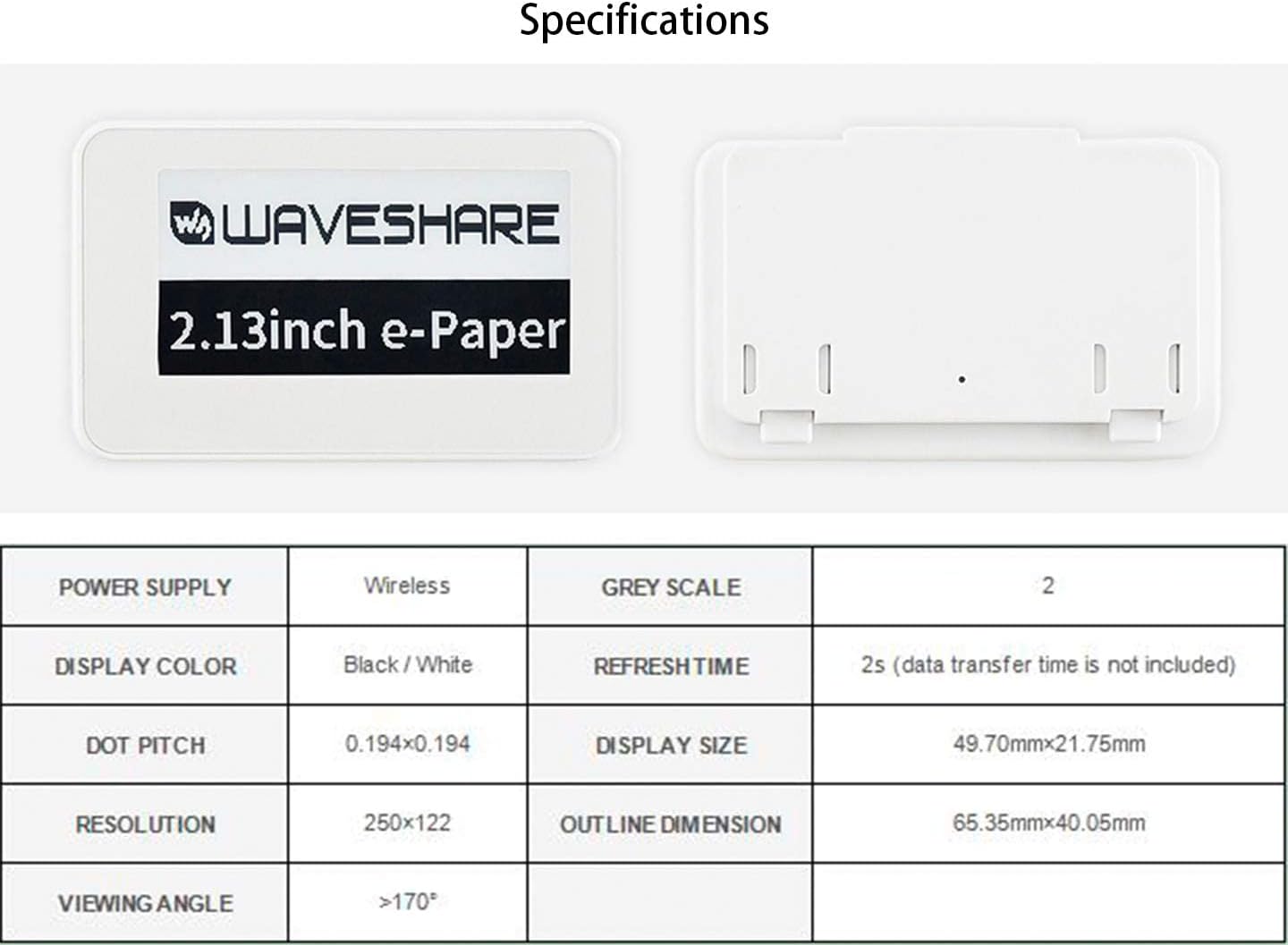
Slika: Prednja i stražnja strana view of the e-Paper module, alongside a table detailing its technical specifications.

Image: Detailed dimensional drawing of the e-Paper module, showing all key measurements in millimeters.
8. Prijava Pramples
The versatility and passive nature of the Waveshare NFC-Powered e-Paper make it suitable for a wide range of applications, including but not limited to:
- Cijena Tags: Dynamic pricing updates in retail environments.
- Asset/Equipment Tags: Tracking and identification of assets without needing internal power.
- Shelf Labels: Digital labels for product information and promotions.
- Naziv konferencije Tags: Customizable and reusable name badges for events.
- IoT Displays: Low-power display for various Internet of Things projects.
- Information Boards: Small, updateable information displays.
9. Jamstvo i podrška
For technical support, documentation, and further resources, please visit the official Waveshare website or their dedicated product wiki page. Information regarding warranty policies can typically be found on the manufacturer's official channels or through your point of purchase.
For the most up-to-date information and detailed guides, refer to the Waveshare Wiki for this product model. This resource often contains comprehensive tutorials, code examples i savjeti za rješavanje problema.


