1. Uvod
This manual provides detailed instructions for the installation, operation, and maintenance of your Hiseeu 5MP Wireless Outdoor Security Camera System. This system includes an 8-channel 3MP NVR and four 5MP (2560x1920P) wireless IP66 waterproof cameras, designed for reliable outdoor surveillance with advanced features like night vision, motion detection, and two-way audio.
2. Sadržaj paketa
Molimo provjerite jesu li svi artikli prisutni u vašem paketu:
- 1 x 8-kanalni 3MP NVR (mrežni video snimač)
- 4 x 5MP Wireless IP66 Waterproof Cameras (2 PTZ, 2 Bullet)
- Adapteri za napajanje za NVR i kamere
- USB miš
- Ethernet kabel
- Setovi vijaka za montažu
- korisnički priručnik
- 1TB Hard Drive (pre-installed in NVR)
3. Sigurnosne informacije
- Ensure proper power supply to avoid electrical hazards.
- Install cameras in secure locations to prevent tampering.
- Avoid direct exposure of cameras to extreme temperatures or corrosive environments beyond their IP66 rating.
- Ne pokušavajte rastavljati ili modificirati uređaje.
4. Vodič za postavljanje
4.1 Fizička instalacija
The cameras are designed for outdoor use with an IP66 waterproof rating. While wireless for data transmission, they require a plugin power cable for operation. Ensure the mounting surface is stable and provides a clear field of view.

Image: Hiseeu IP66 Waterproof Bullet Camera mounted outdoors, demonstrating its resistance to rain. This camera is suitable for various weather conditions.
Use the provided screw kits to securely mount the cameras. For the PTZ cameras, ensure there is enough clearance for full pan and tilt movement.
Video: This video demonstrates the proper method for installing a waterproof cap on the camera's cable connections, ensuring long-term durability and protection against elements.
4.2 NVR and Camera Power Connection
Connect the NVR to a power outlet using its dedicated power adapter. Connect each camera to its respective power adapter. The cameras and NVR are pre-paired from the factory for easy setup.

Image: A diagram illustrating the 'Auto Pair, True Plug and Play' feature, showing the wireless connection between the Hiseeu NVR and cameras via 2.4GHz WiFi.
4.3 EseeCloud App Setup
Download the EseeCloud app from your mobile app store. Register an account and follow the in-app instructions to add your devices. You can scan the QR code on the camera or use the LAN scan feature to detect the NVR and cameras.
Video: A comprehensive video guide demonstrating the setup process for the EseeCloud mobile application, including device pairing and initial configuration steps.
4.4 Konfiguracija mreže
The system supports 2.4GHz WiFi connectivity. Ensure your router is broadcasting on this frequency. For initial setup or if wireless connection is unstable, you can connect the NVR to your router via an Ethernet cable.
5. Upute za rad
5.1 Uživo View i Reprodukcija
Access live camera feeds through the EseeCloud app or a connected monitor. You can switch between standard definition (SD) and high definition (HD) resolution for optimal viewing.

Image: A visual comparison demonstrating the superior clarity of 5MP resolution (2560x1920) compared to 1080P and 960P, highlighting the detailed image quality of the Hiseeu cameras.
5.2 Upravljanje panoramiranjem, nagibom i zumiranjem (PTZ)
For PTZ cameras, use the EseeCloud app to remotely control vertical rotation up to 90° and horizontal rotation up to 320°. The system also supports 5X digital zoom.

Image: A Hiseeu 3MP PTZ camera mounted on a wall, illustrating its pan (0-320°) and tilt (0-90°) capabilities, controlled remotely via a mobile phone app.
5.3 Dvosmjerni zvuk
The built-in microphone and speaker allow for two-way communication through the camera. You can speak to individuals near the camera using the EseeCloud app.

Image: A scenario depicting the two-way audio function, where a person uses a mobile app to communicate with someone at the doorstep through the camera's speaker.
5.4 Detekcija pokreta i upozorenja
Configure motion detection zones and sensitivity settings within the EseeCloud app. When movement is detected, the system will send an alert to your phone. The system can differentiate between human and other movements to reduce false alarms.
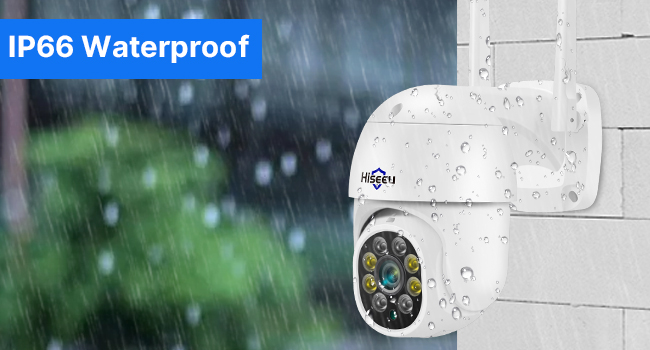
Image: An illustration of the camera's humanoid and motion detection capabilities, showing how it triggers a light alarm and sends app notifications upon detecting human activity.
5.5 Smart Night Vision
The cameras are equipped with smart night vision, offering three modes: full-color night vision (with white LEDs), infrared night vision (black and white), and smart night vision (switches between color and IR based on detection).

Slika: Raskol view demonstrating the camera's night vision capabilities, showing both clear color night vision and traditional infrared (black and white) night vision.
5.6 Snimanje i pohranjivanje
The NVR comes with a pre-installed 1TB hard drive, supporting over 30 days of 24-hour continuous recording for four cameras. H.265+ video compression technology doubles data compression ratio compared to H.264, saving up to 50% storage space while maintaining video quality.

Image: An illustration comparing H.265+ and H.264 compression, showing that H.265+ offers 50% more storage efficiency with a 1TB hard drive, allowing for extended recording periods.
6. Održavanje
6.1 Čišćenje
Redovito čistite leće fotoaparata mekom krpomamp cloth to ensure clear image quality. Do not use harsh chemicals or abrasive materials.
6.2 ažuriranja firmvera
Check the EseeCloud app periodically for firmware updates. Keeping your system updated ensures optimal performance and security.
6.3 Upravljanje pohranom
The 1TB hard drive will automatically overwrite older footage when full. You can manage recording settings and format the hard drive via the NVR interface or EseeCloud app if needed.
Video: A demonstration of the NVR's interface for managing hard drive settings, including options for formatting and viewing storage status.
7. Rješavanje problema
7.1 Nema video prijenosa
- Check if the camera and NVR are powered on.
- Verify network connection for both NVR and cameras.
- Ensure cameras are within WiFi range of the NVR.
7.2 Loša WiFi veza
- Relocate cameras closer to the NVR or WiFi router.
- Ensure no major obstructions (thick walls, metal objects) are blocking the signal.
- Confirm your WiFi is 2.4GHz, as the system does not support 5GHz.
7.3 Frequent/Infrequent Motion Alerts
- Adjust motion detection sensitivity in the EseeCloud app.
- Define specific motion detection areas to exclude irrelevant zones.
7.4 Tvrdi disk ne snima
- Provjerite status tvrdog diska u postavkama NVR-a.
- Ensure the hard drive is not full; if so, it will overwrite older data.
- Format the hard drive if issues persist (this will erase all data).
8. Specifikacije
| Značajka | Specifikacija |
|---|---|
| Marka | Hiseeu |
| Broj modela | 8WK-4HBC23-1T |
| Tehnologija povezivanja | Bežični |
| Rezolucija video snimanja | 2560P (5MP) |
| Posebne značajke | Motion Sensor, Night Vision, PTZ Technology |
| Broj kanala | 8 (Proširivo) |
| Kapacitet pohrane memorije | 1 TB (tvrdi disk) |
| Boja | Bijela |
| Izvor napajanja | Električni na kabel |
| Dimenzije predmeta (D x Š x V) | 13 x 10 x 11 inča |
| Kompatibilnost operativnog sustava | Android, iOS |
| Preporučena upotreba | Nadzor |
| Kompatibilni uređaji | pametni telefoni |
| Tehnologija slabog osvjetljenja | Noćna boja |
| Domet noćnog vida | 65 stopa |
| Frame Rate | 30 FPS |
| Način snimanja | Stalan |
| Hardversko sučelje | 802.11 b/g/n (2.4GHz WiFi) |
| Vrsta objektiva | Zum |
| Video ulaz | RJ45 |
| Viewing kut | 320 Degrees (PTZ Horizontal) |
| Težina artikla | 10 funti |
| Datum prve dostupnosti | 19. listopada 2020 |
9. Jamstvo i podrška
9.1 Jamstvo
The Hiseeu Security Camera System comes with a 12-month limited warranty. The actual warranty period shall be implemented according to the requirements of local laws and regulations.
9.2 Korisnička podrška
For any questions or assistance, please utilize the following support channels:
- EseeCloud App Online Support: The EseeCloud app provides one-on-one 7/24 online support. You can contact support directly through the app to resolve issues.
- Podrška e-poštom: Contact Hiseeu support via email at johnny@hiseeu.com.
- Telefonska podrška: For immediate assistance, call +19173381084.


