1. Uvod
This manual provides comprehensive instructions for the installation, operation, and maintenance of your COUGAR Archon 2 RGB Mid Tower Case. Please read this manual carefully before beginning installation to ensure proper setup and to maximize the performance and longevity of your product.

Slika 1.1: Kutno view of the COUGAR Archon 2 RGB Mid Tower Case, showcasing the tempered glass side panel and front RGB fans.
2. Značajke proizvoda
The COUGAR Archon 2 RGB Mid Tower Case is designed for PC enthusiasts seeking a balance of aesthetics, airflow, and functionality. Key features include:
- Elegant Design with Tempered Glass: A sleek black finish combined with a tempered glass side panel allows for a clear view of internal components and RGB lighting.
- Optimizirani protok zraka: Supports multiple fan configurations and includes three pre-installed 120mm ARGB fans at the front for efficient cooling.
- Opsežna kompatibilnost: Accommodates Mini ITX, Micro ATX, and ATX motherboards.
- AmpMogućnosti pohrane: Provides bays for both 3.5" HDDs and 2.5" SSDs.
- Convenient Front I/O: Features USB 3.0 and USB 2.0 ports for easy peripheral connectivity.
- Kontrola RGB rasvjete: Integrated ARGB fans offer customizable lighting effects.

Slika 2.1: Prednja strana view of the COUGAR Archon 2 RGB case, highlighting the three pre-installed ARGB fans.
3. Vodič za postavljanje
Follow these steps to properly install your components into the COUGAR Archon 2 RGB case.
3.1. Kontrolni popis prije instalacije
- Ensure you have all necessary components: motherboard, CPU, RAM, GPU, power supply, storage drives, and appropriate tools (screwdriver, zip ties).
- Work on a clean, static-free surface. Consider using an anti-static wrist strap.
3.2. Otvaranje slučaja
- Carefully remove the tempered glass side panel by unscrewing the thumbscrews located at the rear of the case. Set the panel aside on a soft, flat surface to prevent scratches.
- Remove the opposite metal side panel by unscrewing its thumbscrews and sliding it backward.
3.3. Instalacija matične ploče
- Ugradite I/O štitnik (ako nije prethodno pričvršćen na matičnu ploču) u stražnji otvor kućišta.
- Align your motherboard with the standoffs inside the case. Ensure all standoffs match the screw holes on your motherboard.
- Pričvrstite matičnu ploču pomoću priloženih vijaka. Nemojte previše zategnuti.
3.4. Ugradnja jedinice za napajanje (PSU)
- Pronađite područje za montažu napajanja na donjoj stražnjoj strani kućišta.
- Slide your PSU into the designated bay from the rear of the case, ensuring the fan faces downwards for optimal cooling (if the case has a bottom vent).
- Pričvrstite napajanje vijcima sa stražnje strane kućišta.
3.5. Instalacija pogona za pohranu
The Archon 2 RGB supports both 3.5" HDDs and 2.5" SSDs.
- For 3.5" HDDs: Locate the drive cage usually beneath the PSU shroud. Slide the HDD into the drive bay and secure it with screws.
- For 2.5" SSDs: Mount SSDs to the designated mounting points on the back of the motherboard tray or within the drive cage, securing them with screws.
3.6. Instalacija kartice za proširenje (GPU)
- Uklonite potrebne poklopce PCIe utora sa stražnje strane kućišta.
- Insert your graphics card or other expansion cards into the appropriate PCIe slot on the motherboard.
- Secure the card with screws to the case.
3.7. Cable Management and Front Panel Connections
Route all power and data cables neatly behind the motherboard tray. Connect the front panel I/O cables (USB, audio, power switch, reset switch, LED indicators) to their respective headers on the motherboard according to your motherboard manual.

Figure 3.1: Dimensions of the COUGAR Archon 2 RGB case, useful for planning component fit and space.
4. Upute za rad
4.1. Uključivanje
Once all components are installed and cables are connected, replace both side panels. Connect your monitor, keyboard, mouse, and power cable to the PSU. Press the power button on the top panel of the case to start your system.
4.2. Upravljanje RGB rasvjetom
The pre-installed ARGB fans are typically controlled via a dedicated button on the case's front I/O panel or through your motherboard's RGB software (if connected to an ARGB header). Refer to your motherboard manual for software-based control options.
5. Održavanje
Redovito održavanje pomaže u osiguravanju optimalnih performansi i dugovječnosti komponenti vašeg računala.
- Čišćenje prašine: Periodically clean dust filters (if present) and internal components using compressed air. Ensure the system is powered off and unplugged before cleaning.
- Uprava za kabele: Ensure cables are neatly routed to avoid obstructing airflow.
- Inspekcija ventilatora: Check fans for dust buildup or obstructions that could impede their operation.
6. Rješavanje problema
Ako naiđete na probleme, pogledajte sljedeće uobičajene korake za rješavanje problema:
- Sustav se ne uključuje:
- Check all power connections, including the PSU to the wall outlet, PSU to motherboard (24-pin and CPU 8-pin), and front panel power switch header.
- Provjerite je li prekidač PSU-a u položaju 'UKLJUČENO'.
- Ventilatori se ne okreću / RGB ne radi:
- Verify fan power cables are securely connected to the motherboard or fan controller.
- Check ARGB headers for proper connection to the motherboard or RGB controller.
- Ensure RGB software or case button is correctly configured.
- Nema izlaza za prikaz:
- Confirm the monitor cable is connected to the graphics card (not the motherboard integrated graphics, unless no dedicated GPU is present).
- Ponovno postavite grafičku karticu i RAM module.
7. Specifikacije
Detailed specifications for the COUGAR Archon 2 RGB Mid Tower Case:
| Značajka | Detalj |
|---|---|
| Naziv modela | ARCHON 2 RGB |
| Vrsta kućišta | Srednji toranj |
| Kompatibilnost matične ploče | Mini ITX, Micro ATX, ATX |
| Dimenzije (DxŠxV) | 14.96 x 8.27 x 18.5 inča (380 x 210 x 470 mm) |
| Težina artikla | 11.37 funti (5.17 kg) |
| Materijal | Metal, Kaljeno staklo |
| Boja | Crna |
| Unaprijed instalirani ventilatori | 3 x 120mm ARGB fans (Front) |
| Nosač ventilatora (prednji) | 3 x 120 mm ili 2 x 140 mm |
| I/O portovi | 1 x USB 2.0, 2 x USB 3.0, Audio In/Out |
| Vrsta montaže napajanja | Donji nosač |
| Metoda hlađenja | Zrak |
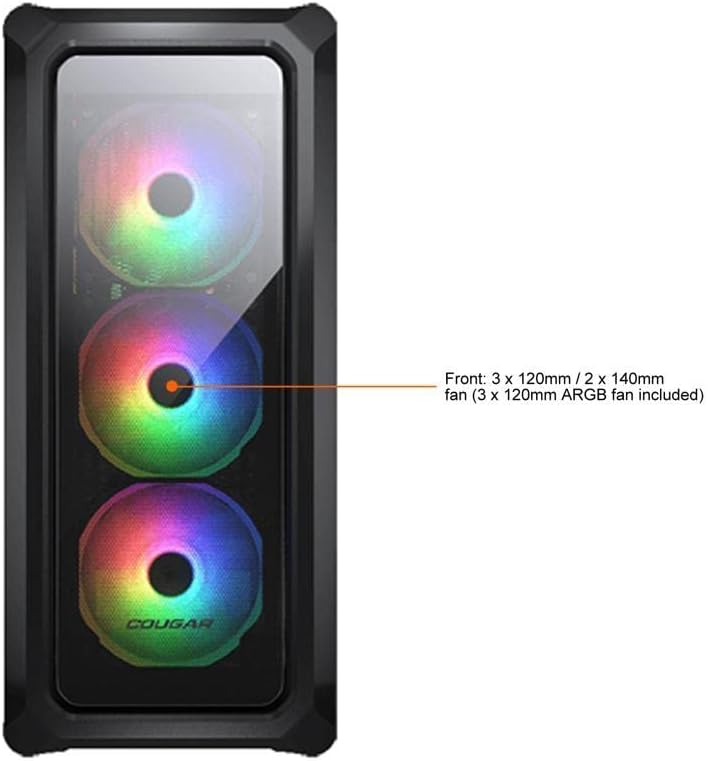
Figure 7.1: Front panel fan configuration and size options for the COUGAR Archon 2 RGB case.
8. Jamstvo i podrška
For warranty information and technical support, please refer to the official COUGAR webweb-mjesto ili se obratite njihovoj službi za korisnike. Sačuvajte dokaz o kupnji za slučaj zahtjeva za jamstvo.
COUGAR Official Webstranica: cougargaming.com


