Uvod
Welcome to the user manual for your CANYON Sandy KW-44 Smartwatch. This guide provides essential information on setting up, operating, maintaining, and troubleshooting your device. Please read this manual carefully to ensure optimal performance and longevity of your smartwatch.
Postavljanje
1. Sadržaj paketa
Prije nego što započnete, provjerite jesu li svi artikli prisutni u paketu:
- CANYON Sandy KW-44 Smartwatch
- Kabel za punjenje
- Korisnički priručnik (ovaj dokument)

Figure 1: Product packaging showing the smartwatch and brand details.
2. Punjenje pametnog sata
Prije prve upotrebe, potpuno napunite svoj pametni sat.
- Connect the charging cable to the charging port on the smartwatch.
- Drugi kraj kabela spojite na USB adapter za napajanje (nije uključen) ili USB priključak računala.
- Indikator punjenja na zaslonu prikazat će status punjenja.
- Potpuno punjenje obično traje otprilike 2 sata.
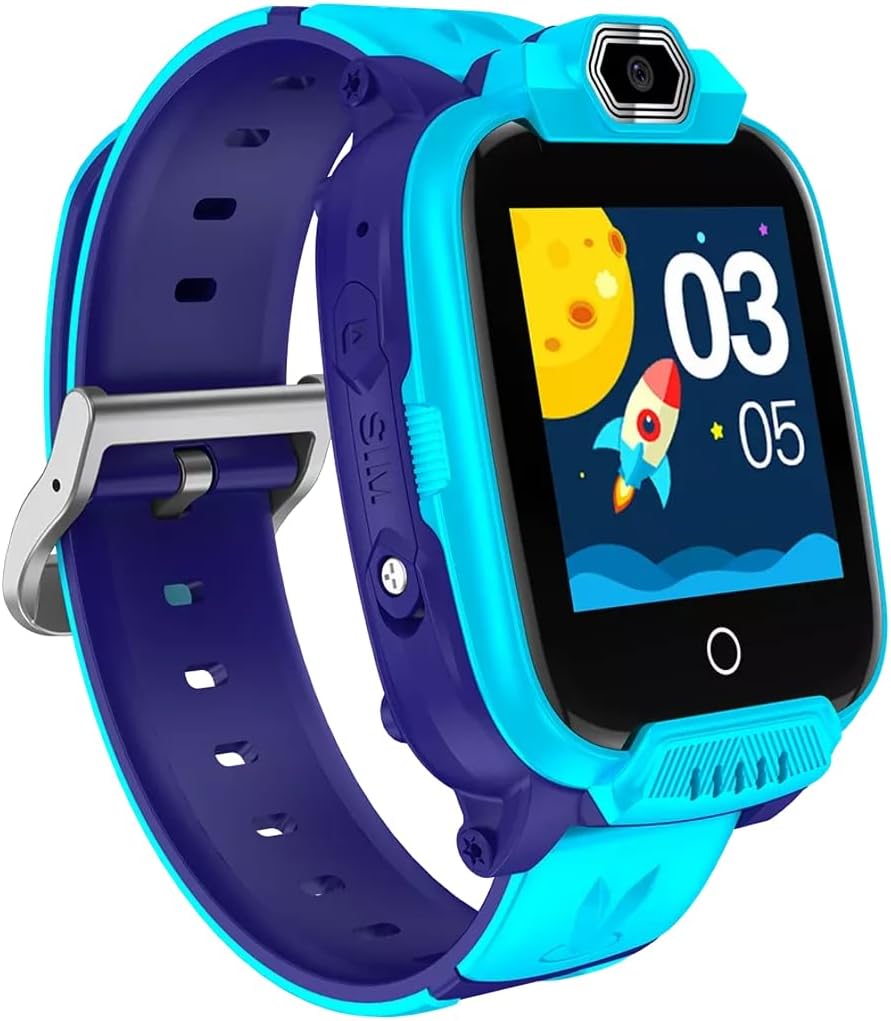
Slika 2: Kutno view of the CANYON Sandy KW-44 Smartwatch, showing the side buttons and SIM card slot area.
3. Ugradnja SIM kartice (opcionalno)
The smartwatch supports a SIM card for call functions.
- Power off the smartwatch.
- Locate the SIM card slot on the side of the device (refer to Figure 2).
- Carefully insert a nano-SIM card into the slot with the gold contacts facing up, ensuring it clicks into place.
- Čvrsto zatvorite poklopac utora za SIM karticu.
- Power on the smartwatch.
4. Instalacija i uparivanje aplikacije
To unlock full features and manage your smartwatch, download the companion app on your smartphone.
- Tražiti the "CANYON Life" app (or similar, check product documentation for exact app name) in your smartphone's app store (Google Play Store or Apple App Store).
- Preuzmite i instalirajte aplikaciju.
- Otvorite aplikaciju i slijedite upute na zaslonu za izradu računa ili prijavu.
- Omogućite Bluetooth na svom pametnom telefonu.
- In the app, select "Add Device" and choose your CANYON Sandy KW-44 from the list of available devices.
- Potvrdite zahtjev za uparivanje i na pametnom telefonu i na pametnom satu.
Upute za rad
1. Osnovna navigacija

Slika 3: Prednja strana view of the CANYON Sandy KW-44 Smartwatch, showing the main display with time and a rocket graphic.
- Uključivanje/isključivanje: Press and hold the power button (usually on the side) to turn the device on or off.
- Zaslon osjetljiv na dodir: Swipe left/right or up/down to navigate through menus and features. Tap to select an option.
- Gumb Natrag: A dedicated button or a swipe gesture may be used to go back to the previous screen.
2. Upućivanje i primanje poziva
With a properly installed and activated SIM card, you can make and receive calls directly from your smartwatch.
- Upućivanje poziva: Access the "Dialer" or "Contacts" app on the smartwatch, select a contact or dial a number, and tap the call icon.
- Primanje poziva: When a call comes in, the smartwatch will ring and display the caller ID. Tap the green answer icon to accept or the red icon to decline.
3. Korištenje kamere
The smartwatch is equipped with a built-in camera.
- Navigate to the "Camera" application on your smartwatch.
- Kadrirajte snimku koristeći zaslon kao viewtražilo.
- Tap the capture button on the screen to take a photo.
- Photos are saved to the smartwatch's internal memory.

Slika 4: Kutno view of the CANYON Sandy KW-44 Smartwatch, highlighting the camera lens above the display.
4. Ostale značajke
Explore other functionalities available on your smartwatch, which may include:
- Prikaz vremena: Customizable watch faces.
- Obavijesti: Primajte upozorenja za pozive, poruke i obavijesti aplikacija s uparenog pametnog telefona.
- Praćenje aktivnosti: Monitor steps, distance, and calories (if supported by the model).
- Glazbeni player: Play music stored on the device or control music on your paired phone.
Održavanje
1. Čišćenje
- Obrišite pametni sat i remen mekom krpomamp tkanina.
- Ne koristite jake kemikalije ili abrazivna sredstva za čišćenje.
- Prije punjenja provjerite je li uređaj suh.
2. Briga o bateriji
- Izbjegavajte ekstremne temperature, koje mogu utjecati na vijek trajanja baterije.
- Ne ostavljajte bateriju potpuno ispražnjenu dulje vrijeme.
- Koristite samo isporučeni kabel za punjenje.
3. Otpornost na vodu (IP67)
The CANYON Sandy KW-44 Smartwatch is rated IP67, meaning it is protected from dust and can withstand immersion in water up to 1 meter for 30 minutes.
- Do not use the smartwatch for swimming or diving.
- Avoid exposure to hot water, steam, or high-pressure water jets.
- Provjerite jesu li svi priključci i poklopci čvrsto zatvoreni kako biste održali vodootpornost.
Rješavanje problema
| Problem | Moguće rješenje |
|---|---|
| Pametni sat se ne uključuje. | Provjerite je li baterija napunjena. Spojite je na punjač najmanje 30 minuta. |
| Nije moguće upariti sa pametnim telefonom. |
|
| SIM kartica nije otkrivena. |
|
| Zaslon ne reagira. | Restart the smartwatch by pressing and holding the power button. If unresponsive, allow the battery to drain completely and then recharge. |
Tehnički podaci
| Značajka | Detalj |
|---|---|
| Marka | KANJON |
| Naziv modela | Sandy KW-44 |
| Broj modela | CNE-KW44BL |
| Veličina zaslona | 1.44 inča |
| Tehnologija povezivanja | Bluetooth |
| Standard bežične komunikacije | Bluetooth |
| Kapacitet pohrane memorije | 512 MB |
| Vrsta baterije | 1 Lithium-polymer (Rechargeable) |
| Uključene komponente | Kabel za punjenje |
| Širina remena | 20 milimetara |
| Ocjena vodootpornosti | IP67 (zaštićeno od prašine, uranjanje do 1 m tijekom 30 minuta) |
Jamstvo i podrška
Za informacije o jamstvu i tehničku podršku, obratite se službenom CANYON servisu. website or contact their customer service. Details are typically provided on the product packaging or the manufacturer's official support page.
Proizvođač: KANJON


