Uvod
This manual provides detailed instructions for the installation, operation, and maintenance of your CP PLUS CP-V41A 4MP Wi-Fi Camera. Please read this manual thoroughly before using the product to ensure correct usage and optimal performance. Keep this manual for future reference.
Proizvod gotovview
The CP PLUS CP-V41A is a 4MP Wi-Fi camera designed for home security and surveillance. It features high-resolution imaging, night vision capabilities, and smart integration options.
Ključne karakteristike:
- 4MP CMOS Image Sensor: Pruža jasan i detaljan videofootage.
- Objektiv od 3.6 mm: Nudi široko polje view za sveobuhvatnu pokrivenost.
- H.265 video kompresija: Efficiently compresses video to save storage space without compromising quality.
- Wi-Fi podrška: Enables wireless connectivity for flexible placement.
- IR Distance of 15 Mtr.: Ensures clear night vision up to 15 meters.
- IP65 ocjena: Suitable for both indoor and outdoor use, offering protection against dust and water jets.
- Integracija pametnog doma: Works with Google Assistant and Amazon Alexa for voice control and smart automation.
Što je u kutiji:
- CP PLUS CP-V41A 4MP Wi-Fi Camera
- Adapter napajanja
- Vijci i tiple za montažu
- Kratki vodič za početak (za sve detalje pogledajte ovaj priručnik)

Image: The CP PLUS CP-V41A 4MP Wi-Fi Camera, highlighting its model and key features.
Postavljanje
1. Fizička instalacija
- Odaberite lokaciju: Select a suitable location for your camera, considering the desired viewing area, Wi-Fi signal strength, and power source accessibility. The camera is rated IP65, making it suitable for both indoor and outdoor environments.
- Montirajte kameru:
- Označite točke bušenja na zidu ili stropu koristeći montažnu podlogu kamere kao predložak.
- Izbušite rupe i umetnite priložene zidne tiple.
- Secure the camera's mounting base with the screws.
- Po potrebi prilagodite kut kamere.
- Priključite napajanje: Plug the power adapter into the camera's power input and then into a power outlet. The camera will power on and initiate its startup sequence.
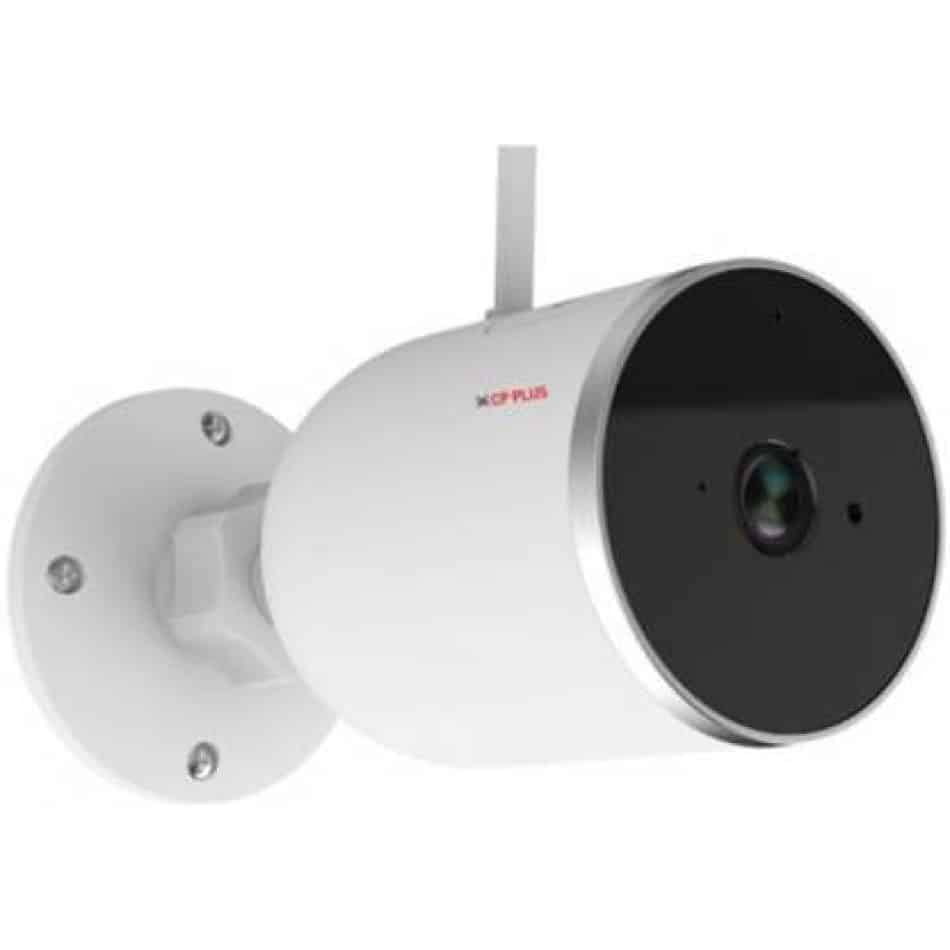
Slika: Bočno view of the CP PLUS CP-V41A camera showing its mounting base and antenna, illustrating physical installation.
2. Mrežna veza (Wi-Fi)
- Preuzmite aplikaciju: Tražiti the official CP PLUS mobile application on your smartphone's app store (iOS or Android) and install it.
- Napravi račun: Otvorite aplikaciju i registrirajte se za novi račun ili se prijavite ako ga već imate.
- Dodaj uređaj: Follow the in-app instructions to add your new camera. This typically involves:
- Scanning a QR code on the camera.
- Connecting your phone to the camera's temporary Wi-Fi hotspot.
- Selecting your home Wi-Fi network and entering its password.
- Završetak: Once connected, the camera's status indicator will change, and you will see the camera online in your app.
Upute za rad
1. Uživo View i Snimanje
- Pristupite uživo View: Open the CP PLUS app and select your camera from the device list to view hrana uživo.
- Ručno snimanje: Tap the record button in the app to start or stop manual video recording.
- Snimak: Use the snapshot button to capture still images from the live feed.
2. Detekcija pokreta i upozorenja
- Omogući detekciju pokreta: Navigate to the camera settings in the app and enable motion detection.
- Podešavanje osjetljivosti: Set the motion detection sensitivity to minimize false alarms.
- Set Alert Schedule: Configure specific times or days for receiving motion alerts.
- Primanje obavijesti: The app will send push notifications to your smartphone when motion is detected.
3. Noćni vid
The camera automatically switches to night vision mode in low-light conditions, utilizing its infrared (IR) LEDs to provide clear black-and-white video up to 15 meters. Ensure no obstructions block the IR lights for optimal performance.
4. Smart Home Integration (Google Assistant / Amazon Alexa)

Image: The CP PLUS CP-V41A camera integrated into a smart home environment, indicating compatibility with Google Assistant.
- Poveži račun: In your Google Home or Amazon Alexa app, search for the CP PLUS skill/service and link your CP PLUS account.
- Otkrijte uređaje: Nakon povezivanja, zamolite svog pametnog asistenta da otkrije nove uređaje.
- Glasovne naredbe: You can now use voice commands to view your camera feed on compatible smart displays (e.g., "Hey Google, show me the front door camera" or "Alexa, show me the living room camera").
Održavanje
- Čišćenje:
- Nježno obrišite objektiv i tijelo fotoaparata mekom, suhom krpom.
- Ne koristite jake kemikalije ili abrazivna sredstva za čišćenje.
- Prije čišćenja provjerite je li kamera isključena.
- Ažuriranja firmvera: Regularly check the CP PLUS app for available firmware updates. Updates often include performance improvements, new features, and security enhancements. Follow the in-app instructions to perform updates.
- Upravljanje pohranom: If using a local storage (e.g., microSD card, not included), periodically review i upravljati snimljenim footage to ensure sufficient space.
Rješavanje problema
| Problem | Mogući uzrok | Otopina |
|---|---|---|
| Kamera se ne uključuje. | Adapter za napajanje nije spojen ili je neispravan. | Ensure the power adapter is securely connected to the camera and a working power outlet. Try a different outlet. |
| Ne mogu se spojiti na Wi-Fi. | Netočna lozinka za Wi-Fi, slab signal ili je kamera previše udaljena od usmjerivača. | Verify Wi-Fi password. Move the camera closer to the router. Ensure your router is broadcasting a 2.4GHz network (5GHz is not supported by many smart devices). Reset the camera and try pairing again. |
| Loša kvaliteta slike ili mutan video. | Protective film on lens, dirty lens, or insufficient lighting. | Remove any protective film. Clean the lens with a soft cloth. Ensure adequate lighting or check night vision functionality. |
| Detekcija pokreta ne radi. | Motion detection disabled, sensitivity too low, or incorrect schedule. | Check app settings to ensure motion detection is enabled, sensitivity is appropriate, and the schedule is correctly configured. |
| No sound or poor audio. | Microphone/speaker blocked, app volume low, or network issues. | Ensure nothing is obstructing the microphone or speaker. Check volume settings in the app and on your phone. Verify stable network connection. |
Tehnički podaci
| Značajka | Detalj |
|---|---|
| Broj modela | CP-V41A |
| Senzor slike | 1/2.8” 4MP CMOS (0.9071cm) |
| Objektiv | 3.6 mm |
| Video kompresija | H.265 |
| Povezivost | Wi-Fi, Ethernet |
| IR udaljenost | 15 Mtr. |
| Zaštita od prodora | IP65 |
| Kompatibilnost s pametnim asistentom | Google asistent, Amazon Alexa |
| Izvor napajanja | Električni na kabel |
| Unutarnja/vanjska upotreba | Unutarnji, vanjski |
| Težina artikla | 460 g |
| Dimenzije (DxŠxV) | 20 x 10 x 5 centimetara |
| Uključene komponente | Adapter |

Image: An office setting with the CP PLUS CP-V41A camera mounted, illustrating its 4MP CMOS image sensor capability.
Jamstvo i podrška
CP PLUS products are designed for reliability and performance. For warranty information, please refer to the warranty card included with your product or visit the official CP PLUS website. For technical support, troubleshooting assistance, or service inquiries, please contact CP PLUS customer support through their official channels.
Napomena: Specifikacije i značajke proizvoda podložne su promjenama bez prethodne najave.


