Korisnički priručnik za glavnu jedinicu AXIS F9114
Model: 01991-001
Uvod
This manual provides comprehensive instructions for the installation, operation, and maintenance of the Axis F9114 Main Unit. Please read this manual carefully before using the product to ensure proper functionality and safety.
Proizvod gotovview
The AXIS F9114 is a main unit designed for the F-Series surveillance system. It supports up to four F21 or F7 sensor units, providing a flexible and discreet surveillance solution. This unit acts as the central processing hub for connected camera sensors.
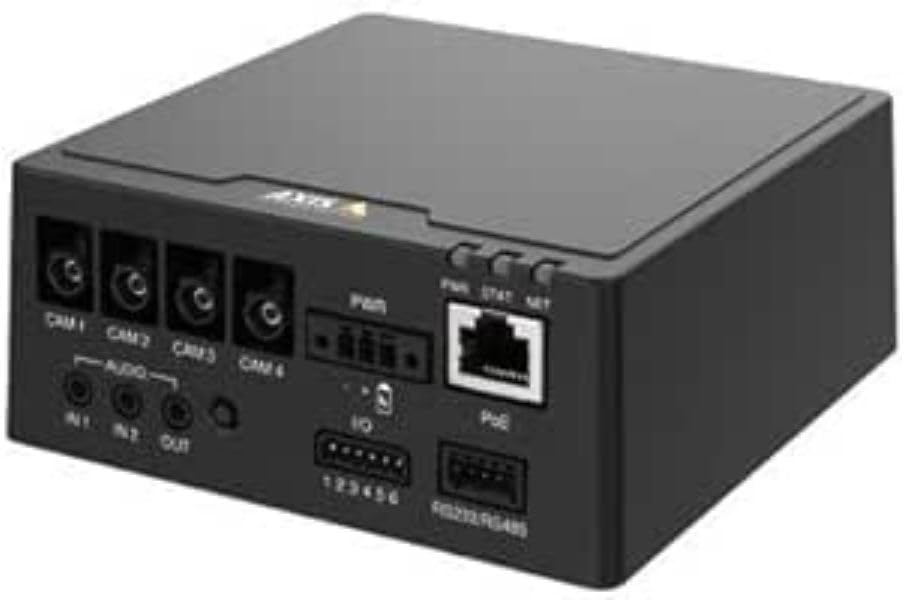
Slika 1: Ispred view of the AXIS F9114 Main Unit, showing camera input ports (CAM 1-4), audio input/output, power input, I/O ports, and an Ethernet port with PoE support.
Ključne karakteristike:
Supports up to 4 Axis F-Series sensor units (e.g., F21, F7).
Central processing unit for video and audio streams.
Kompaktan dizajn za fleksibilnu instalaciju.
Integrated Power over Ethernet (PoE) for simplified power and data connectivity.
Multiple I/O ports for external device integration.
Audio input/output capabilities.
Postavljanje i instalacija
Sadržaj paketa:
Glavna jedinica AXIS F9114
Vodič za instalaciju
(Power supply and sensor units sold separately, unless specified)
Connecting Sensor Units:
Ensure the main unit is powered off before connecting any sensor units.
Connect the cables from your AXIS F-Series sensor units (e.g., F21, F7) to the designated "CAM 1", "CAM 2", "CAM 3", and "CAM 4" ports on the rear of the F9114 Main Unit. Ensure a secure connection.
Each sensor unit requires a dedicated port.
Napajanje jedinice:
Napajanje preko Etherneta (PoE): Connect an Ethernet cable from a PoE-enabled switch or injector to the "PoE" port on the F9114. This will provide both power and network connectivity.
Vanjsko napajanje: If PoE is not used, connect a compatible DC power adapter (not included) to the "PWR" input terminal. Refer to specifications for voltage zahtjevi.
Mrežna veza:
Connect an Ethernet cable from your network to the "PoE" port on the F9114. This provides network access for configuration and video streaming.
Audio i I/O veze:
Audio: Connect external microphones to "IN 1" or "IN 2" and speakers to "OUT" if audio functionality is required.
I/O: Use the "IO" terminal block for connecting external devices such as alarm sensors or relays. Refer to the detailed wiring diagram in the full technical documentation for specific connections.
Operacija
Početno napajanje:
Once all connections are secure and power is supplied, the unit will begin its startup sequence. Observe the LED indicators for status.
LED indikatori:
PWR (snaga): Indicates power status. (e.g., Solid green for normal operation).
STATUS (Status): Indicates operational status. (e.g., Flashing for network activity, solid for ready).
MREŽA (Mreža): Indicates network connection and activity.
Pristup uređaju:
Use the AXIS IP Utility or a network scanner to discover the IP address of the F9114 on your network.
Otvori a web browser and enter the IP address to access the device's web sučelje.
Log in using the default credentials (refer to the installation guide or Axis website for current defaults).
Follow the on-screen instructions to configure network settings, video streams, and other system parameters.
Video upravljanje:
The F9114 integrates with various video management software (VMS) solutions. Refer to your VMS documentation for adding and managing the device.
Održavanje
Čišćenje: Za čišćenje vanjske strane uređaja koristite meku, suhu krpu. Nemojte koristiti jake kemikalije ili abrazivna sredstva za čišćenje.
Ažuriranja firmvera: Redovito provjeravajte Axis Communications website for firmware updates. Keeping the firmware updated ensures optimal performance, security, and access to new features.
Uvjeti okoliša: Ensure the unit is operated within its specified temperature and humidity ranges to prevent damage.
Rješavanje problema
Uobičajeni problemi i rješenja:
Bez napajanja:
Verify power cable connection (if using external power).
Ensure PoE switch/injector is active and providing power (if using PoE).
Provjerite izvor napajanja.
Nema mrežne veze:
Provjerite priključak Ethernet kabela.
Verify network switch/router functionality.
Confirm IP address settings are correct or DHCP is functioning.
No Video from Sensor Unit:
Ensure sensor unit cables are securely connected to the F9114.
Verify the sensor unit is compatible with the F9114.
Check the sensor unit's status indicators (if available).
Access the F9114 web interface to confirm sensor unit detection and configuration.
Zaboravili ste lozinku:
Refer to the Axis Communications support documentation for password reset procedures, which typically involve a factory reset button or specific software tools.
For more detailed troubleshooting, refer to the comprehensive support resources available on the Axis Communications webmjesto.
Tehnički podaci
Značajka
Detalj
Marka
Axis Communications
Broj modela
01991-001
Težina artikla
1.87 funti
Dimenzije proizvoda (DxŠxV)
19.69 x 19.69 x 11.02 inča
Proizvođač
OS - KAMERA
ASIN
B0BWNS49VS
Datum prve dostupnosti
23. veljače 2023
Note: Specifications are subject to change without notice. For the most current information, please refer to the official Axis Communications webmjesto.
Jamstvo i podrška
Informacije o jamstvu:
For detailed warranty information, please refer to the warranty statement provided with your product or visit the official Axis Communications webstranicu. Sačuvajte dokaz o kupnji za slučaj reklamacije.
Tehnička podrška:
If you encounter issues that cannot be resolved using this manual or the troubleshooting section, please contact Axis Communications technical support. Support resources, including FAQs, documentation, and contact information, are available on their official webmjesto.
AXIS tablice usporedbe proizvoda za treći kvartal 2025.: Mrežni video, audio, kontrola pristupa i interfoni Ovaj dokument tvrtke Axis Communications za treći kvartal 2025. pruža sveobuhvatne tablice usporedbe proizvoda za njihov širok asortiman mrežnih video, audio, kontrolnih i interfonskih rješenja. Detaljno opisuje specifikacije, značajke i informacije o modelima za različite linije proizvoda, uključujući kamere, snimače, softver i interfonske sustave.
Vodič za instalaciju panoramske kamere AXIS M43 Ovaj vodič za instalaciju pruža bitne informacije za postavljanje panoramske serije kamera AXIS M43, uključujući modele AXIS M4327-P i AXIS M4328-P. Obuhvaća postupke instalacije, sigurnost i usklađenost s propisima.
Vodič za instalaciju AXIS High PoE Midspan i razdjelnika Vodič za instalaciju za AXIS T8123 High PoE Midspan i AXIS T8126/T8128 High PoE razdjelnike, koji pokriva postavljanje, specifikacije i rješavanje problema za Power over Ethernet rješenja.
Vodič za instalaciju AXIS Q1808-LE 150 mm Bullet kamere | AXIS Communications This comprehensive installation guide provides detailed instructions for setting up the AXIS Q1808-LE 150 mm Bullet Camera. It covers essential safety information, legal considerations, regulatory compliance, and step-by-step mounting and configuration procedures.