Uvod
Hvala na kupnjiasing the Denver KMS-20B Karaoke Speaker. This manual provides essential information for the safe and efficient operation of your device. Please read these instructions carefully before use and retain them for future reference.
Važne sigurnosne informacije
- Ne izlažite uređaj kiši, vlazi ili ekstremnim temperaturama.
- Izbjegavajte ispuštanje ili izlaganje uređaja jakim udarcima.
- Ne pokušavajte sami rastavljati ili popravljati uređaj. Sve servisne radove prepustite kvalificiranom osoblju.
- Držite uređaj dalje od izvora topline i izravne sunčeve svjetlosti.
- Koristite samo navedeni kabel za punjenje i adapter za napajanje.
- Baterije odložite odgovorno u skladu s lokalnim propisima.
Sadržaj paketa
Provjerite jesu li svi artikli prisutni u paketu:
- Denver KMS-20B Karaoke Speaker
- Kratki vodič za početak
- Power Cable (USB Type A)
Proizvod gotovview
Familiarize yourself with the components and controls of your Denver KMS-20B Karaoke Speaker.
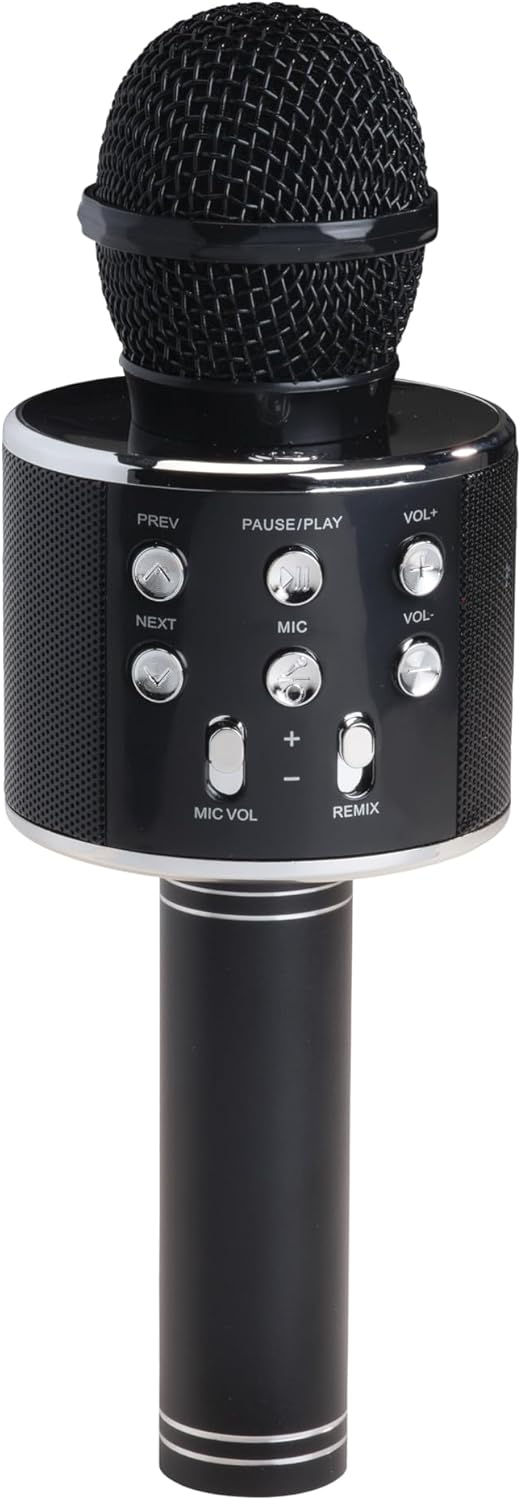
Slika 1: Prednja strana View. This image displays the main body of the karaoke speaker, featuring the microphone grille at the top and the central control panel with various buttons for playback and volume adjustments.
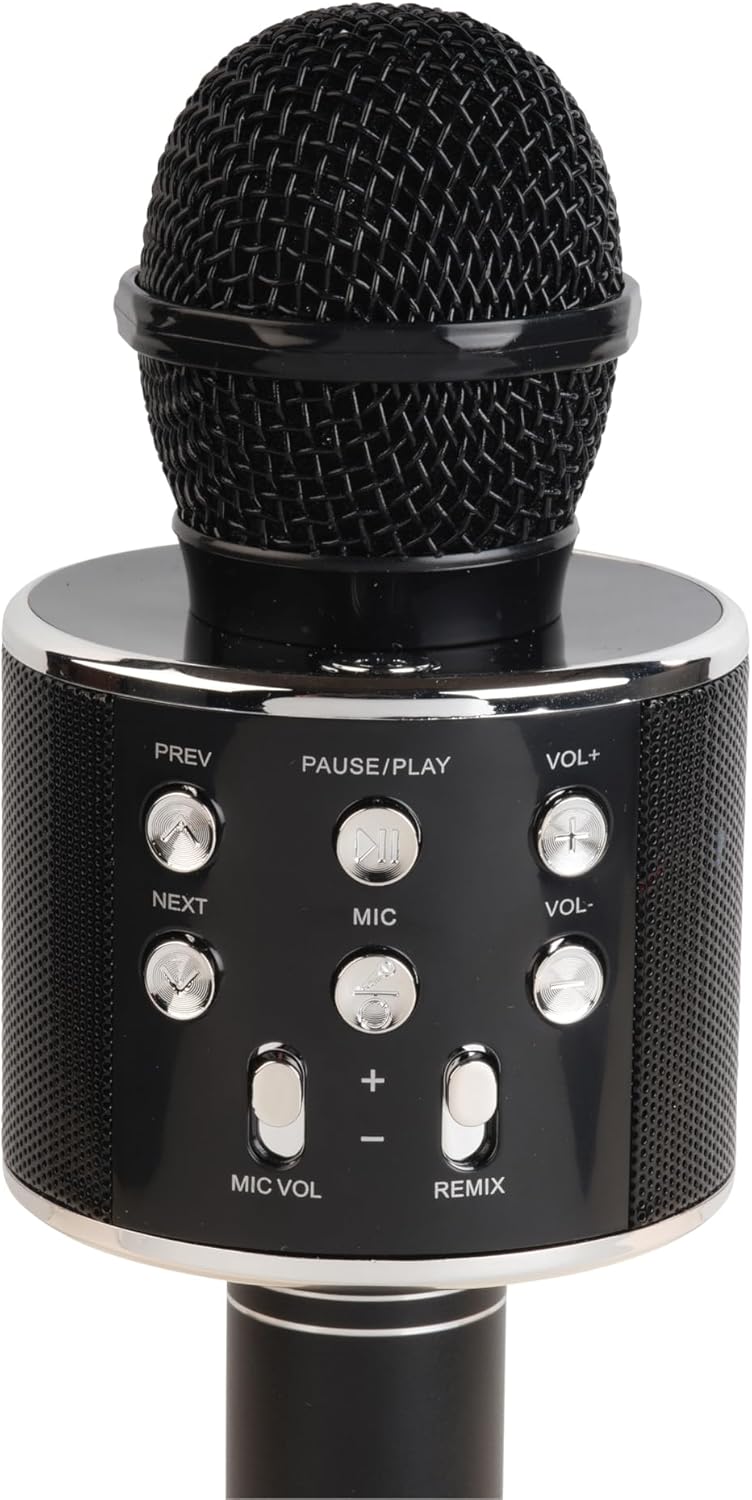
Figure 2: Control Panel Detail. A closer look at the control panel, highlighting buttons such as PREV, NEXT, PAUSE/PLAY, VOL+, VOL-, MIC, MIC VOL, and REMIX. The power button is also visible.

Figure 3: Bottom Ports. This image shows the bottom section of the speaker handle, revealing the charging port (5V 0.5A), a USB port, and a 3.5mm headphone jack for external connections.
Funkcije upravljačke ploče:
- Gumb za napajanje: Pritisnite i držite za uključivanje/isključivanje zvučnika.
- PAUZIRANJE/IGRAJ: Pritisnite za reprodukciju ili pauziranje glazbe.
- PREV (Previous): Pritisnite za povratak na prethodnu pjesmu.
- SLJEDEĆI: Pritisnite za prijelaz na sljedeću pjesmu.
- VOL+ (pojačavanje glasnoće): Pritisnite za povećanje glasnoće zvučnika.
- VOL- (Stišavanje glasnoće): Pritisnite za smanjenje glasnoće zvučnika.
- MIC: Press to activate/deactivate the microphone.
- GLASNOĆA MIKROFONA (+/-): Podešava glasnoću mikrofona.
- REMIX: Activates/deactivates the echo effect for the microphone.
Priključci:
- Charging Port (5V 0.5A): Za punjenje unutarnje baterije.
- USB priključak: Za reprodukciju glazbe s USB flash pogona.
- 3.5 mm utičnica za slušalice: Za spajanje slušalica ili vanjskih audio uređaja.
Postavljanje
1. Punjenje zvučnika
- Connect the provided power cable to the charging port (5V 0.5A) on the speaker.
- Connect the other end of the cable to a compatible USB power adapter (not included) or a USB port on a computer.
- The charging indicator (if present) will illuminate during charging and turn off or change color when fully charged.
- Prije prve upotrebe, napunite bateriju otprilike 2-3 sata.
2. Uključivanje/isključivanje
- To turn ON: Press and hold the Power button until the indicator light illuminates and you hear an audible prompt.
- To turn OFF: Press and hold the Power button again until the indicator light turns off and you hear an audible prompt.
3. Bluetooth uparivanje
- Ensure the speaker is powered on. It will automatically enter Bluetooth pairing mode, indicated by a flashing LED light and an audible prompt.
- Na svom mobilnom uređaju (pametnom telefonu, tabletu itd.) omogućite Bluetooth i potražite dostupne uređaje.
- Select "KMS-20B" from the list of found devices.
- Once successfully paired, the LED indicator will stop flashing, and you will hear a confirmation sound.
- The speaker will automatically connect to the last paired device when powered on, if it is within range and Bluetooth is enabled.
Upute za rad
Music Playback (Bluetooth/USB)
- Bluetooth: After successful pairing, start playing music on your connected device. The audio will stream through the KMS-20B speaker.
- USB: Umetnite USB flash pogon koji sadrži MP3 audio fileu USB priključak. Zvučnik će automatski prepoznati i početi reproducirati glazbu s pogona.
- PAUZIRANJE/IGRAJ: Press this button to pause or resume music playback.
- PRETHODNO/SLJEDEĆE: Press these buttons to skip to the previous or next track.
- GLASNOĆA+/GLASNOĆA-: Press these buttons to adjust the main speaker volume.
Upotreba mikrofona
- Activating Microphone: Pritisnite tipku MIC button to turn on the microphone function. Press it again to turn off.
- Glasnoća mikrofona: Koristite GLASNOĆA MIKROFONA (+/-) buttons to increase or decrease the microphone's output volume.
- Echo Effect (REMIX): Pritisnite tipku REMIKS button to activate or deactivate the echo effect for your voice. This adds a reverberation effect, common in karaoke.
Održavanje
- Čišćenje: Za čišćenje vanjske strane zvučnika koristite meku, suhu krpu. Nemojte koristiti abrazivna sredstva za čišćenje ili otapala.
- Skladištenje: Kada se zvučnik ne koristi dulje vrijeme, pohranite ga na hladnom i suhom mjestu, dalje od izravne sunčeve svjetlosti i ekstremnih temperatura.
- Njega baterije: To prolong battery life, fully charge the speaker at least once every three months, even if not in regular use.
Rješavanje problema
| Problem | Mogući uzrok | Otopina |
|---|---|---|
| Zvučnik se ne uključuje. | Prazna baterija. | Potpuno napunite zvučnik. |
| Nije moguće uparivanje putem Bluetootha. | Bluetooth is off on your device; speaker is not in pairing mode; too far from device. | Ensure Bluetooth is enabled on your device. Power cycle the speaker to enter pairing mode. Move device closer to speaker (within 10 meters). |
| Nema zvuka iz zvučnika. | Volume too low; device not connected; incorrect input source. | Increase speaker and device volume. Ensure Bluetooth is connected or USB is properly inserted. |
| Mikrofon ne radi. | Microphone function is off; MIC VOL is too low. | Press the MIC button to activate. Increase MIC VOL. |
Tehnički podaci
- Model: KMS-20B
- Marka: Denver
- Povezivost: Bluetooth, USB Type A, 3.5mm Jack
- Izvor napajanja: Napajanje na baterije
- Vrsta baterije: Litij-ionska (punjiva)
- Ulaz za punjenje: 5V 0.5A (via USB Type A)
- Dimenzije: 7.8 x 7.8 x 23 cm (otprilike 3.07 x 3.07 x 9.06 inč)
- Težina: 340 g (otprilike 0.75 lbs)
- Uključene komponente: Quick Start Guide, Power Cable
Jamstvo i podrška
Za informacije o jamstvu i tehničku podršku, molimo pogledajte jamstveni list koji je priložen uz vaš proizvod ili posjetite službenu web stranicu u Denveru. webstranicu. Sačuvajte račun kao dokaz o kupnji.


