1. Uvod
This user manual provides detailed instructions for the installation, operation, and maintenance of your LS VISION 4K 180-Degree Ultra-Wide Angle 4G Solar-Powered Outdoor Security Camera. Please read this manual thoroughly before using the product to ensure proper functionality and safety.
2. Proizvod je gotovview
2.1 Ključne značajke
- 4K/8MP Resolution for clear video capture.
- 180-Degree Ultra-Wide Angle Dual Lens for comprehensive coverage without distortion.
- Integrated 4G Module for connectivity without Wi-Fi, ideal for remote locations.
- Solar-Powered with 6W solar panel and built-in 18000 mAh batteries for continuous operation. Supports integrated and separate solar panel installation.
- Two-Way Audio for real-time communication.
- Cloud Storage and local TF card storage (up to 128GB, TF card not included).
- Daljinski Viewing and Playback via Niview app (Android/iOS).
- PIR + Human Detection with automatic human tracking, wake-up video recording, and push notifications.
- Multiple Recording Modes: 24-hour continuous recording, 24-hour + trigger recording, and three trigger recording modes.
- Dual Light Source Design: Full-color night vision up to 20 meters and infrared night vision up to 40 meters.
- IP66 Waterproof Rating for outdoor durability.
2.2 Dijagram proizvoda
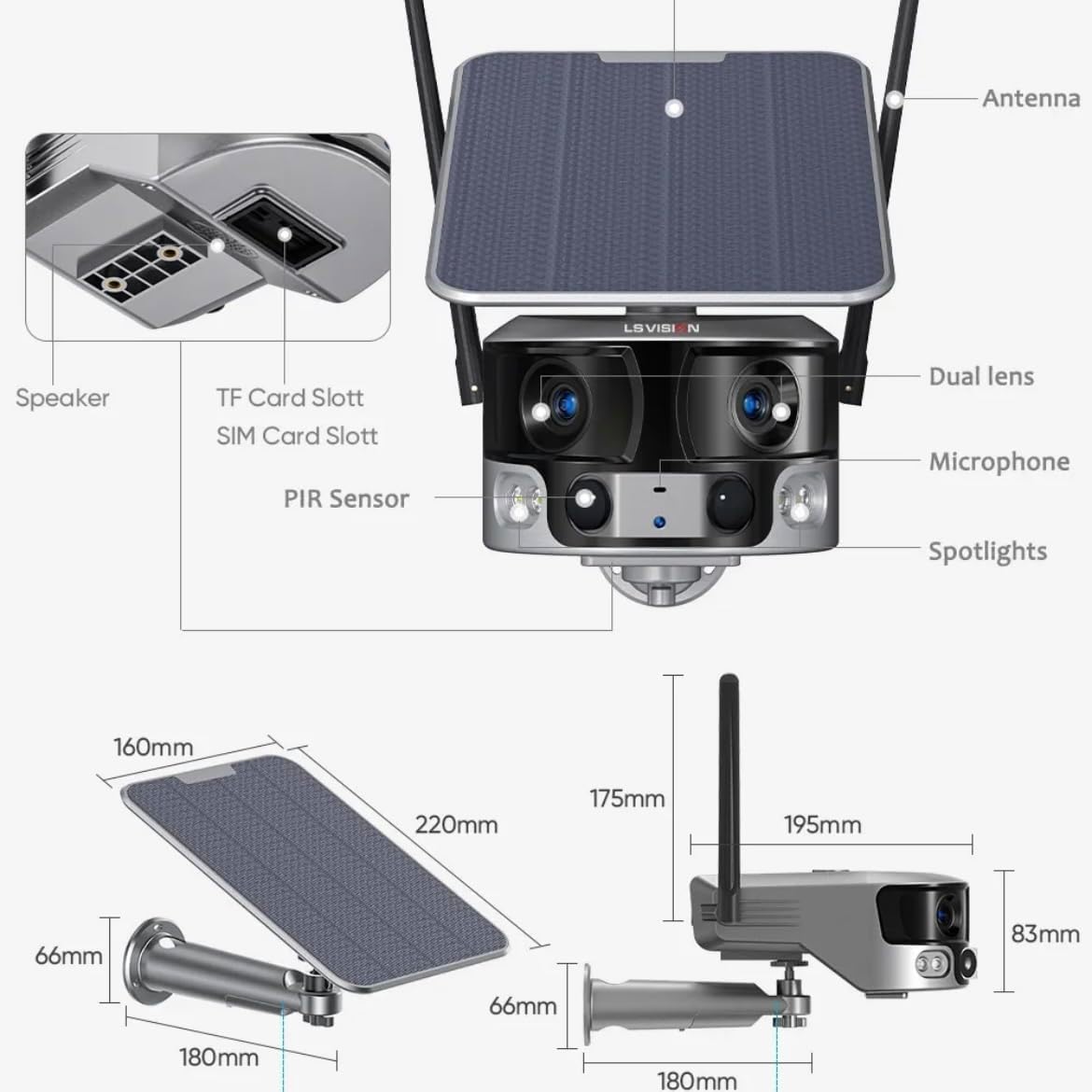
Figure 2.1: Product components and dimensions. Key parts include the solar panel, antennas, dual lens, microphone, spotlights, PIR sensor, speaker, TF card slot, and SIM card slot.
3. Sadržaj paketa
Molimo Vas da prilikom otvaranja provjerite sadržaj paketa kako biste bili sigurni da su svi artikli prisutni i neoštećeni:
- 1 x LS VISION 4K 180-Degree Ultra-Wide Angle 4G Solar-Powered Outdoor Security Camera
- 1 x Solar Panel (6W)
- 1 x set montažnih nosača
- 1 x 4G antena
- 1 x Set vijaka i tipli
- 1 x 2-meter Extension Cable for Solar Panel
4. Vodič za postavljanje
4.1 Početno punjenje
Although the camera is solar-powered, it is recommended to fully charge the built-in batteries before the first use. Connect the camera to a 5V/2A USB power adapter (not included) using a standard USB cable for initial charging. The charging indicator will show the status.
4.2 Instalacija SIM kartice i TF kartice
Locate the SIM card slot and TF card slot on the camera (refer to Figure 2.1). Ensure the camera is powered off before inserting or removing cards.
- Open the protective cover of the card slots.
- Insert a standard 4G SIM card into the SIM card slot with the gold contacts facing down. Ensure it clicks into place.
- Insert a TF (microSD) card (up to 128GB, not included) into the TF card slot with the gold contacts facing down. Ensure it clicks into place.
- Close the protective cover firmly to maintain the IP66 waterproof rating.
4.3 Montaža kamere
The camera is designed for wall mounting and outdoor use. Consider the following for optimal placement:
- Odaberite mjesto s ampizravna sunčeva svjetlost za solarni panel.
- Provjerite ima li kamera jasan view područja koje želite nadzirati.
- Mount the camera at a height that provides good coverage and deters tampering.

Figure 4.1: The LS VISION camera shown with its solar panel and mounting bracket, ready for outdoor installation.

Figure 4.2: The camera operates on a 4G network, eliminating the need for a Wi-Fi router, making it suitable for locations without existing Wi-Fi infrastructure.
The solar panel can be installed integrated with the camera or separately using the 2-meter extension cable for optimal sun exposure.
4.4 Instalacija i povezivanje aplikacije
To access and control your camera, download the Niview aplikaciju iz trgovine aplikacija na vašem pametnom telefonu (dostupna za Android i iOS).
- Tražiti "Niview" in the App Store or Google Play Store and install it.
- Registrirajte novi račun ili se prijavite ako ga već imate.
- Slijedite upute u aplikaciji za dodavanje kamere. To obično uključuje skeniranje QR koda na kameri ili ručni unos njezinog ID-a.
- Nakon povezivanja, možete view živi footage, access recordings, and configure settings.
5. Upute za rad
5.1 Uživo View & Reprodukcija
Access the Niview app on your smartphone or tablet to view live video streams from your camera anytime, anywhere. The app also allows you to review snimljeno footage.

Figure 5.1: The Niview app interface demonstrating real-time monitoring and timeline playback, ensuring no moment is missed.
5.2 Detekcija pokreta i upozorenja
The camera features advanced PIR and human detection capabilities. When motion or a human figure is detected, the camera will:
- Automatically begin recording a wake-up video.
- Send instant push notifications to your connected smartphone.
- Initiate automatic human tracking to follow the detected subject.

Figure 5.2: The camera's human tracking feature automatically follows detected individuals, ensuring continuous monitoring of their movement.
5.3 Noćni vid
The camera is equipped with a dual light source design for enhanced night vision:
- Noćni vid u punoj boji: Provides clear, colored images up to 20 meters in low-light conditions when spotlights are activated.
- Infracrveni (IR) noćni vid: Offers black and white vision up to 40 meters using infrared LEDs.
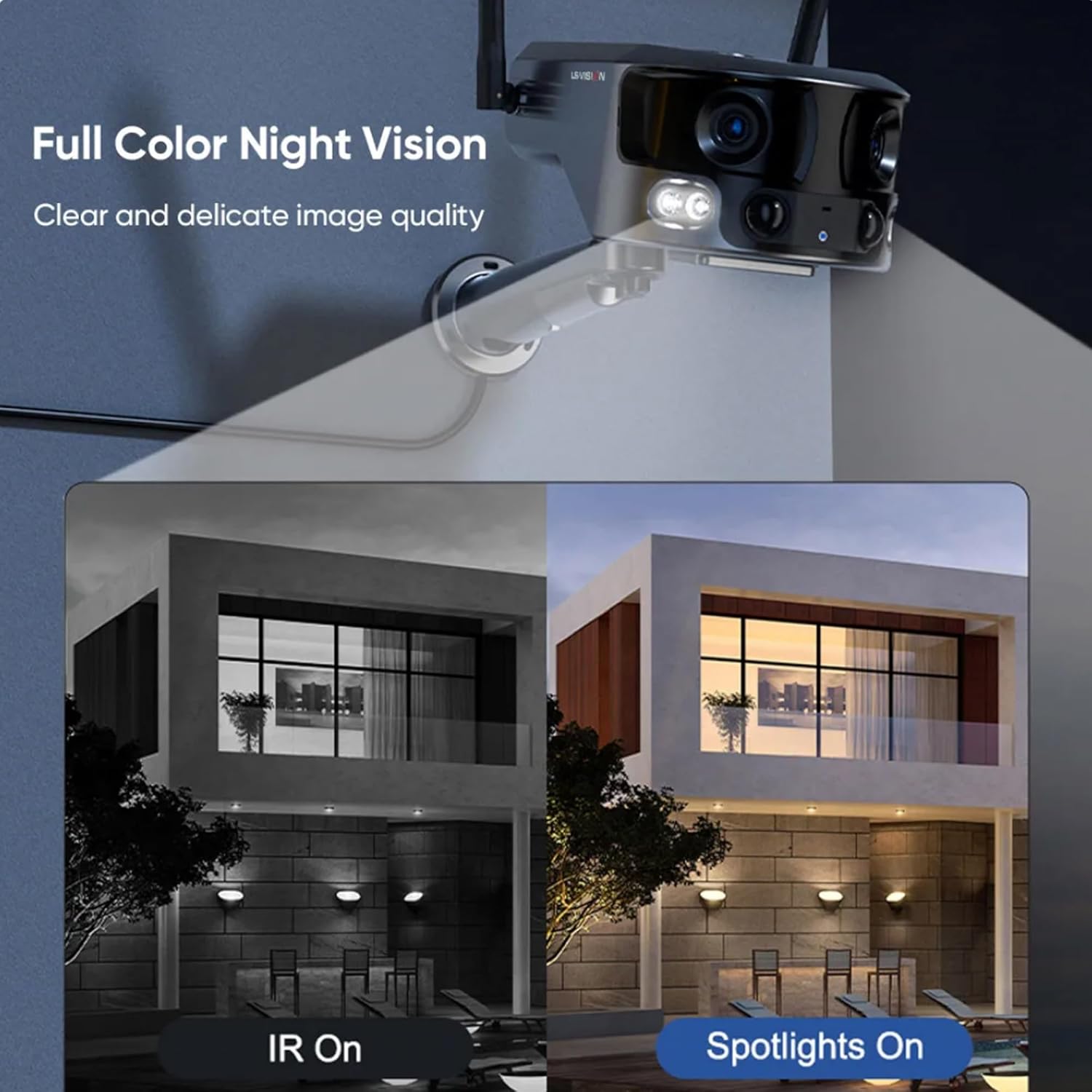
Figure 5.3: Comparison illustrating the difference between standard IR night vision and full-color night vision when the camera's spotlights are active.
5.4 Dvosmjerni zvuk
Utilize the built-in microphone and speaker for two-way audio communication through the Niview app. This allows you to listen in on the camera's surroundings and speak through the camera.
5.5 Načini snimanja
The camera supports various recording modes to suit your needs:
- 24-satno kontinuirano snimanje: Records continuously throughout the day.
- Trigger Recording: Records only when motion or human detection is triggered. This mode has three sub-options for customization.
6. Održavanje
Redovito održavanje osigurava optimalne performanse i dugotrajnost vašeg fotoaparata:
- Čišćenje: Povremeno obrišite objektiv kamere i solarnu ploču mekom,amp krpom za uklanjanje prašine i ostataka. Nemojte koristiti jake kemikalije.
- Njega baterije: Ensure the solar panel is exposed to sufficient sunlight to keep the built-in batteries charged. In prolonged periods of low sunlight, consider manually charging the camera.
- Ažuriranja firmvera: Check the Niview app regularly for firmware updates. Keeping the firmware updated ensures the latest features and security patches.
- Zaštita okoliša: While IP66 rated, avoid exposing the camera to extreme weather conditions beyond its specified operating range if possible.

Figure 6.1: The camera's IP66 industrial-grade waterproof design ensures reliable operation even in adverse outdoor weather conditions like rain.
7. Rješavanje problema
Ako naiđete na probleme s fotoaparatom, pogledajte sljedeće uobičajene probleme i rješenja:
| Problem | Mogući uzrok | Otopina |
|---|---|---|
| Kamera izvan mreže | No 4G signal; Low battery; SIM card issue. | Check 4G signal strength; Recharge battery; Reinsert SIM card or try a different one. |
| Loša kvaliteta slike | Dirty lens; Insufficient light; Network bandwidth. | Clean the lens; Ensure adequate lighting or enable night vision; Check 4G network speed. |
| Detekcija pokreta ne radi | Detection sensitivity too low; Incorrect settings; Obstructions. | Adjust sensitivity in app; Verify detection zone settings; Clear any obstructions. |
| Baterija se ne puni | Insufficient sunlight; Dirty solar panel; Faulty connection. | Relocate solar panel to direct sunlight; Clean solar panel; Check cable connections. |
Ako se problem nastavi, obratite se korisničkoj podršci.
8. Specifikacije
| Značajka | Specifikacija |
|---|---|
| Naziv modela | LS-MS2 |
| Rezolucija video snimanja | 4K |
| Viewing kut | 180 Degrees (Ultra-Wide) |
| Tehnologija povezivanja | 4G Cellular Network (also supports Wi-Fi) |
| Izvor napajanja | Solarni pogon (solarni panel od 6 W) |
| Kapacitet baterije | 18000 mAh (ugrađeno) |
| Night Vision Range (Color) | Do 20 metara |
| Night Vision Range (IR) | Do 40 metara |
| Skladištenje | Cloud Storage, TF Card (Max 128GB, not included) |
| Ocjena vodootpornosti | IP66 |
| Materijal | Acrylonitrile Butadiene Styrene (ABS) and Metal |
| Vrsta instalacije | Zidni nosač |
| Kompatibilni uređaji | Tablet, Smartphone (Android/iOS) |
| Dimenzije proizvoda | 18 x 18 x 15 cm |
| Težina artikla | 1.25 kilogram |
9. Informacije o jamstvu
This product comes with a standard manufacturer's warranty. For specific warranty terms, duration, and claim procedures, please refer to the warranty card included in your product packaging or contact the retailer/manufacturer directly. Keep your purchase receipt as proof of purchase.
10. Korisnička podrška
For technical assistance, product inquiries, or troubleshooting beyond this manual, please contact LS VISION customer support. Contact details can typically be found on the product packaging, the manufacturer's official webweb-mjestu ili putem mjesta kupnje.