Uvod
This manual provides detailed instructions for the setup, operation, and maintenance of your ARRIS Jumper T20S V2 Radio Controller. Please read this manual thoroughly before using the device to ensure proper function and safety.
Ključne značajke
- RDC90 Sensor Gimbals: Experience precise and sensitive control for your RC devices.
- Vivid OLED Screen Display: Stay informed with crucial flight data, telemetry, and settings on a high-resolution screen.
- ELRS and EdgeTX Compatibility: Benefit from reliable, extended-range communication and advanced firmware capabilities.
- Podrška za više protokola: Connect effortlessly to a wide array of RC models and brands.
- Customization for Personalized Flying: Tailor your control setup with configurable switches, buttons, and functions via EdgeTX.
Proizvod gotovview
Familiarize yourself with the components and design of your Jumper T20S V2 Radio Controller.

Slika: prednja strana view of the Jumper T20S V2 Radio Controller, showing the gimbals, OLED screen, power button, and various control switches and buttons.
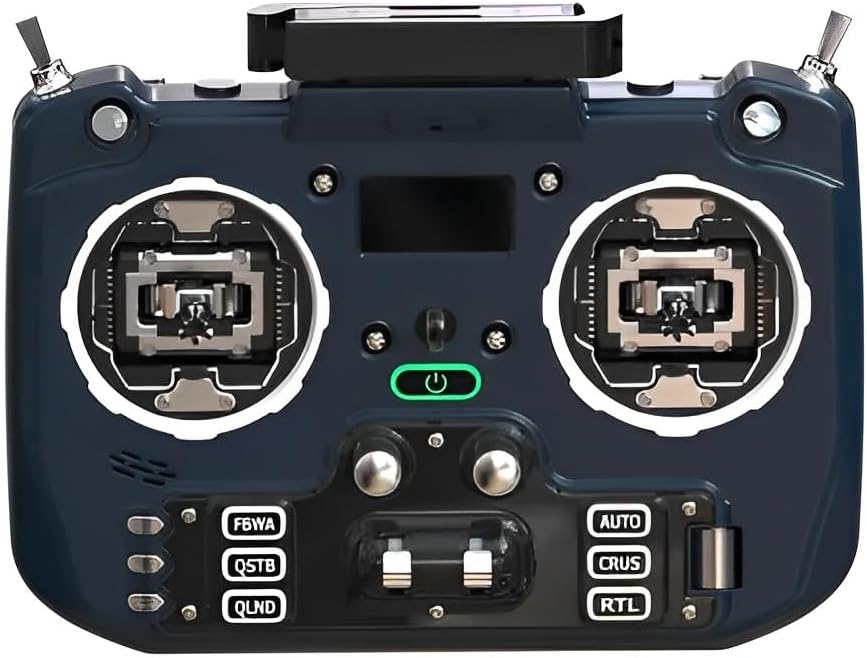
Slika: Kutni prednji dio view of the Jumper T20S V2 Radio Controller, highlighting the gimbals and control layout.

Slika: Bočno view of the Jumper T20S V2 Radio Controller, showing the foldable antenna in an extended position.

Slika: Stražnja strana view of the Jumper T20S V2 Radio Controller, displaying the external cooling fan and battery compartment area.

Image: Diagram illustrating the airflow and cooling fan system integrated into the Jumper T20S V2 for high-power ELRS operation.

Slika: Krupni plan view of the omnidirectional foldable antenna, designed to provide stable signal support in all directions.
Postavljanje
1. Ugradnja baterije
- Open the battery compartment cover located on the rear of the controller.
- Insert two 21700 batteries, ensuring correct polarity.
- Čvrsto zatvorite poklopac odjeljka za baterije.
2. Početno uključivanje
- Press and hold the power button (located centrally on the front panel) until the OLED screen illuminates.
- Kontroler će se pokrenuti u EdgeTX operativni sustav.
3. Gimbal Calibration (Recommended)
For optimal performance, it is recommended to calibrate the gimbals after initial setup or if you experience inconsistent control. Refer to the EdgeTX documentation for detailed calibration procedures.
Upute za rad
1. Navigation and Menu System
The Jumper T20S V2 utilizes the EdgeTX firmware. Navigation is primarily done using the scroll wheel and menu buttons. The OLED screen displays all relevant information.
- Kotačić za pomicanje: Koristi se za navigaciju kroz izbornike i podešavanje vrijednosti.
- Gumbi izbornika: Pristupite raznim postavkama i funkcijama.
- Izbornik sustava: Configure global settings, model setup, and radio calibration.
2. Postavljanje i povezivanje modela
To control an RC model, you must first create a model profile and bind the controller to the receiver.
- Navigate to the Model Select screen in EdgeTX.
- Create a new model or select an existing one.
- Configure the internal or external RF module settings (e.g., ELRS, Multi-Protocol) to match your receiver.
- Initiate the binding process on both the controller and the receiver according to their respective manuals.
- Verify successful binding by checking receiver telemetry or control response.
3. Customizing Controls
The Jumper T20S V2 offers extensive customization. You can assign functions to switches, buttons, and sliders through the EdgeTX firmware.
- Access the Mixer and Special Functions menus within EdgeTX to configure control assignments.
- Adjust gimbal tension and stick settings by disassembling the radio, if desired (refer to advanced user guides for detailed instructions).
Održavanje
- Čišćenje: Za čišćenje vanjske strane regulatora koristite meku, suhu krpu. Izbjegavajte abrazivna sredstva za čišćenje ili otapala.
- Skladištenje: Store the controller in a cool, dry place, away from direct sunlight and extreme temperatures. Remove batteries if storing for extended periods.
- Ažuriranja firmvera: Regularly check for and install the latest EdgeTX firmware updates to ensure optimal performance and access new features. Refer to the official EdgeTX webstranicu za upute.
- Briga o gimbalu: Keep gimbals free from dust and debris. Avoid applying excessive force.
Rješavanje problema
- Controller does not power on:
- Ensure batteries are correctly installed and fully charged. Check battery polarity.
- No response from RC model:
- Verify that the controller is properly bound to the receiver. Check model settings in EdgeTX for correct RF protocol and channel assignments. Ensure the RC model's battery is charged and connected.
- OLED screen is blank or flickering:
- Restart the controller. If the issue persists, ensure firmware is up to date. Contact support if the problem continues.
- Gimbal movement is erratic:
- Perform a gimbal calibration through the EdgeTX system menu. Check for any physical obstructions or damage to the gimbals.
Tehnički podaci
| Značajka | Detalj |
|---|---|
| MCU | STM32F407ZGT6 |
| Sučelje vanjskog modula | Reserved (1.25mm-5P) |
| Zaslon | 1.3" OLED (128*64) |
| External Module Power Supply | XT30 (2S2A output) |
| SD kartica | Chip-based internal (officially recommended by EdgeTX) |
| Vrsta gimbal | Standard full size gimbal |
| Voltage | 6-8.4 V |
| Gimbal Sensors | RDC90 / Hall optional |
| Baterija | 2pcs 21700 (not included) |
| Izlazna snaga | Maksimalno 1W |
| Težina | 449g (baterija nije uključena) |
| Broj modela artikla | LA0316 |
| Dimenzije paketa | 8.7 x 7.91 x 3.78 inča |
| Item Weight (with batteries) | Otprilike 10.6 unci (300 g) |
Jamstvo i podrška
Za informacije o jamstvu i tehničku podršku, molimo pogledajte dokumentaciju koju ste dobili uz kupnju ili posjetite službenu ARRIS stranicu webstranicu. Sačuvajte dokaz o kupnji za slučaj reklamacije.
For further assistance with EdgeTX firmware, visit the official EdgeTX project website and community forums for comprehensive resources and community support.


