1. Uvod
Hvala na kupnjiasing the AFK Portable Bluetooth Wireless Speaker. This manual provides detailed instructions on how to set up, operate, and maintain your speaker to ensure optimal performance and longevity. Please read this manual thoroughly before using the product.

Image: The AFK Portable Bluetooth Wireless Speaker, showcasing its sleek black cylindrical design and top-mounted control panel.
2. Proizvod je gotovview
2.1 Sadržaj paketa
Molimo provjerite sadržaj paketa nakon raspakiranja:
- AFK Portable Bluetooth Wireless Speaker (Model: BT528) with built-in microphone
- USB-C kabel za punjenje
- Korisnički priručnik (ovaj dokument)
2.2 Ključne značajke
- Snažan zvuk: Dual speaker drivers and a powerful amplifier module deliver up to 15W room-filling sound with punchy bass, strong midranges, and crisp highs.
- Bluetooth 5.3 povezivost: Offers fast and stable wireless connections up to 100 feet (30 meters).
- Dinamičko osvjetljenje: Features 5 colorful light colors and 6 light modes, including mixed color flashes that sync with the beat, creating an immersive audio-visual experience.
- Produljeno vrijeme igranja: Enjoy up to 18 hours of non-stop playback at 50% volume, or up to 4 hours at 100% volume. Lights can be turned off to conserve battery.
- Više opcija reprodukcije: Supports wireless playback via Bluetooth, TF card, or USB.
- Ugrađeni mikrofon: Allows for clear hands-free calls within the Bluetooth range.
- Prijenosni dizajn: Lightweight and easy to carry for indoor and outdoor use.
- USB-C punjenje: Convenient and modern USB-C port for charging.
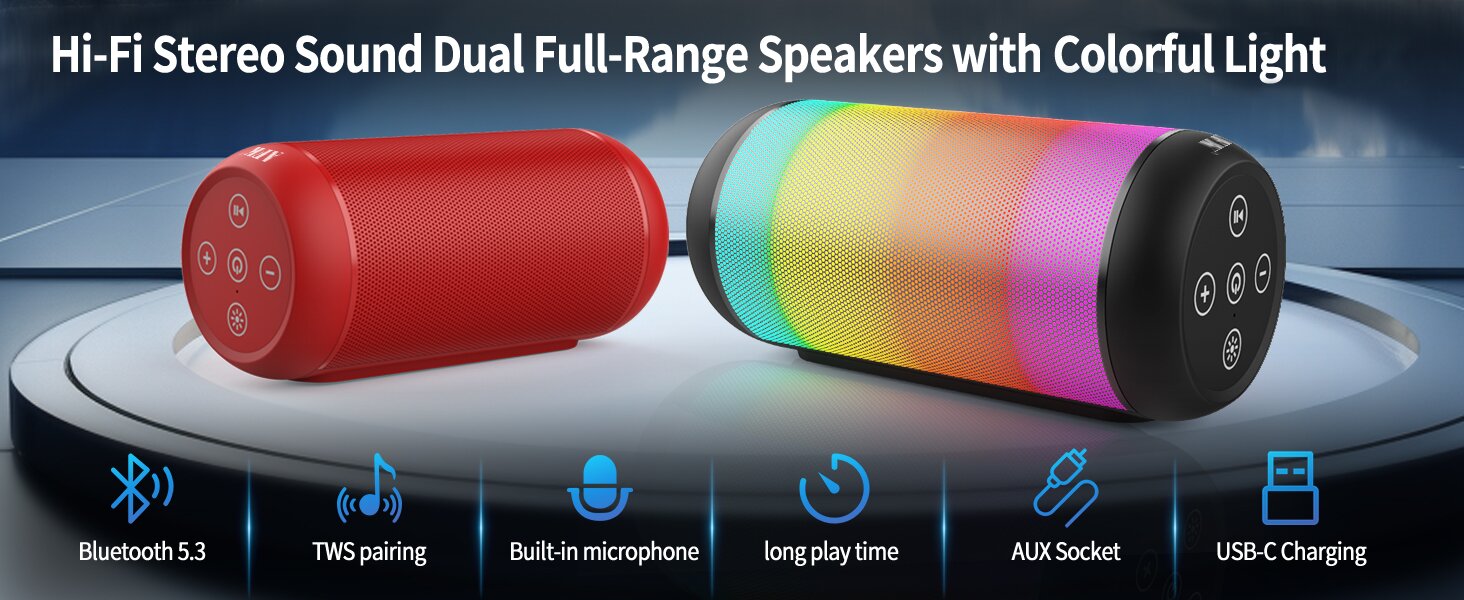
Image: An illustration highlighting key features such as Bluetooth 5.3, TWS pairing, built-in microphone, long playtime, AUX socket, and USB-C charging.

Slika: Izrez view illustrating the dual speaker drivers responsible for deep bass stereo sound.

Image: The speaker positioned on a table, demonstrating its 360-degree stereo surround sound capability.
3. Postavljanje
3.1 Punjenje zvučnika
Before first use, fully charge the speaker. Connect the provided USB-C charging cable to the speaker's USB-C port and the other end to a compatible USB power adapter (not included) or a computer's USB port. The charging indicator light will show the charging status and turn off when fully charged.
3.2 Uključivanje/isključivanje
- Za uključivanje: Pritisnite i držite gumb za uključivanje/isključivanje (⏻) for a few seconds until you hear an audible prompt and the indicator lights turn on.
- Za isključivanje: Pritisnite i držite gumb za napajanje (⏻) again for a few seconds until you hear an audible prompt and the indicator lights turn off.
4. Upute za rad
4.1 Bluetooth uparivanje
Za povezivanje zvučnika s uređajem s omogućenom Bluetooth vezom:
- Ensure the speaker is powered on and in Bluetooth pairing mode (indicated by a flashing blue light, or similar).
- Na svom uređaju (pametnom telefonu, tabletu, računalu) omogućite Bluetooth i potražite dostupne uređaje.
- Select "AFK Speaker" (or similar name) from the list of found devices.
- Once paired, the speaker will indicate a successful connection (e.g., a solid blue light or an audible prompt).
The speaker will automatically attempt to reconnect to the last paired device when powered on, if the device is within range and Bluetooth is enabled.

Image: The speaker in an outdoor setting, demonstrating its stable Bluetooth connection range of up to 100 feet.
4.2 Reprodukcija glazbe
- Bluetooth način rada: Once paired, play music from your connected device. Use the speaker's control buttons or your device to control playback (play/pause, next/previous track, volume).
- TF kartica/USB način rada: Insert a TF card or USB drive containing audio files into the respective port on the speaker. The speaker will automatically switch to the corresponding mode and begin playback. Use the speaker's control buttons for navigation.
4.3 Controlling Lights
The speaker features dynamic lighting modes. Press the Light button (💡) to cycle through the available light modes:
- Tarry Sky Light
- Disanje
- Teče
- Brzi skok
- Rhythm Jump
- Svjetlo isključeno

Slika: Prekoview of the six dynamic light modes available on the speaker, including options to turn the lights off.
4.4 Upravljanje pozivima
Pomoću ugrađenog mikrofona možete upravljati pozivima kada ste povezani putem Bluetootha:
- Odgovori/prekini poziv: Pritisnite gumb Reproduciraj / Pauziraj (⏸) jednom.
- Odbij poziv: Pritisnite i držite tipku Reproduciraj/Pauziraj (⏸) 2 sekunde.

Image: The speaker being used for a hands-free call, demonstrating the functionality of its built-in microphone.
5. Održavanje
5.1 Čišćenje
To clean your speaker, use a soft, dry, lint-free cloth. Do not use abrasive cleaners, alcohol, or chemical solvents, as these may damage the surface or internal components. Avoid getting moisture into any openings.
5.2 Skladištenje
Store the speaker in a cool, dry place away from direct sunlight, extreme temperatures, and humidity. If storing for an extended period, charge the battery periodically (e.g., every 3 months) to maintain battery health.
6. Rješavanje problema
If you encounter issues with your AFK Portable Bluetooth Wireless Speaker, please refer to the following common problems and solutions:
| Problem | Mogući uzrok | Otopina |
|---|---|---|
| Zvučnik se ne uključuje. | Slaba baterija; Gumb za napajanje nije pravilno pritisnut. | Potpuno napunite zvučnik. Pritisnite i držite gumb za uključivanje/isključivanje nekoliko sekundi. |
| Nema zvuka. | Glasnoća je preniska; Uređaj nije spojen; Neispravan način unosa. | Increase speaker and device volume. Ensure Bluetooth is connected or TF/USB is inserted correctly. |
| Nije moguće uparivanje putem Bluetootha. | Zvučnik nije u načinu uparivanja; Bluetooth uređaja isključen; Previše udaljen od zvučnika; Smetnje. | Ensure speaker is in pairing mode. Turn device Bluetooth off/on. Move device closer to speaker. Avoid strong electromagnetic interference. |
| Kratko trajanje baterije. | High volume usage; Lights constantly on; Battery degradation. | Reduce volume. Turn off lights when not needed. Battery life naturally decreases over time. |
7. Specifikacije
| Značajka | Detalj |
|---|---|
| Naziv modela | BT528-BLK-US |
| Vrsta zvučnika | Dvostruki zvučnik |
| Tehnologija povezivanja | Bluetooth 5.3 |
| Bežična komunikacijska tehnologija | Bluetooth |
| Maksimalni domet | 30 metara (100 stopa) |
| Maksimalna izlazna snaga zvučnika | 11 Watts (RMS) / 15 Watts (Peak) |
| Frekvencijski odziv | 20 KHz (Napomena: Ovo je vjerojatno gornja granica, tipičan raspon je 20 Hz-20 kHz) |
| Način audio izlaza | Stereo |
| Konfiguracija kanala surround zvuka | 2.0 |
| Posebna značajka | Built-in Microphone, Dynamic LED Lights |
| Preporučena upotreba | Indoor/Outdoor, Sport, Outdoor Events, Parties, Camping, Planinarenje |
| Kompatibilni uređaji | Desktop, Smartphone, Tablet, Television |
| Izvor napajanja | Baterija (1 litij-ionska baterija uključena) |
| Metoda kontrole | Dodirnite gumbe |
| Boja | Crna |
| Dimenzije proizvoda | 2.6"D x 6.1"Š x 2.6"V (6.6 cm D x 15.5 cm Š x 6.6 cm V) |
| Težina artikla | 1.26 funti (0.57 kilograma) |
| Je vodootporan | NETOČNO |
8. Jamstvo i podrška
8.1 Ograničeno jamstvo
This AFK Portable Bluetooth Wireless Speaker comes with a limited warranty. Please refer to the warranty card included in your package or contact AFK customer support for specific terms and conditions. The warranty typically covers manufacturing defects and malfunctions under normal use.
8.2 Korisnička podrška
For further assistance, technical support, or warranty claims, please contact AFK customer service. Contact information can usually be found on the product packaging, the official AFK webweb-mjestu ili putem kanala podrške vašeg prodavača.


