1. Uvod
This manual provides essential information for the proper setup, operation, and maintenance of your ZEISS DTI 6/20 Thermal Imaging Camera. Please read these instructions carefully before using the device to ensure optimal performance and longevity.
2. Što je u kutiji
Provjerite jesu li sve sljedeće komponente uključene u vaš paket:
- Termovizijska kamera
- Lens (20 mm)
- Neoprenska traka
- Carrying case including shoulder strap
- USB kabel
- Krpa za čišćenje optike
- Litij-ionska baterija
- Brzi vodič
- Sigurnosne napomene
- Jamstveni list
- EULA dokument
3. Proizvod je gotovview
The ZEISS DTI 6/20 is a high-resolution thermal imaging monocular designed for detailed observation in low-light conditions. It features advanced image processing and ergonomic design for ease of use.

Slika 1: Pod kutom view of the ZEISS DTI 6/20 Thermal Imaging Camera. This image displays the overall design, including the objective lens, eyepiece, and the ZEISS branding on the side.
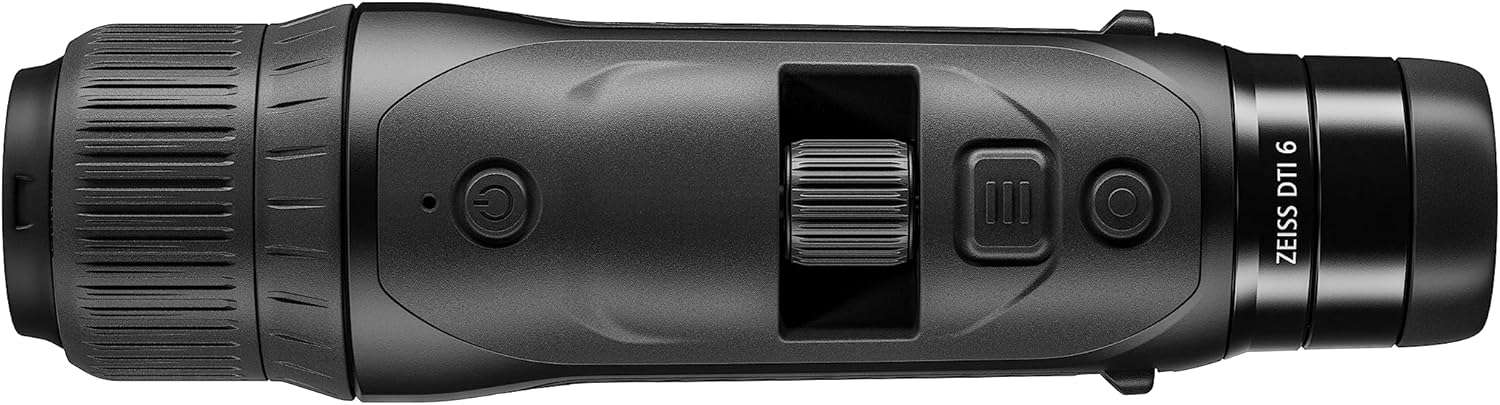
Slika 2: Vrh view of the ZEISS DTI 6/20, highlighting the power button, scroll wheel for magnification control, and other operational buttons. The ergonomic placement of controls is visible.
Ključne karakteristike:
- ZSIP Pro Image Technology: Delivers sharp, high-contrast thermal images.
- Zaslon visoke rezolucije: AMOLED display with 1024x768 resolution, paired with a 640x480 sensor and 12µm pixel pitch.
- Povećanje: 1.5x optical magnification with up to 10x digital zoom, controlled by a scroll wheel.
- Prilagodba: 4 preset scene modes and up to 5 user-created layouts. Adjustable zoom settings, display brightness, and color palettes.
- Interna pohrana: 16GB for capturing images and videos.
- Trajanje baterije: Up to 6.5 hours of continuous operation with a removable lithium-ion battery.
- Ergonomski dizajn: Suitable for both left and right-handed users, with controls positioned for natural access even with gloves.
- Povezivost aplikacije: Seamless data transfer and live streaming to smartphones via the ZEISS Hunting App using Bluetooth, USB, or WLAN.
4. Postavljanje
4.1 Ugradnja baterije
- Pronađite odjeljak za baterije na uređaju.
- Otvorite poklopac pretinca.
- Insert the provided lithium-ion battery, ensuring correct polarity.
- Čvrsto zatvorite poklopac odjeljka za baterije.
4.2 Početno uključivanje
- Press and hold the power button (refer to Figure 2) until the ZEISS logo appears on the display.
- Allow the device to initialize. This may take a few seconds.
- Adjust the diopter on the eyepiece for clear focus according to your vision.
5. Upute za rad
5.1 Uključivanje/isključivanje
- Za uključivanje: Pritisnite i držite tipku za napajanje.
- Za isključivanje: Press and hold the power button until the shutdown sequence initiates.
5.2 Magnification Control
Use the scroll wheel located on the top of the device (refer to Figure 2) to adjust the digital zoom level. Rotate the wheel forward to increase magnification and backward to decrease it.
5.3 scenska načina
The DTI 6/20 offers 4 preset scene modes optimized for different observation conditions. Access these modes through the device's menu to enhance image clarity based on your environment.
NIKADA Prilagodba
The device allows for extensive personalization:
- User Layouts: Create and save up to 5 custom display layouts.
- Postavke zaslona: Adjust display brightness to suit ambient light conditions.
- Palete boja: Select from various color palettes to optimize thermal contrast and target identification.
5.5 App Connectivity (ZEISS Hunting App)
Enhance your experience by connecting the DTI 6/20 to the ZEISS Hunting App on your smartphone.

Slika 3: A user operating the ZEISS DTI 6/20 thermal imaging camera in an outdoor environment, demonstrating its ergonomic handling and practical application.
- Prijenos podataka: Transfer images and videos from the device's 16GB internal storage to your smartphone via Bluetooth, USB, or WLAN.
- Streaming uživo: Stream live thermal footage directly to your smartphone for shared viewsnimanje ili snimanje.
- Further Customization: The app provides additional options for device settings and management.
6. Održavanje
6.1 Čišćenje
- Use the provided optics cleaning cloth to gently wipe the lenses. Avoid abrasive materials.
- For the device body, use a soft, damp tkanina. Nemojte koristiti jake kemikalije ili otapala.
- Prije čišćenja provjerite je li uređaj isključen iz struje.
6.2 Njega baterija
- Prije prve uporabe do kraja napunite bateriju.
- Uređaj i bateriju čuvajte na hladnom i suhom mjestu kada ih ne koristite dulje vrijeme.
- Izbjegavajte izlaganje baterije ekstremnim temperaturama.
7. Rješavanje problema
7.1 Uređaj se ne uključuje
- Provjerite je li baterija ispravno instalirana i potpuno napunjena.
- Try charging the battery for at least 30 minutes before attempting to power on again.
7.2 Image Appears Blurry
- Adjust the diopter on the eyepiece for your vision.
- Ensure the objective lens is clean and free from smudges or debris.
- Check the focus of the thermal image using the manual focus ring if available.
7.3 Connectivity Issues with ZEISS Hunting App
- Ensure Bluetooth or WLAN is enabled on both the device and your smartphone.
- Verify that the ZEISS Hunting App is updated to the latest version.
- Restart both the thermal camera and your smartphone.
8. Specifikacije
| Značajka | Specifikacija |
|---|---|
| Dimenzije proizvoda | 9.06 x 2.44 x 2.68 inča |
| Težina artikla | 1.52 funti (24.33 unci) |
| Broj modela artikla | 527020-9911-000 |
| Marka | ZEISS |
| Naziv modela | DTI 6/20 |
| Opis očne leće | Plössl |
| Vrsta fokusa | Ručni fokus |
| Izvor napajanja | Napajanje baterijama (litij-ionska) |
| Kompatibilni uređaji | Pametni telefon |
| Opis žarišne duljine | 300 mm |
| Polje Of View | 10 stupnja |
| Omjer zumiranja | 3x Optical, up to 10x Digital |
| Razlučivost senzora | 640 x 480 with 12 micron pixel pitch |
| Razlučivost zaslona | 1024 x 768 HD AMOLED |
| Unutarnja pohrana | 16 GB |
| Vrijeme rada baterije | 6.5 sata (kontinuirano) |
9. Jamstvo i podrška
The ZEISS DTI 6/20 Thermal Imaging Camera is manufactured by ZEISS. For detailed warranty information, please refer to the included warranty card or visit the official ZEISS website. For technical support, service, or inquiries, please contact ZEISS customer service through their official channels.
Proizvođač: ZEISS


