1. Uvod
This manual provides detailed instructions for the installation, operation, and maintenance of your Denver IIC-251ED WiFi IP Indoor Camera. Please read this manual thoroughly before using the product to ensure correct usage and to prevent damage. Keep this manual for future reference.
2. Sigurnosne informacije
- Ensure the camera is installed in a stable location to prevent it from falling.
- Use only the power adapter supplied with the device. Using an incorrect adapter may cause damage or fire.
- Do not expose the camera to water, moisture, or extreme temperatures. This product is designed for indoor use only.
- Izbjegavajte postavljanje kamere u blizinu izvora topline ili na izravnu sunčevu svjetlost.
- Ne pokušavajte sami rastavljati ili popravljati kameru. Sve servisne radove prepustite kvalificiranom osoblju.
- Držite kameru i njezinu dodatnu opremu izvan dohvata djece.
3. Sadržaj paketa
Molimo provjerite sadržaj pakiranja nakon otvaranja. Ako bilo koji predmet nedostaje ili je oštećen, obratite se prodavaču.
- Denver IIC-251ED WiFi IP Indoor Camera
- Adapter napajanja
- Pribor za montažu (vijci, tiple za zid)
- Korisnički priručnik (ovaj dokument)
4. Proizvod je gotovview
The Denver IIC-251ED is a WiFi-enabled IP indoor camera designed for home surveillance. It features 1080p Full HD video, two-way audio, infrared night vision, and motion detection capabilities. The camera is TUYA compatible, allowing for easy integration with smart home systems.
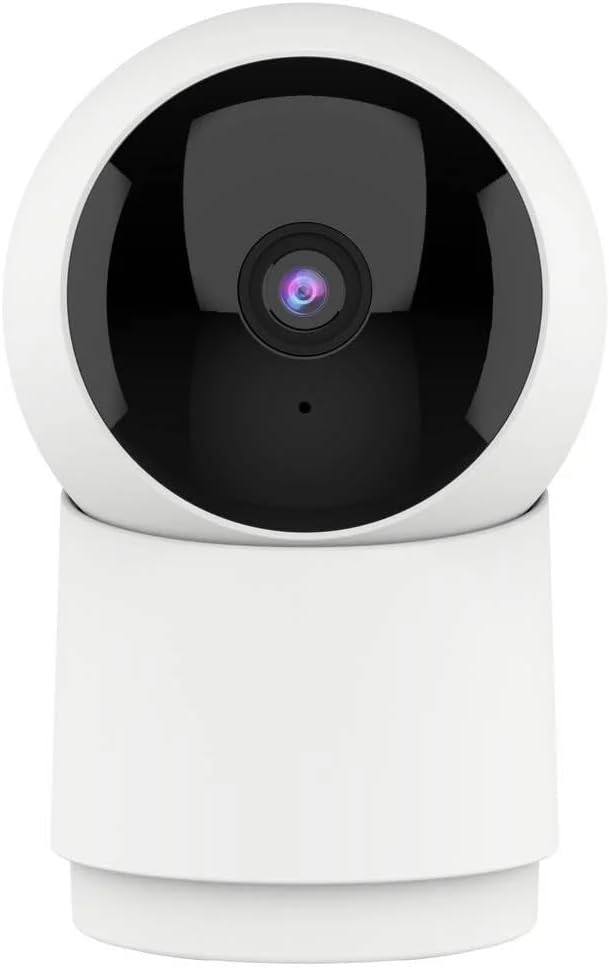
Slika 1: Ispred view of the Denver IIC-251ED WiFi IP Indoor Camera. The camera features a spherical top housing the lens, mounted on a cylindrical base, allowing for pan and tilt functionality.

Slika 2: Product packaging for the Denver IIC-251ED, indicating key features such as Wi-Fi connectivity, 1080p Full HD resolution, built-in speaker/microphone, IR LED for night vision, and motion detection. It also highlights TUYA compatibility.
5. Postavljanje
5.1 Instalacija aplikacije
- Download the compatible smart home application (e.g., Tuya Smart or Smart Life) from your mobile device's app store.
- Tražiti "Tuya Smart" or "Smart Life" in the Apple App Store or Google Play Store.
- Install the application and create an account if you are a new user.
5.2 Uključivanje kamere
- Connect the power adapter to the camera's power input port.
- Uključite strujni adapter u zidnu utičnicu.
- The camera will power on and initiate its startup sequence. Wait for the indicator light to flash, indicating it is ready for pairing.
5.3 Uparivanje s aplikacijom
- Open the installed smart home application on your mobile device.
- Tap the "+" icon (usually in the top right corner) to add a new device.
- Select "Security & Video Surveillance" and then choose "Smart Camera" or a similar option.
- Follow the on-screen instructions to connect the camera to your Wi-Fi network. This typically involves entering your Wi-Fi password and scanning a QR code generated by the app with the camera's lens.
- Once connected, the camera will be added to your device list in the app.
6. Upute za rad
6.1 Uživo View
From the app's device list, tap on your camera to access the live video feed. You can view foo u stvarnom vremenutage s vašeg fotoaparata.
6.2 Upravljanje panoramiranjem i nagibom
The Denver IIC-251ED camera offers flexible viewing angles. You can remotely control the camera's movement through the app.

Slika 3: Diagram illustrating the pan (355° horizontal) and tilt (50° vertical) capabilities of the Denver IIC-251ED camera, alongside a smartphone displaying the camera's app interface.
- U živo view interface, use the directional controls (usually a joystick or arrow buttons) to pan the camera horizontally up to 355 degrees and tilt it vertically up to 50 degrees.
6.3 Dvosmjerni zvuk
The camera is equipped with a built-in speaker and microphone, allowing for two-way communication.
- Dodirnite ikonu mikrofona u aplikaciji da biste govorili putem zvučnika kamere.
- The camera's microphone will pick up audio from its surroundings, which you can hear through your phone.
6.4 Detekcija pokreta i upozorenja
The camera can detect motion and send alerts to your mobile device.
- Omogućite detekciju pokreta u postavkama kamere unutar aplikacije.
- Podesite razinu osjetljivosti prema potrebi.
- When motion is detected, you will receive a notification on your phone.
6.5 Snimanje i reprodukcija
The camera supports video recording, typically to a microSD card (not included) or cloud storage (subscription may be required).
- Insert a microSD card (up to 128GB, Class 10 recommended) into the camera's card slot for local storage.
- Configure recording settings (e.g., continuous recording, event-triggered recording) in the app.
- Pristup snimljenom footagputem odjeljka "Reprodukcija" ili "Povijest" u aplikaciji.
6.6 Noćni vid
The integrated IR LEDs provide clear video footagčak i pri slabom osvjetljenju ili potpunom mraku.
- Night vision typically activates automatically in low-light conditions.
- You can usually adjust night vision settings (e.g., auto, on, off) in the app.
7. Održavanje
- Čišćenje: Use a soft, dry cloth to clean the camera's exterior. Do not use liquid cleaners or aerosols. Gently wipe the lens with a microfiber cloth if necessary.
- Ažuriranja firmvera: Redovito provjeravajte aplikaciju za dostupna ažuriranja firmvera kako biste osigurali optimalne performanse i sigurnost.
- Skladištenje: Ako kameru skladištite dulje vrijeme, isključite je iz napajanja i pohranite na hladnom i suhom mjestu.
8. Rješavanje problema
- Kamera se ne povezuje na Wi-Fi: Ensure your Wi-Fi network is 2.4GHz (5GHz is not supported by many smart cameras). Check Wi-Fi password accuracy. Move the camera closer to the router.
- Nema uživo view: Check your internet connection. Ensure the camera is powered on and connected to Wi-Fi. Restart the camera and the app.
- Detekcija pokreta ne radi: Verify that motion detection is enabled in the app settings. Adjust sensitivity. Ensure there are no obstructions blocking the camera's view.
- Loša kvaliteta videa: Provjerite jačinu Wi-Fi signala. Provjerite je li objektiv kamere čist.
- Cannot hear audio or speak through camera: Check volume settings on your phone and in the app. Ensure microphone and speaker permissions are granted to the app.
9. Specifikacije
| Model | IIC-251ED (Reference: 118101020112) |
| Marka | Denver |
| Povezivost | WiFi (2.4 GHz) |
| Video rezolucija | 1080p Full HD |
| Pan Kut | 355 stupnjeva |
| Kut nagiba | 50 stupnjeva |
| Audio | Two-way (Built-in Speaker & Microphone) |
| Noćni vid | IR LED |
| Detekcija pokreta | Da |
| Kompatibilnost | TUYA Smart Home Ecosystem |
| Dimenzije | 15 x 9 x 8 cm |
| Težina | 330 grama |
10. Jamstvo i podrška
Za informacije o jamstvu i tehničku podršku, molimo pogledajte jamstveni list koji je priložen uz vaš proizvod ili posjetite službenu web stranicu u Denveru. website. Do not attempt to repair the device yourself, as this may void your warranty.
For further assistance, please contact Denver customer support.


